


The replacement laptop has arrived as have the ordered upgrade parts. Most people don’t take apart their brand new laptops, but I do 🙂

With the laptop put back together and the development environment installed, we are now all green to start coding again!

The first coding task is to add rolling entity groups to calendars:
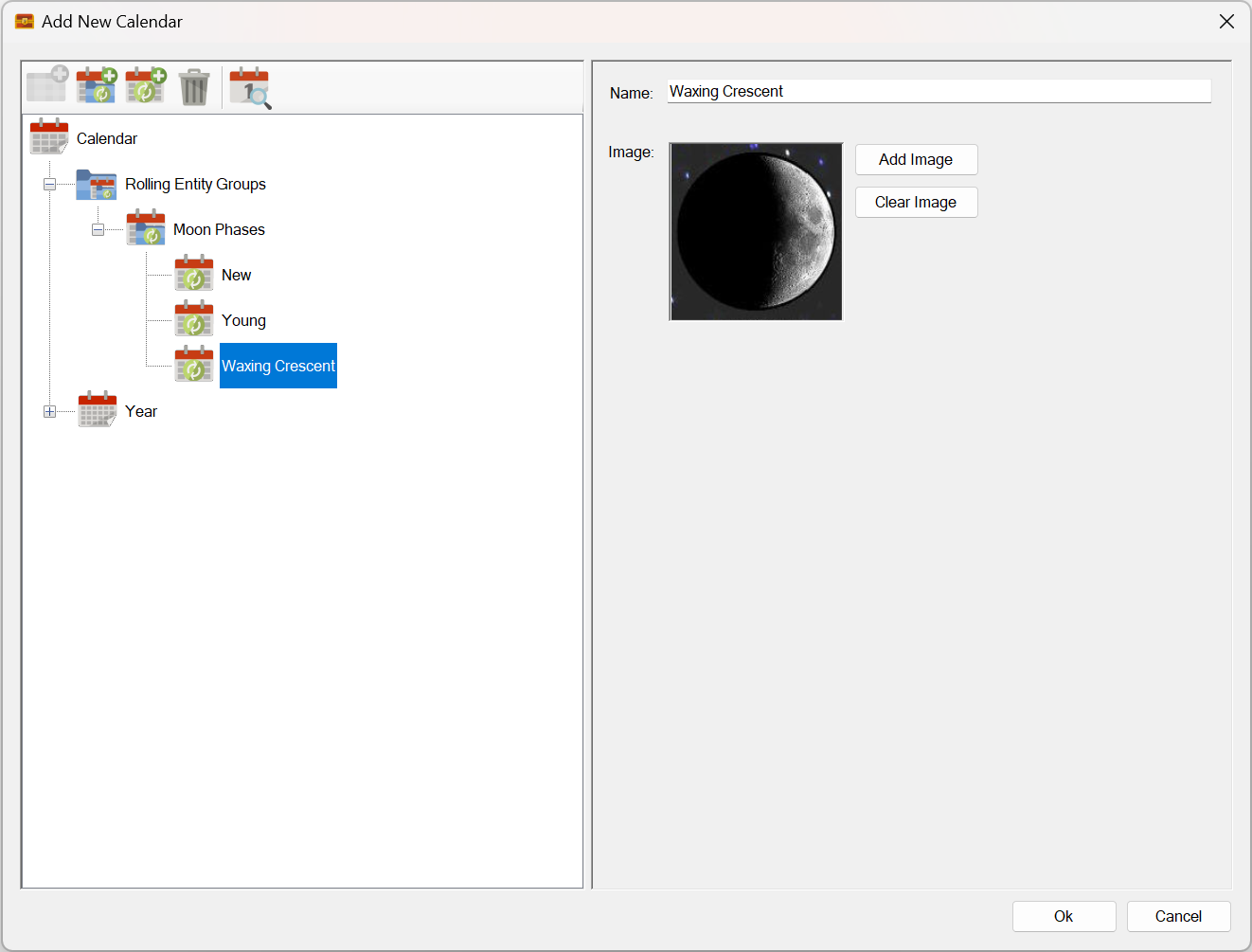
What are these?
They are groups of any entity type that you can think of. They can be days of a week, or perhaps phases of the moon as shown above. Or anything else that you can imagine!
These groups are then attached to calendar time-unit levels. The idea being that each time-unit on that level will cycle to the next rolling entity in the rolling entity group. If the calendar is already on the last rolling entity, it will roll around back around to the first entity.
This mechanism will allow users to create custom calendars with rolling dates. It will also allow users to attach as many rolling entity groups to each level of time units as required.
For example you could set the lowest level time units to show the day of the week and the moon-phases together! Both sets of rolling entities will independently roll and display on the calendar!
I know this all sounds confusing, but it will be a very powerful feature.
Once it is done, I’ll update the custom calendars video on You-Tube to include a demonstration of this new feature. It’s much easier to demonstrate than it is to explain – honest!
That’s it for this week!
Have Fun!
RobP
 Sojour