April 2025 Development Update!

A quick fly-by update to let you good folk know where we are.

Development has been slow, mainly because I’m finding trouble getting the time together. That’s completely my fault, as I have far too many hobbies!

I’m still working on the Mk2 Calendar system but we have progress!

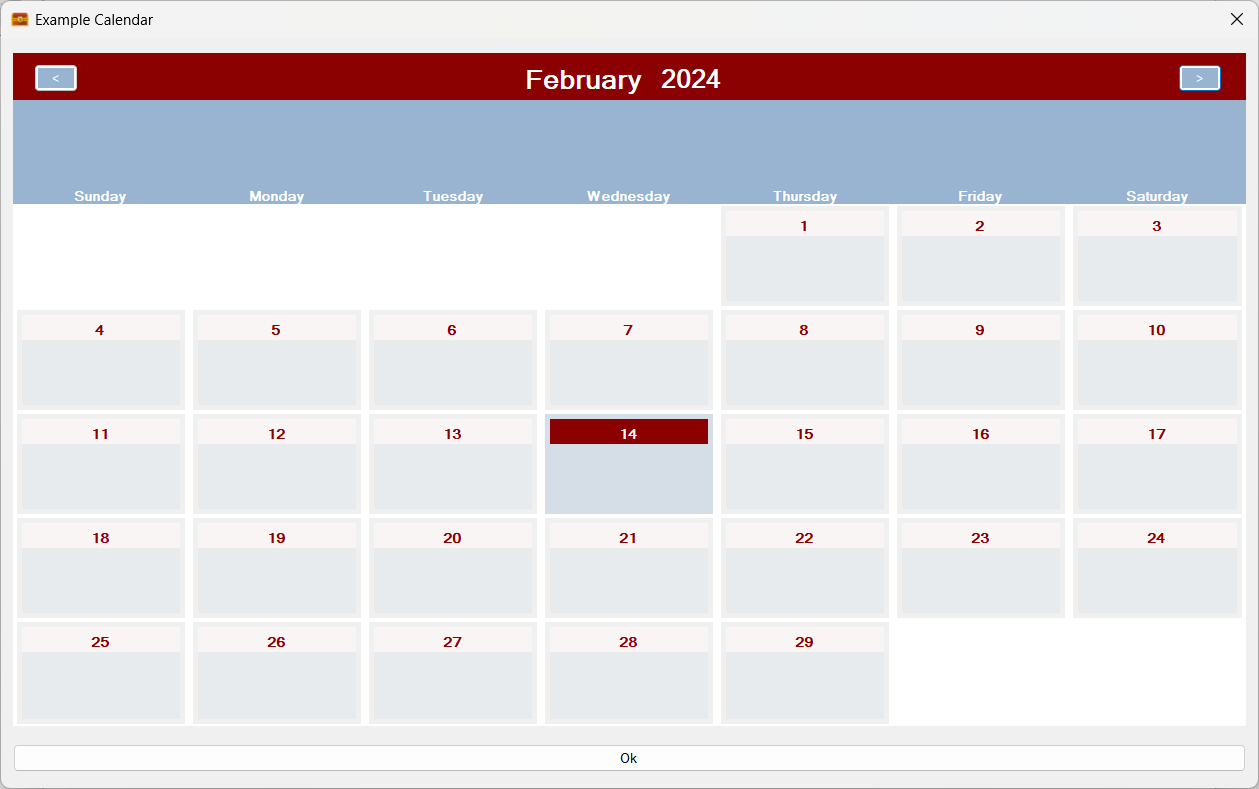
Firstly, we are back where we were – in that the calculation and display systems are now fully operational again:
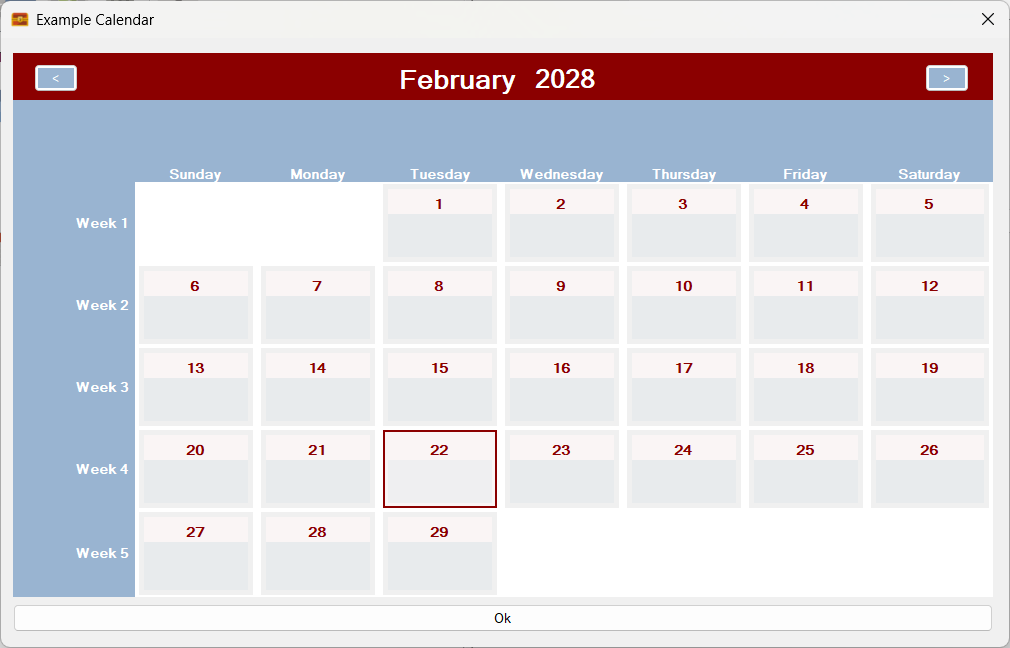
The calendar is now working again!

In addition, multiple rolling entities can now be added. In the above screenshot we are just using one set of rolling entities called ‘Days of the Week’. But what if we also added phases of the moon?
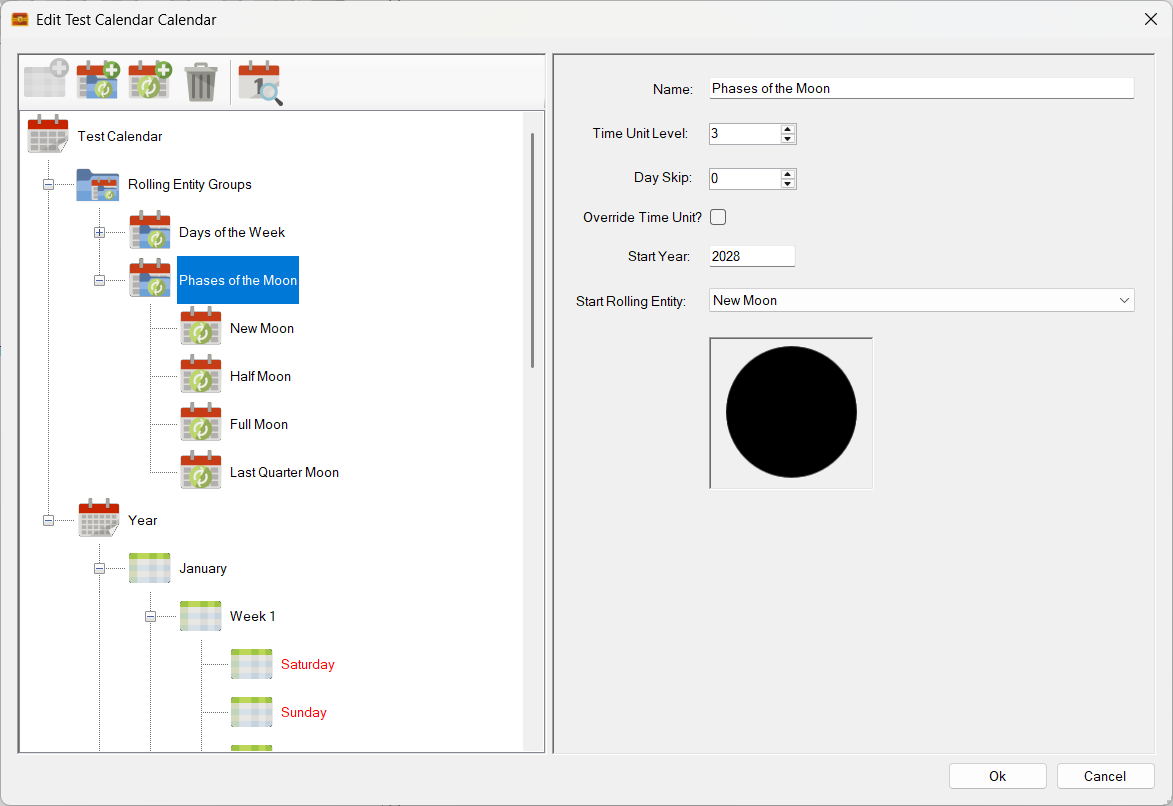
It’s a little artificial in that I have only included 4 phases, but it’s a great example!

Here is what the calendar looks like with phases of the moon added:

Two sets of rolling entities! Days of the week and phases of the moon!

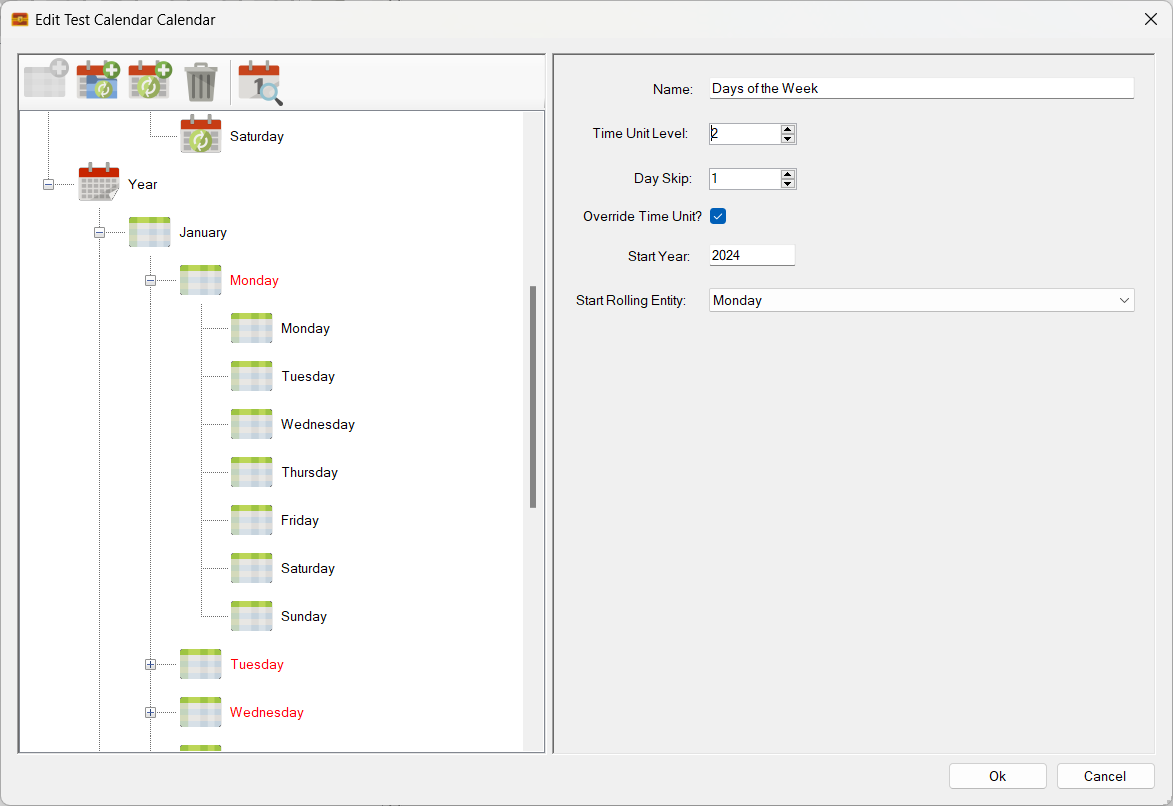
Not entirely realistic. However, rolling entities do support a skip function. Given that these phases tend to happen every 7 days in real life, I have decided to set the ‘Day Skip’ to six. eg there will be six skipped cells before the next rolling entity triggers.
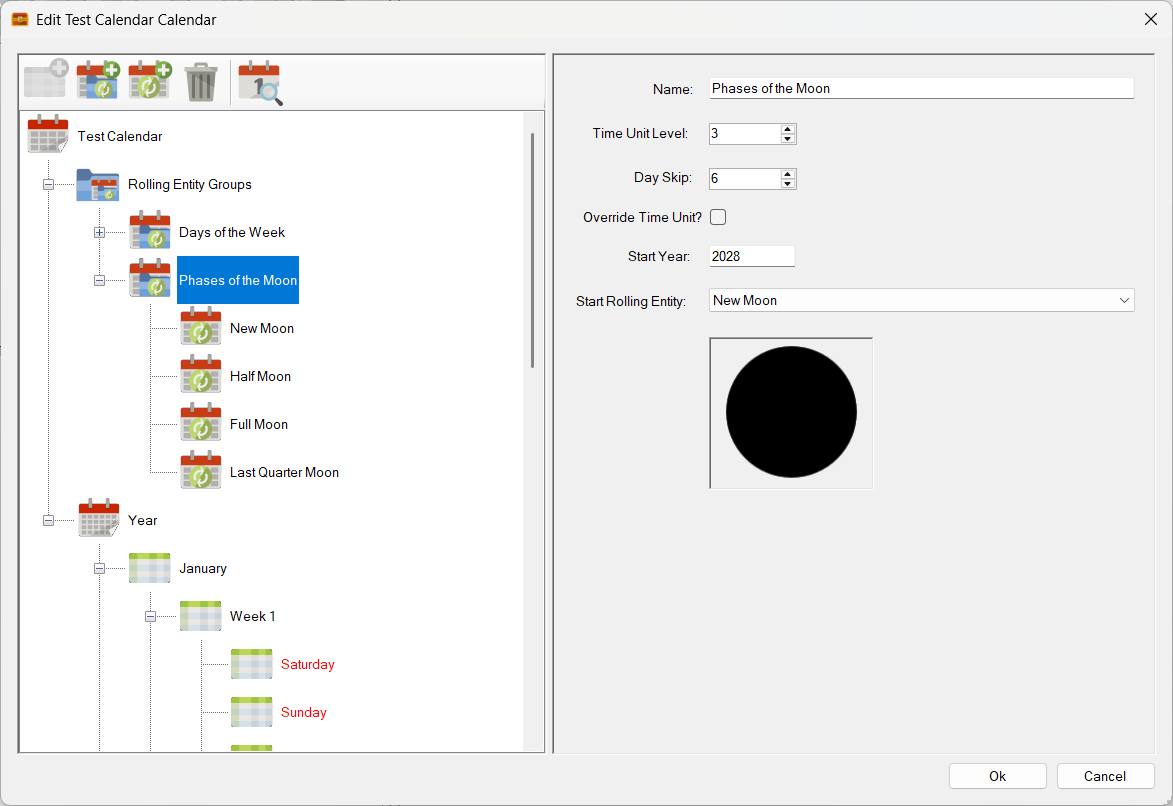
Sets the day skip – 3rd field down – to six!

The results?

The phases of the moon rolling entity now skips every six cells!

It is starting to look a little more ‘real’, though I did randomly set the synchronisation point on the previous screen (aka Start Year and Start Rolling Entity), so these moon phases will not be the ones you will see in real life – unless I’m very lucky.

The above functionality will enable people to to add special rolling events in the form of iconography or text to their calendars. This should benefit many RPG calendars. For example the Runequest Gloranthan calendar should show the phases of the Red Moon as that moon directly affects the strength of Lunar magic. This system makes it very easy to add those phases!

Can we go further? Maybe by adding a third rolling entity?

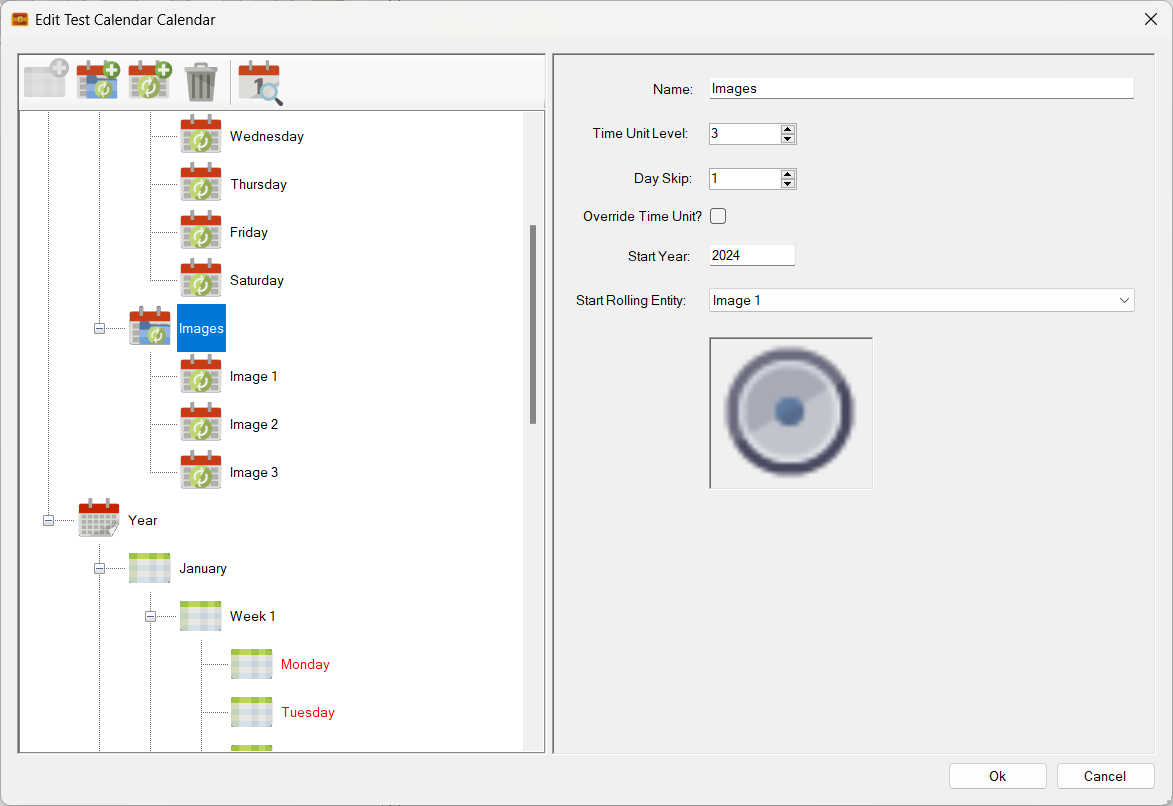
A third set of rolling entities? Why not?

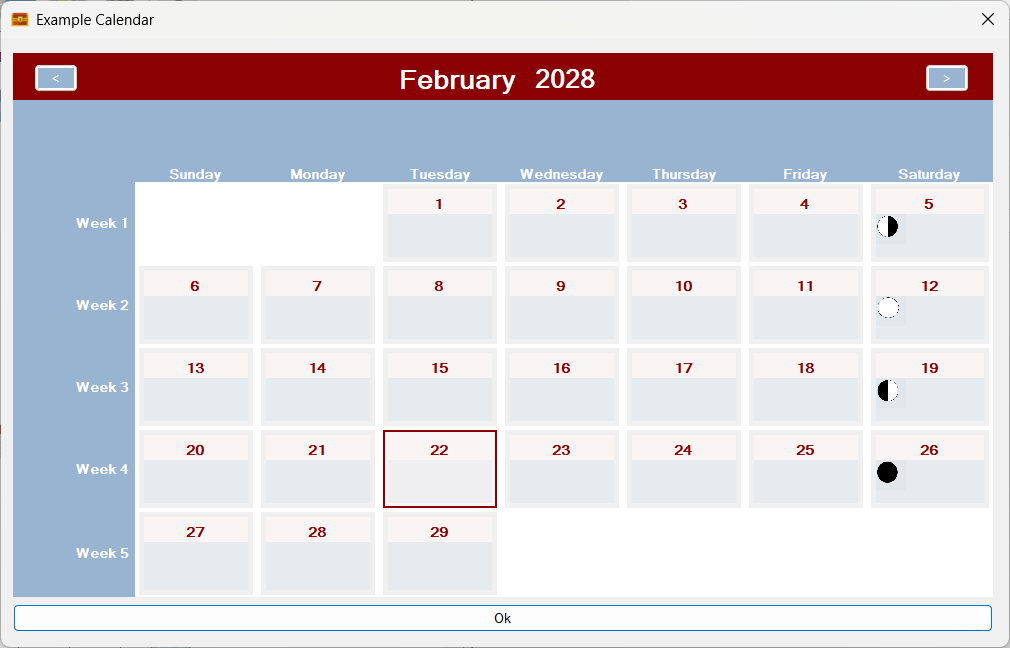
This new set comprises of 5 random pictures in a fixed sequence. Adding the new sequence results in a calendar that looks like this:
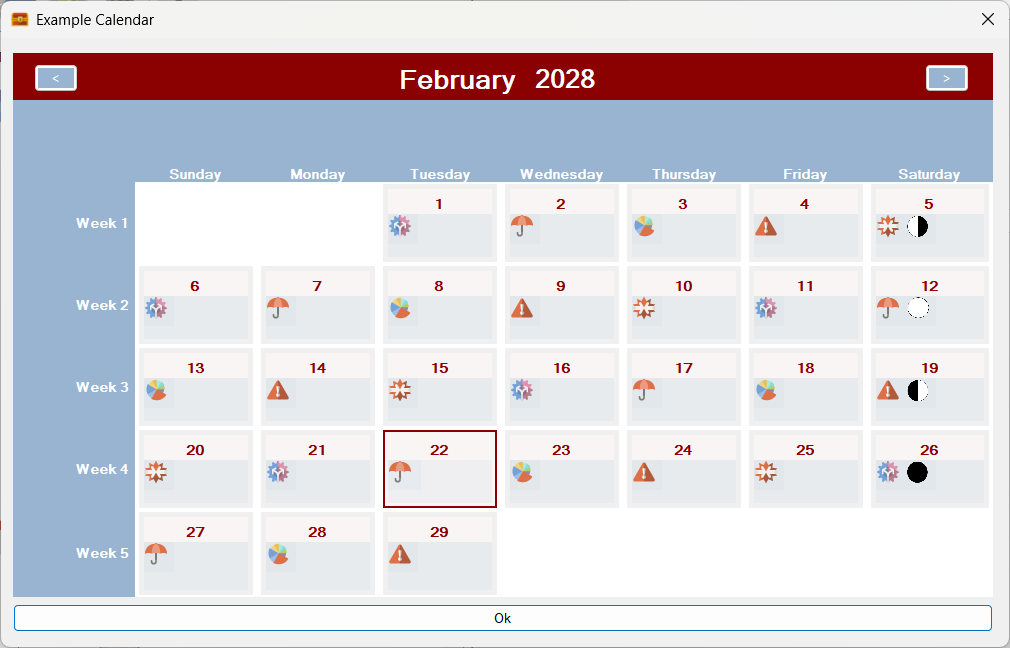
Three sets of rolling entities! Days of the week, Moon Phases and another random image sequence!

In addition, I can also apply an independent ‘Day Skip’ to the new rolling entities. In this case I will specify a skip of 2 cells:
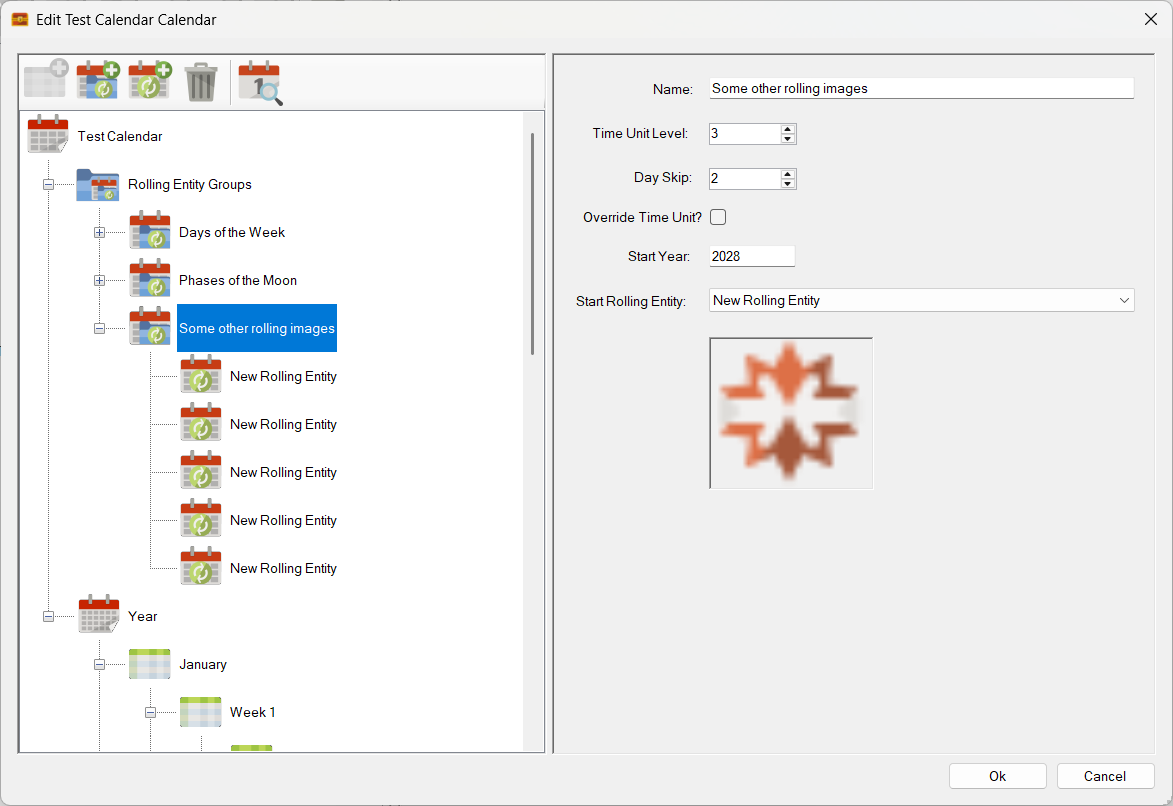
Skip set to two fields!

The result?

All working as expected!

As you can see in the above screenshot it all works perfectly!

Plus, as you would expect, these rolling entities roll properly across month boundaries.

Here is a screenshot of the previous month:
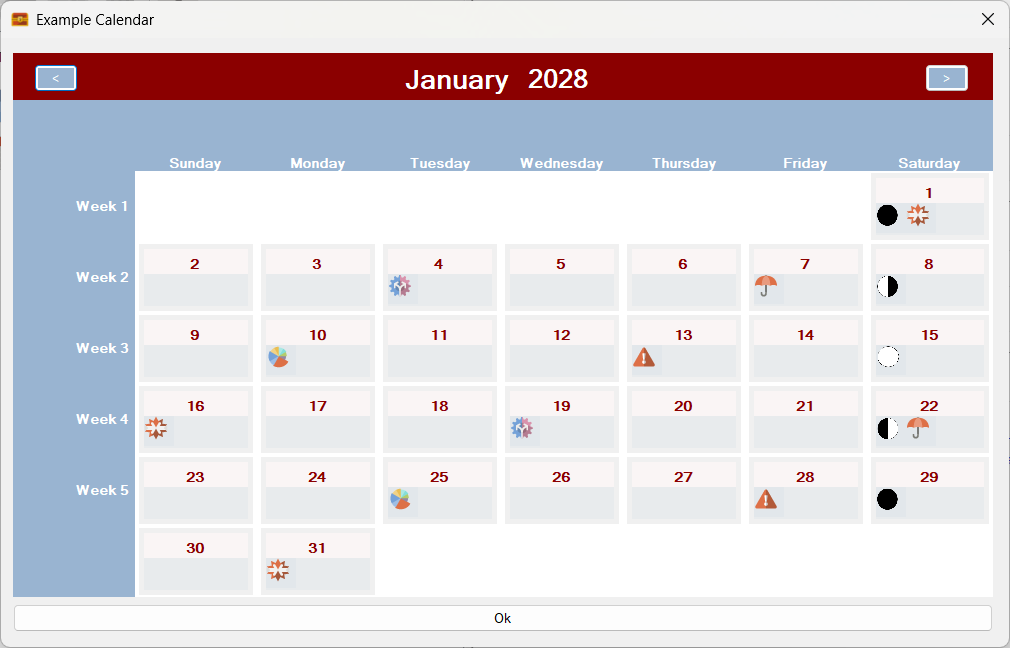
The previous month!

Note that the sequences of rolling entities, the days, moon phases and the other images carry over across the month boundary!

What about going a month forward?
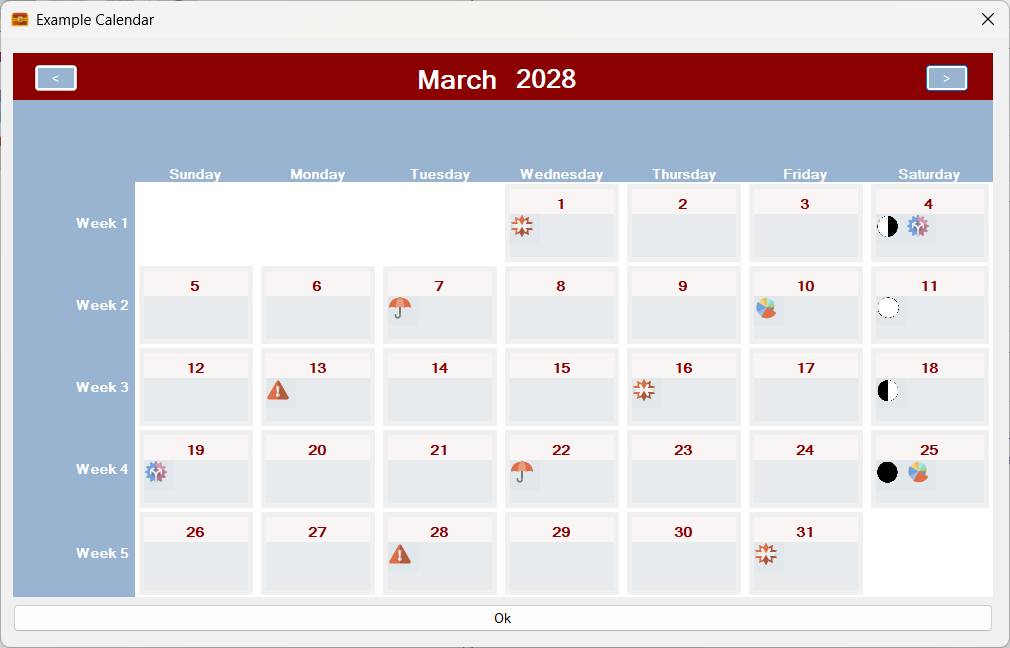
Forward a month!

Going forward a month also results in the three sequences from each rolling entity group carrying on correctly across the month boundary 😎

Plus, remember, that the Gregorian calendar that you see in the above examples is created from first principals using time units and rolling entities – no operating system calendar components are used! Sojour’s calendars also go a lot further forward and a lot further backward in time than the Windows calendar too – see this post for more information.

None of this post probably makes much sense right now, but it will do when I put a video together explaining this new powerful system and how it will help you create any calendar that you can imagine!

A lot of progress with the Mk2 Calendar system, but still a lot more to do.

And for those that don’t know, if you buy Sojour, all updates are free 🙂

That’s it for this update!

Have Fun!

RobP

March 2025 Development Update!

Rather than stay in a black hole whilst working on the Calendar Mk2 system, I thought, that instead, I’ll provide some regular updates.

These updates might not necessarily prove useful in of themselves, but at least they’ll let you folk know that I’m still working on things.

In the last post I alluded to the fact that I had refactored the code in the calendar backend without having updated the UI to use that code (Doh!). This resulted in various UI elements simply not working, or in extreme cases crashing!

A bit of a backward step considering we did have a mostly working system!

I’m now at a point where the UI is starting to work again.

Although a hard slog, I think the detour is worth it. The result is that the new code runs faster and because it is better encapsulated, the higher level code in the UI is also a lot simpler!

The hard bit is working out what needs to stay, what needs to go and what needs to be modified. This is quite a difficult task when one considers the complexity of the modelling (it’s complex because it can model any calendar you can imagine!)

Here are some screenshots that show the UI is now back and working… mostly….

Firstly we can now view mark 2 calendars again:

The UI is now showing calendars again – without crashing out!

The above screenshot shows a Gregorian Calendar created with Sojour’s built in tools.

At this point, the structure of a year has been defined, but the Days of the Week rolling entities have not been switched on. The result is a calendar month with the correct number of days but no real context.

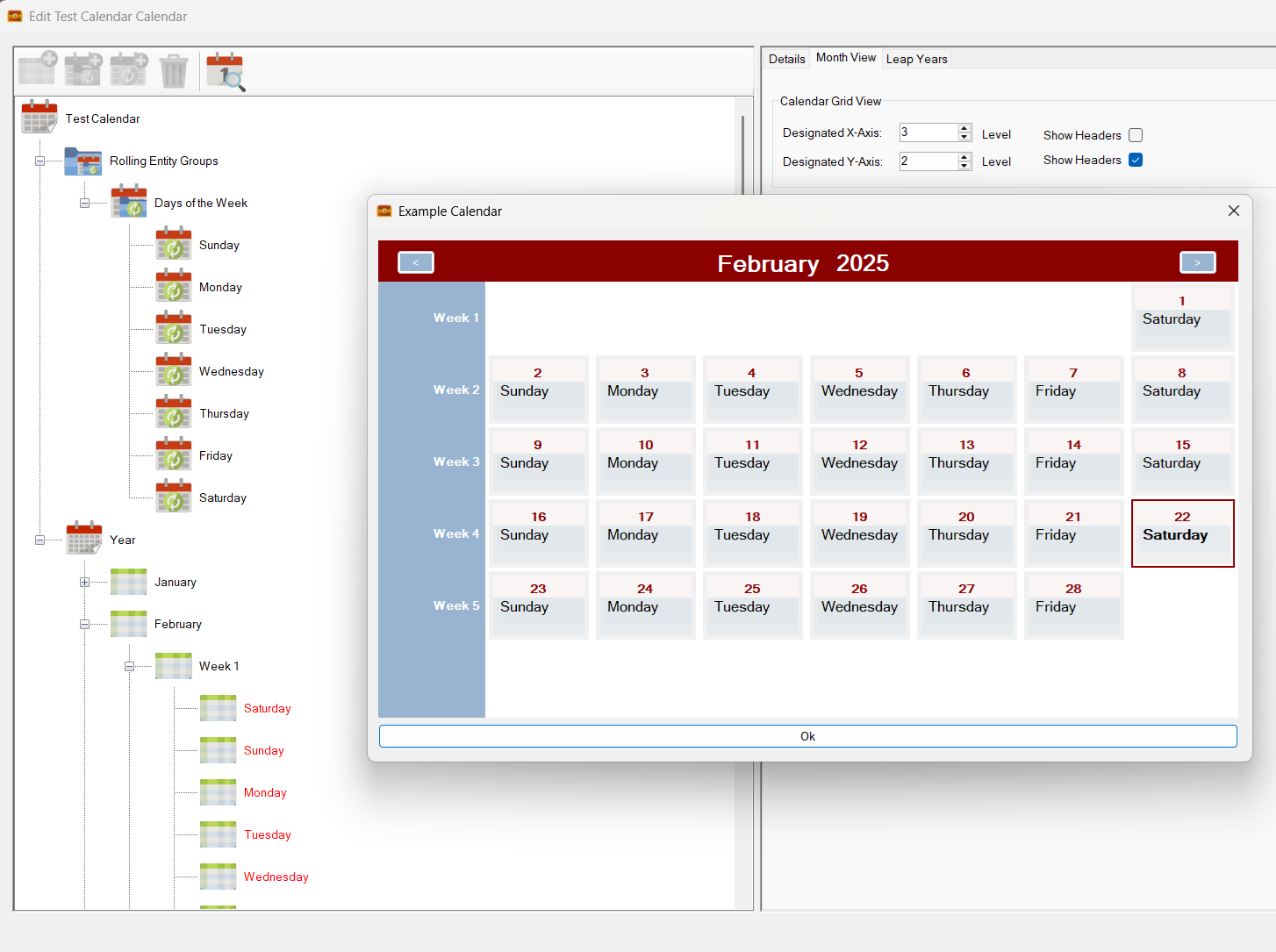
Next up, I switch on the Days of the Week rolling entities:

Days of the Week rolling entities activated!

Straight away we can see a number of things have kicked in.

Firstly, days of the week now appear in the calendar and you can see that the relevant time units in the tree-view have been properly overridden by the rolling entities.

The other notable feature is the way the month view has automatically added space elements to allow all of the same days of the week to align in the correct column (the additional blank row at the bottom is an existing bug that will be fixed).

The fact that this is working at all, is somewhat miraculous, given how different the new backend code is.

Next up I tried turning off the upper header bar to see what would happen:

Upper header bar turned off!

Right away, the system removes that header bar.

It has also realised that with no column headers, the calendar cells no longer have context – i.e. the day of the week. The system remedies this by automatically adding the day of the week to each calendar cell.

Speaking of calendar cells, these are not the finished product. The cells are currently rudimentary and are designed so that I can check the calendar calculations are working correctly. They will look a lot better and incorporate a lot of new functionality once completed.

Everything seems in order, although the ‘spare-row’ bug is still there.

Finally I turn off Days of the Week to make sure the tree-view reverts back to its original settings:

Days of the week turned back off!

And it does! All good!

There is still a huge amount of work to do as I keep identifying additional use-cases that need to be covered off by the code. The good news is that the newer code is much better segregated, which makes adding new functionality like this a cinch.

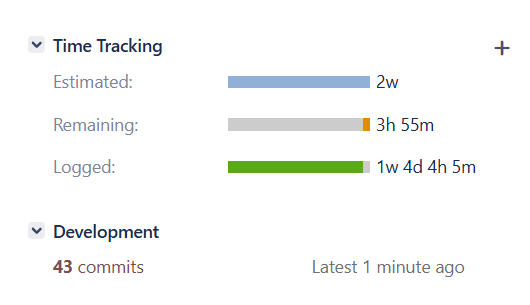
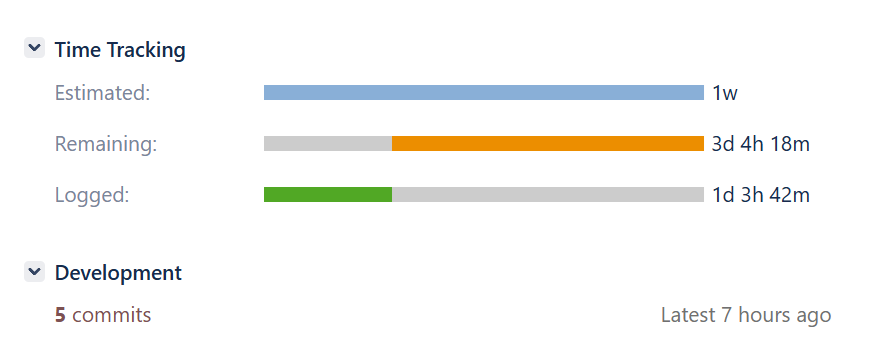
The effort ploughed into this feature, so far:

That’s a lot of commits!

That’s a lot of commits and development time!

Whilst this feature takes me away from Sojour’s more regular updates, I’m a firm believer that it is essential for Sojour’s longevity.

Sojour needs a calendar system that can model rolling calendars, which right now it cannot do. The current version cheats with regard to this feature by having the Gregorian calendar use the Windows Calendar! In contrast the new system does not do this and recreates all calendars from first principals.

That’s it for this mini update!

Have Fun!

RobP

Sojour 1.3.18.0 minor bug fix has been released!

This is a small bug fix that one of my customers reported:

RPG-440 Drag and drop in the Assets Tree-View now works when there is no map loaded.

That’s it for the release.

Work is still underway on the Mk2 calendar system, though it turns out I have more work to do than planned.

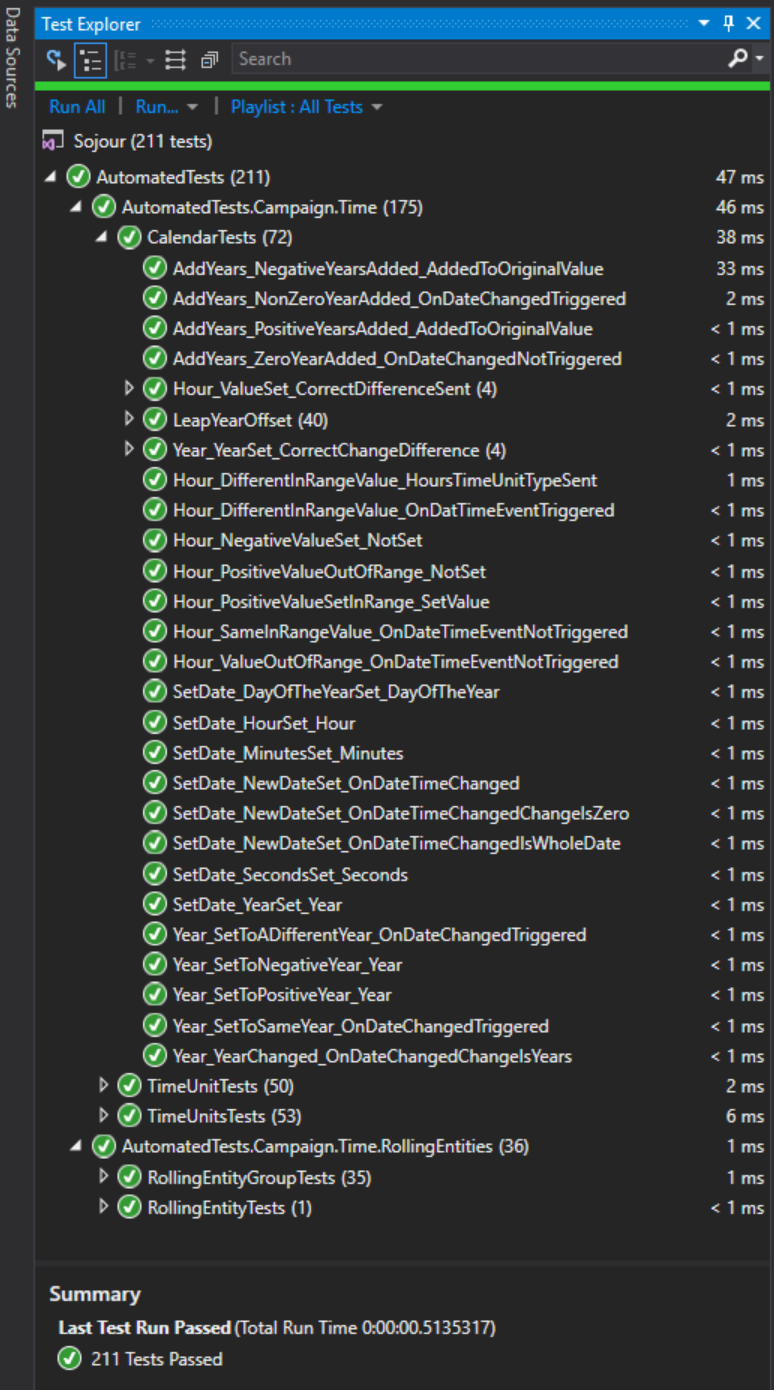
Last year, before I added the custom folders system I had added a whole bunch of integration tests to Sojour to support the MK2 calendar – 211 of them in total!

Integration Tests for the Mk2 Calendar System!

What I hadn’t realised was that whilst writing these tests I had actually performed a large refactoring of the code to ensure that each class was focused on its job, and solely on its job.

Architecturally, it’s a great idea and it will also make the system easier to maintain in the future.

However, these changes were put in without updating the UI layer to use the new updated system(!) – “previous Rob” has a lot to answer for!

This has meant a lot of rework in the UI layer. We are headed in the right direction, it’s just I’m a little further behind schedule than anticipated.

In the meatime

Have Fun!

RobP

Back in the Saddle!

I’m now back in the saddle after some time off over the Christmas period.

I hope that everyone had a great Christmas holiday and is feeling refreshed for 2025!

The first part of this year’s development effort will be focused on completing the work on the calendar Mk2 system for which there have already been a number of posts.

The Mk2 Calendar System!

For those that want the TLDR, the new system supports rolling calendars which means that calendars such as Pathfinder’s become a possibility. It also means that the Western Gregorian calendar can start using the same calendar technology as everything else (it currently uses Windows Operating system components).

Once the work is completed, users should be able to create any calendars that they can imagine – all from within Sojour itself.

I feel that the Mk2 system is important because Sojour is primarily built upon three cornerstones:

  1. Time tracking
  2. A sense of place (aka mapping)
  3. Journaling.

I have always considered the time tracking part to be the weakest subsystem of the three which is why it is being upgraded. There are also plans for the other two, especially the journal, but I don’t want to go into that just yet.

The Mk2 Calendar System is one of those tasks that I know is big and that I’m already quite far into it, but alas, I don’t really know how much farther there is to go. All I know is that there is a tangible sense that I’m over the hump.

That’s it for this short update.

Have Fun!

And I’ll talk to you all later!

RobP

Folders and a Refactor!

This is a quick update to let you folks know what I’m currently up to!

Calendar Mk2 work is still progressing with more automated tests being added all the time.

However, I decided to take a short break from the calendar work to enable me to deliver some much requested functionality: Folders!

Up until now the user had no real power of organisation in Sojour. They were reliant on the structure that’s provided in the Asset Browser.

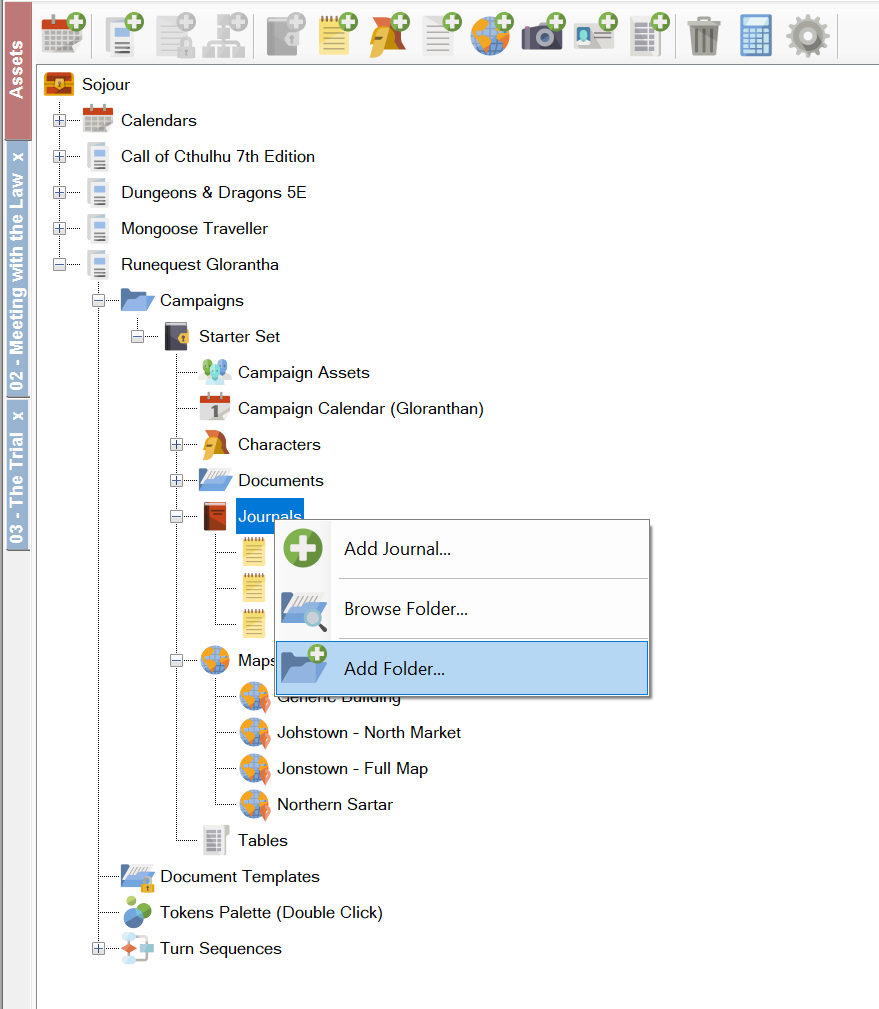
The new code that’s being written changes this and will allow users to add their own folders so as to better organise their work:

We will soon be able to add folders! (Click for larger image)

To add a folder, all one need do is right click and select ‘Add Folder…’ to an existing folder or to one of the following nodes:

  • Campaign Assets
  • Characters
  • Documents
  • Journals
  • Maps
  • Tables
  • Document Templates

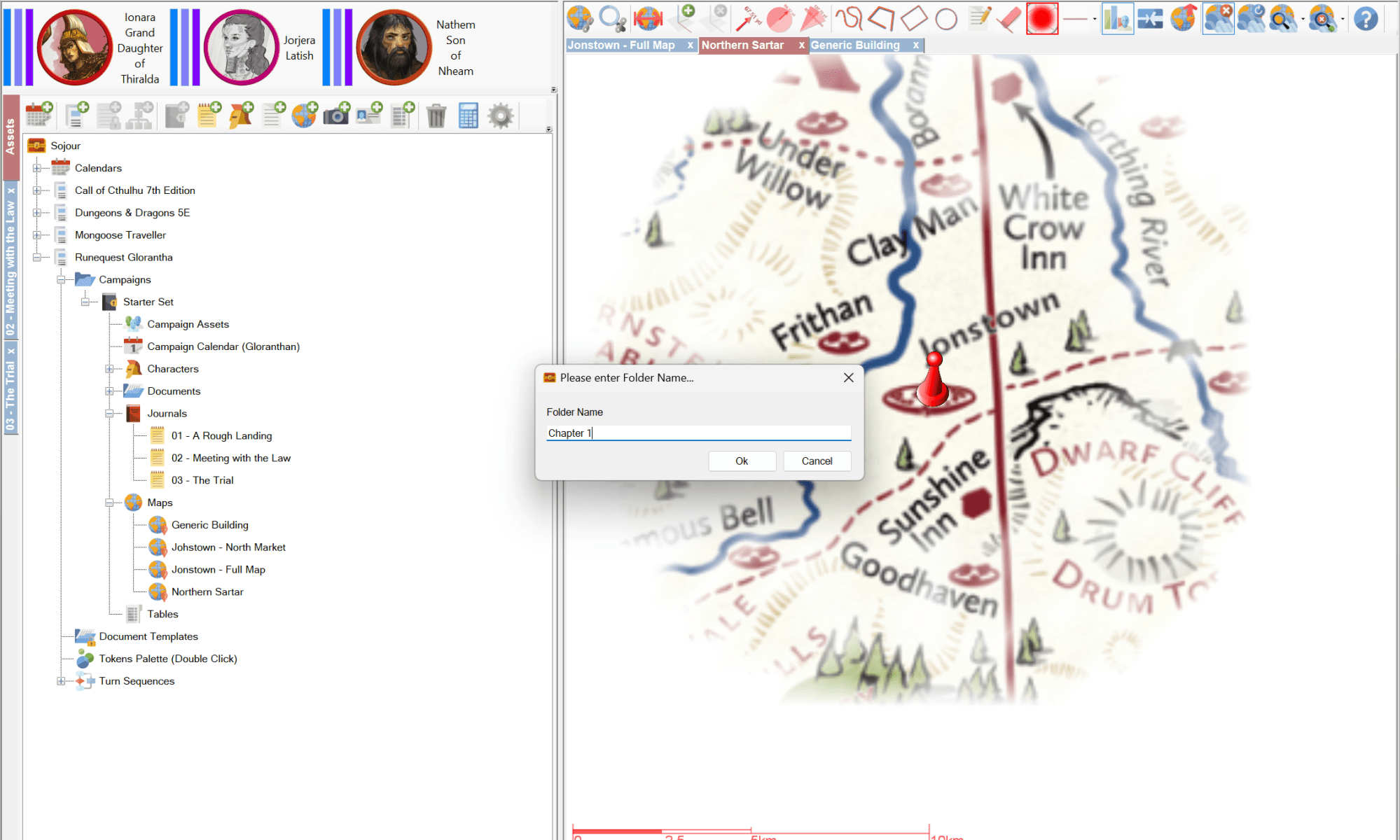
This will result in the folder naming dialog appearing:

The folder naming dialog (click for larger image)

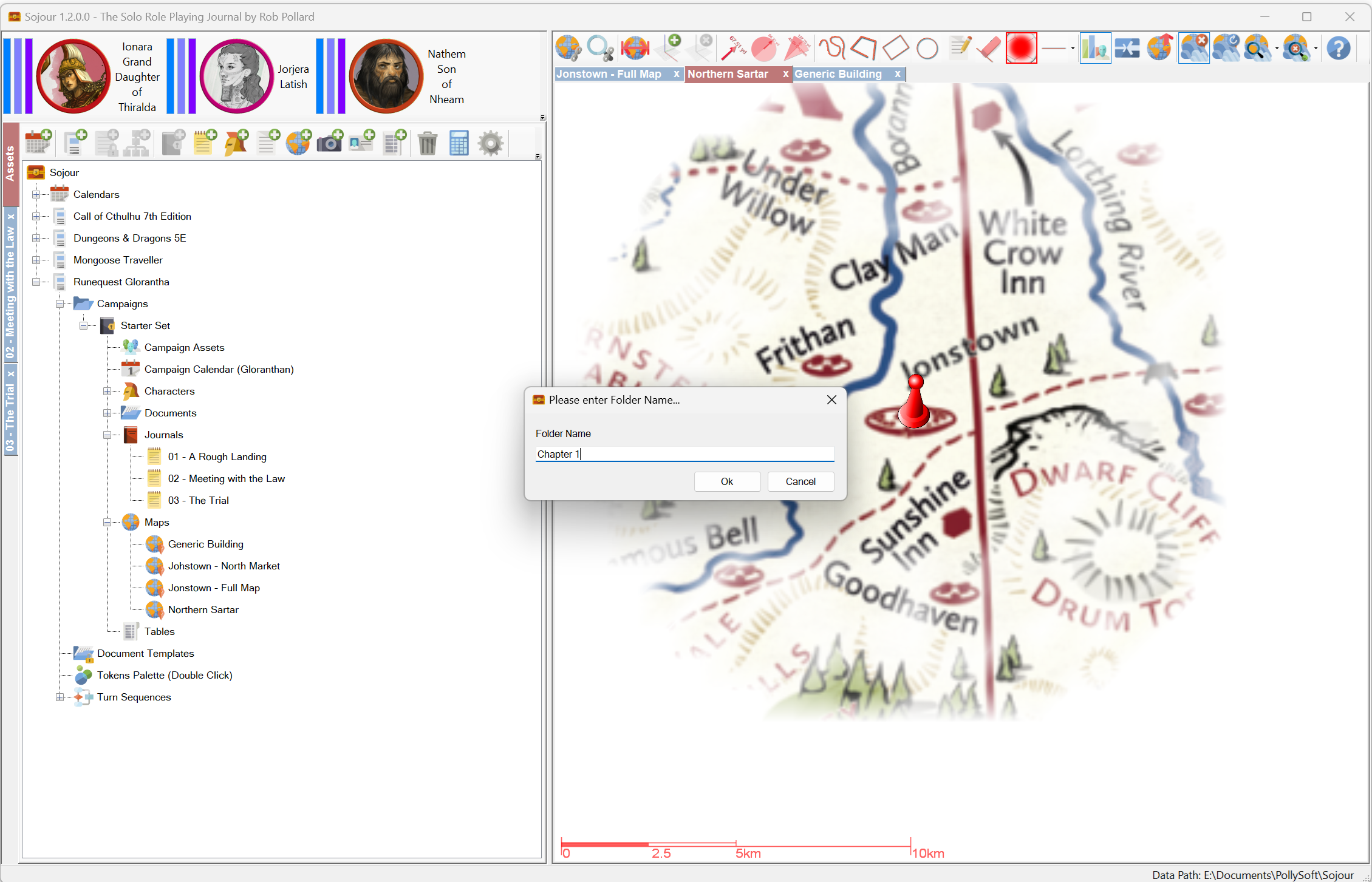
Once a name has been entered, your new folder will appear in the Asset Browser:

A new custom folder! (Click for larger image)

The folder system is coded to allow one to define folders within folders. You can go as deep as you need to go. The only limitation is that folders can only hold one type of data based on their parent node.

For example, if you create a number of folders under the Maps node, only maps can be stored in those folders. However, you can store as many maps as you want at whichever levels that you want!

I was on the home straight of delivering the folders functionality when I realised that Sojour had a bit of an architectural problem…

Whilst plumbing in the new menu items needed to support the folders system I realised that the display layer of Sojour had rather too much complex code in it. 6412 lines of code to be precise. (Eeek!)

This code encompasses a huge range of user functionality resulting in it being hard to figure out what’s where and how it all hangs together.

Architecturally, on the whole, Sojour is pretty good in that each subsystem such as Maps, Journals, Tables etc is confined to its own classes with no cross talk.

However, the large display layer kind of throws the spanner in the works with regard to architecture because it has to orchestrate many of these subsystems and user controls to do the users bidding – often resulting in some pretty complex code.

This complex code is made harder to understand simply because it is all in one place within the display layer.

I felt I needed a way to simplify the display layer in order to make it easier to find and understand what was going on within that layer.

To that end, I came up with the concept of an Action.

These Actions represent the actions of a user.

Actions would then be grouped into classes by originating subsystem. For example, all actions originating from a Journal would find themselves housed in a JournalActions class.

These actions classes would then coordinate all the UI changes and subsystem orchestrations in order to achieve what it is that the user wants. Such an architecture helps keep related functionality together and it encapsulates the really hard parts away from the display layer.

The result is that the display layer will have a much simpler and smaller code base.

For example, if you wanted to change the hit points of an NPC in the Journal, all the display layer would need to do is call JournalActions.UpdateNpcHitPoints – just one line of code and that’s it! This contrasts to the many hundreds of lines of code currently within the display layer for this specific functionality.

The other advantage of this architecture is that many UI elements can now cleanly invoke the same functionality without having to duplicate the code or understand how it works!

It’s a great architecture and I’m quite pleased with it. But, alas, it’s going to take a fair bit of time. I have already made a fair bit of progress but there is still a long way to go:

Almost 12 hours have been pumped in so far! (Click image for full sized version)

It turns out that the quick diversion from the Calendar Mk2 work for custom folders is going to end up being a not-so-quick one.

On the plus side, it will leave Sojour’s architecture in a much better place to accept changes and as a bonus you folks will get the much requested folders system!

That’s it for this update!

Have Fun!

RobP

Automated Tests! Oh, and Dorian…

This is a fly by update to let folks know that development is still ongoing in the Sojour world despite time pressures.

As per previous posts, the current development focus remains with the Calendar Mk2 system (which I should really give a name!).

One of the things that I have realised whilst developing this system is that it has many complex algorithms that interact with each other. As a result it can be quite easy to upset them and not know that they have been upset.

In the end I decided that this is an area of Sojour that absolutely needs some automated testing around it.

Automated tests will automatically ensure that the complex algorithms in the Mk2 Calendar are performing as they should. These tests also highlight existing potential issues and pitfalls – many of which have since been fixed after being identified by these tests.

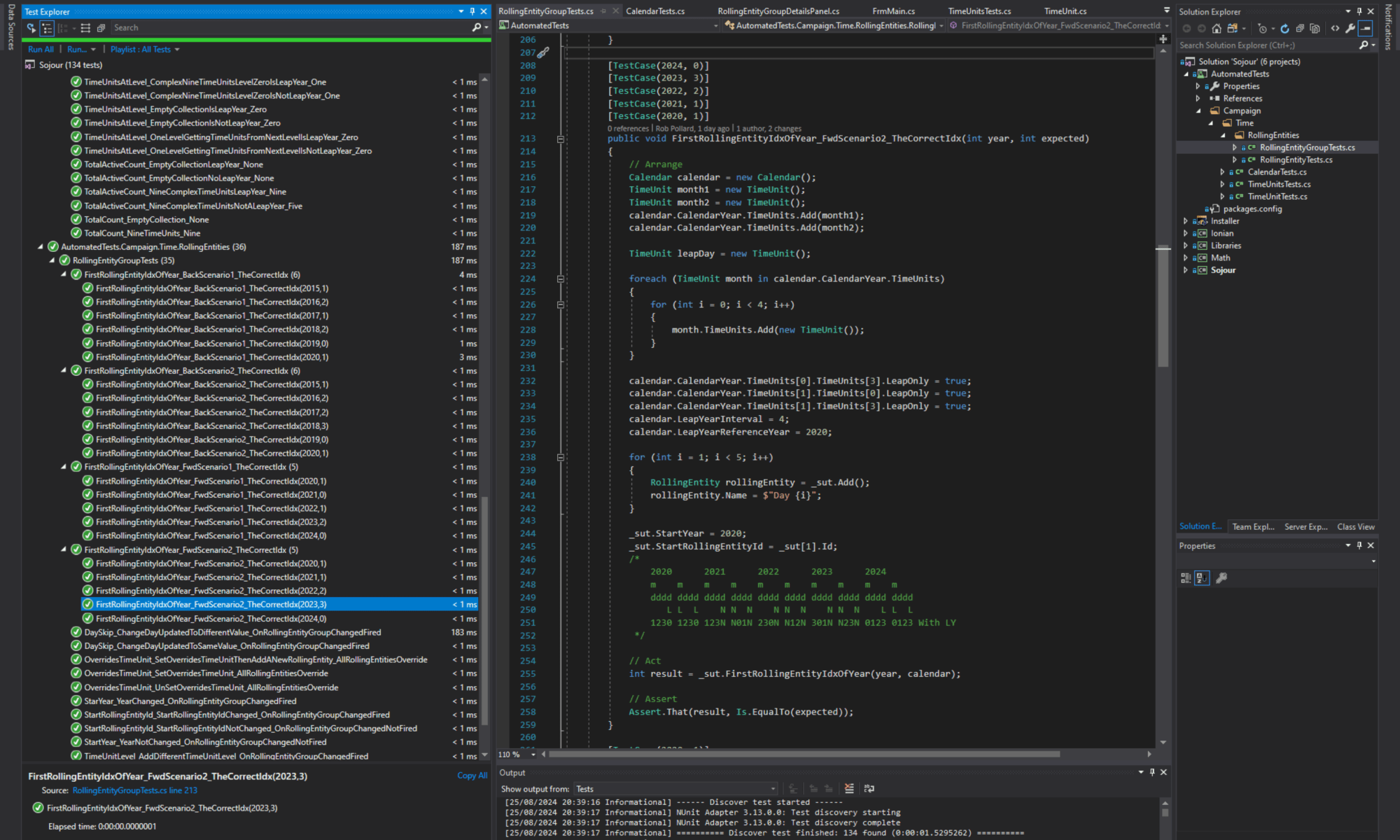
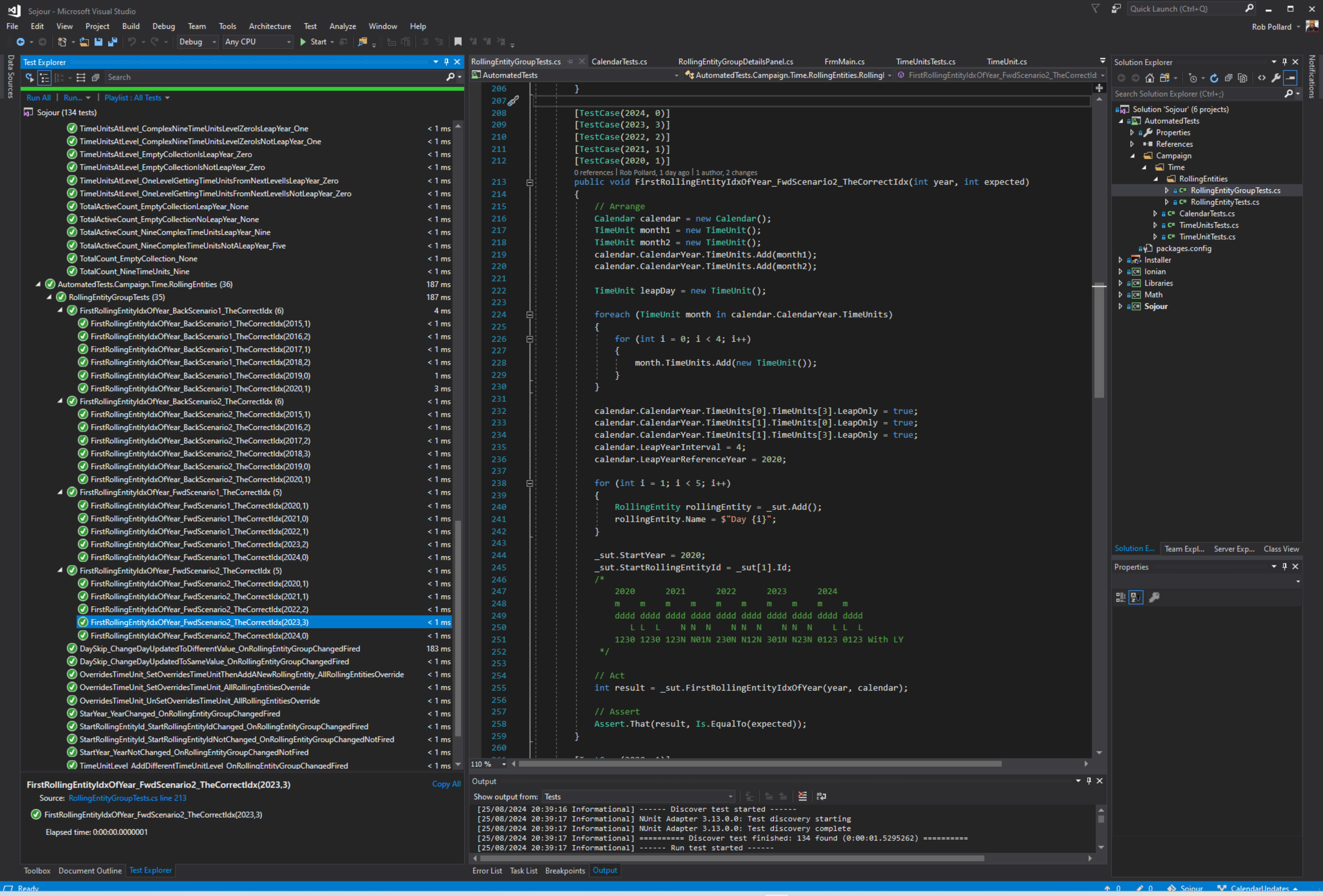
The ever expanding test suite for calendars Mk2 (Click for larger image)

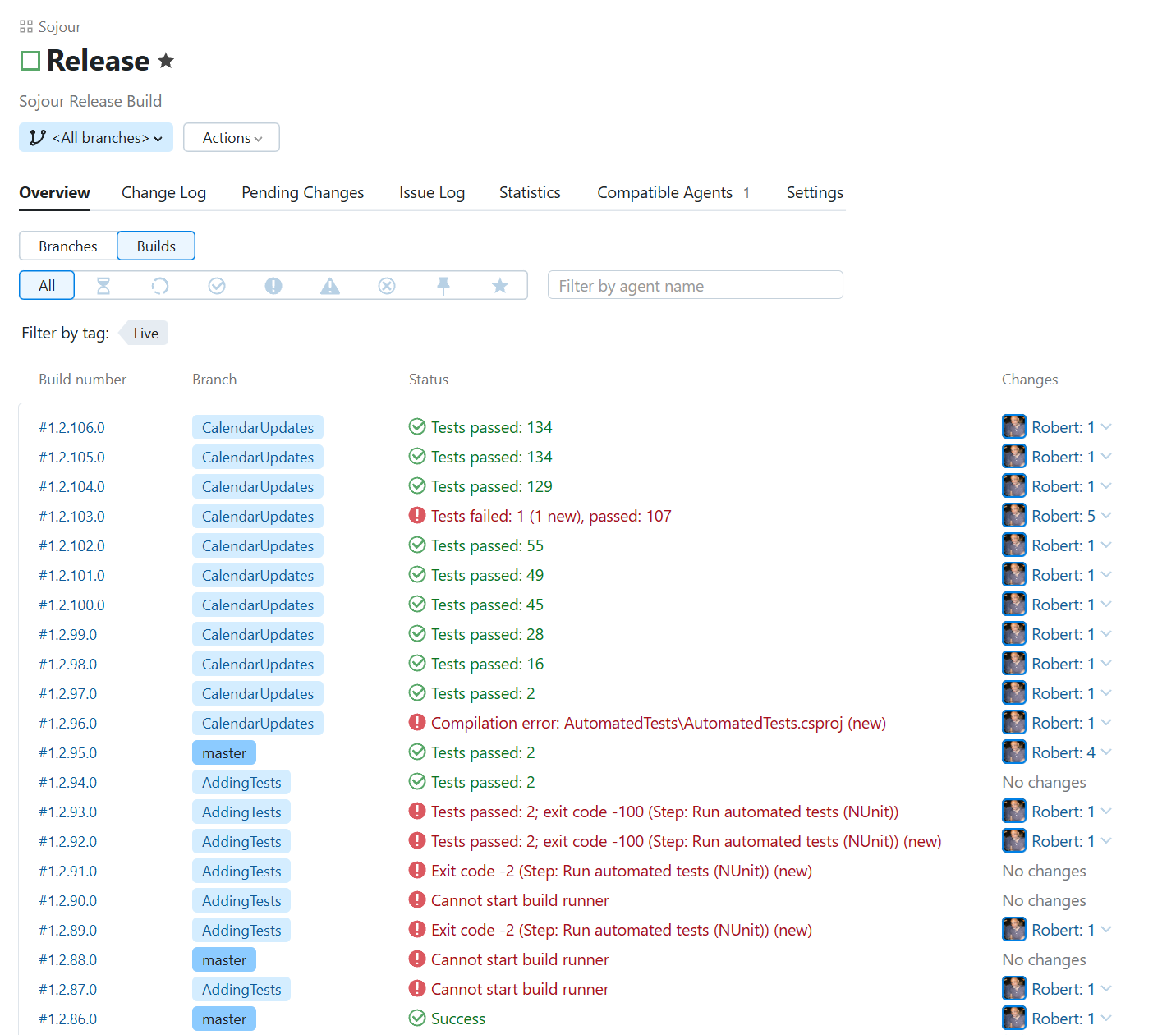
We are now up to 134 integration tests that are automatically run by my development environment every time I merge code:

The build server automatically running the new tests! (Click for larger image)

Writing the tests takes a fair bit of time, including the time required to integrate them with the automated build pipeline – it’s why the build server screenshot above shows a lot of red as I try to get the server to run the tests correctly.

Despite the time cost, these tests enable me to write code faster and more efficiently.

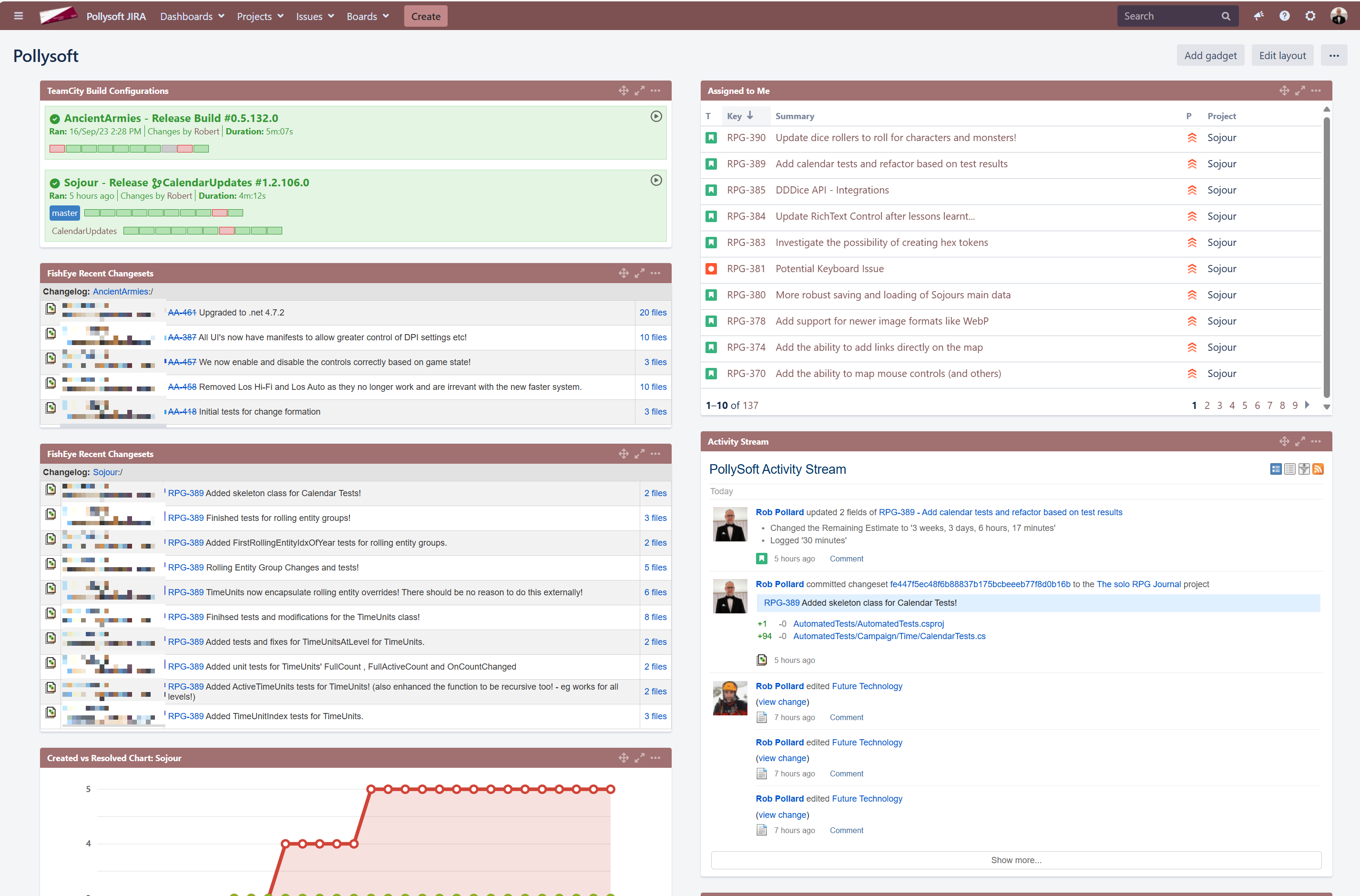
If I do break something it will be flagged on the build server and also in JIRA as shown below, top left (the red rectangles are builds where tests failed):

The builds show up top left in JIRA! (Click for larger image)

If any of the tests do fail, they will provide detailed information as to why they failed that should speed up my job and also help to produce a warm fuzzy feeling that things are working properly and headed in the right direction.

Ok, so that’s what I have been doing on the new calendar system, but, what’s Dorian when it’s not at home?

Dorian is a new graphics engine that I’m working on. It will replace Ionian which is the one currently used by Sojour (and by Ancient Armies).

A very early version of Dorian strutting its stuff!

Why a new graphics engine?

The primary reason is that Ionian is preventing Sojour from being a 64 bit application, which limits the memory it can access. This can lead to limitations with image sizes etc.

Dorian will be fully 64 bit compatible, it will support Direct-X 9, 11 and 12, plus it will allow rendered surfaces to be embedded in WinForms – much like the current Ionian engine.

The above demo shows it running successfully in a 64 bit application in a WinForm – a big milestone for the engine.

There is still a lot of work to do and once the engine is ready, Sojour will need to be updated to be able to work with the new engine. It will be a non-trivial job, but it’s a piece of tech debt that has to be tackled to allow me to take Sojour to the new places it has to go.

That’s it for this post!

Have fun!

RobP

Calendar progress and Release Notes for v1.2.86.0

As many of you know, I have been finding it difficult this year to get the time together to do as much development on Sojour as I would like.

However, progress is being made, and if anyone reports any game-breaking bugs or other general usability issues, I will try and make the necessary time.

The calendar’s user interface has had a few changes made to it. Here is a screenshot of it displaying a Gregorian calendar designed from first principals using time units:

The new calendar pane! (Click for larger version)

The changes are required to allow the calendar to accommodate the additional information that the Mk2 calendar system can support.

In the future one will be able to get a zoomed in view of a day as one’s mouse cursor passes over it!

Time Units will now show you when they are being overridden by rolling entities by turning red and displaying a message to that effect. The affected fields also show the overridden values and are set to read-only:

Overridden time units (Click for larger version)

Clearing their overrides or moving the rolling entities to a different level results in the colour’s moving with the changes. Here I have moved the day rolling entities up to the week level (level 2):

The rolling entities are moved up a level! (Click for larger version)

Not a good idea, just demonstrating functionality! Note that there is a new bug in the above image where the original level three values are not being restored. This used to work and will be fixed!

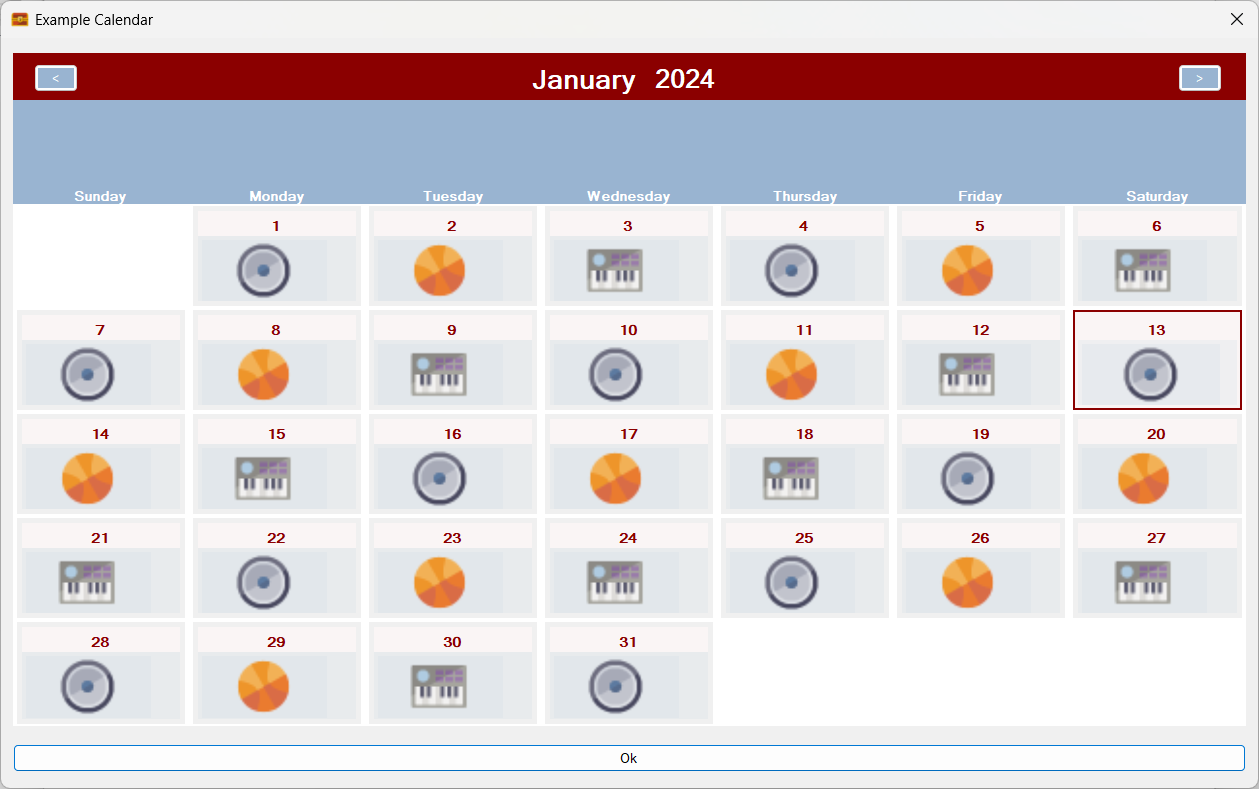
Rolling entities image coding is now mostly done. Here I have created a second rolling entity group just called Images and have assigned three rolling entities to it with three different images (a speaker, a basket ball and a musical keyboard). Here is the speaker one:

Rolling entities now support images! (Click for a larger version)

Here we have assigned the Image rolling entities to level 3 and set the speaker image is the start of the sequence. We have also set a parameter called ‘Skip’ to 1. This means that every single calendar cell will get a rolling entity. (If it had been set to 2, every other calendar cell would have got this rolling entity):

Setting the assigned level! (Click for larger version)

By assigning our Image rolling entities to level 3 we now get this on the calendar pane:

Two sets of rolling entities in action at the same time! Days of the week and Images! (Click for larger image)

The above image is quite significant in that it shows that Sojour can now handle multiple rolling entities, simultaneously, even when assigned to the same level!

The image render code is an early version and is just there to show me the system working. It will be improved as coding continues.

Why support images?

By doing so, one could add an image sets that represent cyclical things such as, for example, the phases of the moon.

That’s about it for the calendar progress. It is slow, but it is getting there!

Now for v1.2.86.0 release notes – (this update will be up very soon):

Enhancements
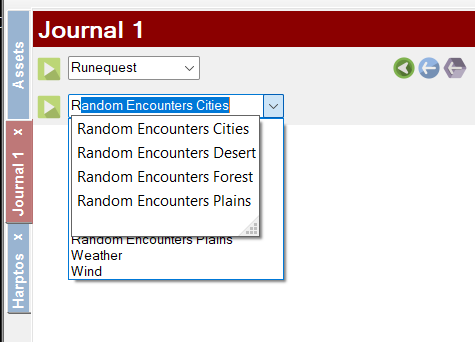
RPG-386: The drop down lists in the journal for look-up tables and turn sequences can now be filtered and searched by starting to type the name of the table or turn sequence you are trying to find. It should make finding the required items faster when you have a lot of them!

You can now filter the drop down lists! (Click for large image)

RPG-387: Sojour only used to save data on exit unless the user used the various manual save buttons. The problem with this approach is that if Sojour crashes or your computer dies, you could lose a lot of data.

Sojour has now been updated to be a lot more aggressive with regards to saving your data. It will now auto-save your data for no less than 41 additional activities! Alas, there are some activities that I couldn’t add this for without compromising performance. However, I will keep this under review.

Fixes
RPG-388: Fixed a bug where events could end up on the wrong day for years with leap days. Also fixed recurring events so that they take account the origin year’s leap days and all subsequent year’s leap days. This ensures that recurring events now always occur on the same day across all years.

That’s it for this post!

Have Fun!

RobP