This is a short fly by post to talk about two more features that have been added to Sojour Release Version 1.4.
These two features were added as a direct result of customer feedback from the You-Tube preview video.
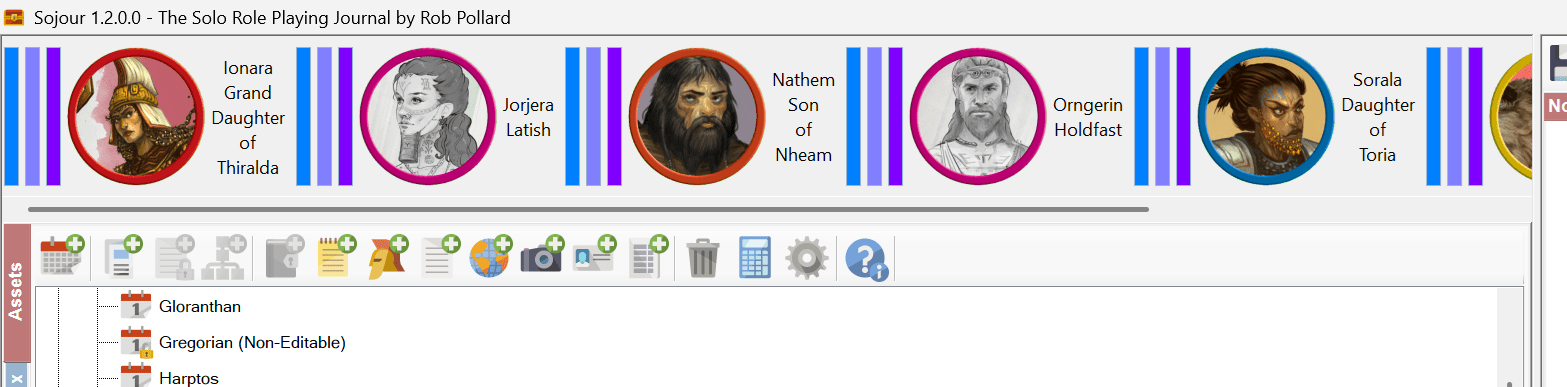
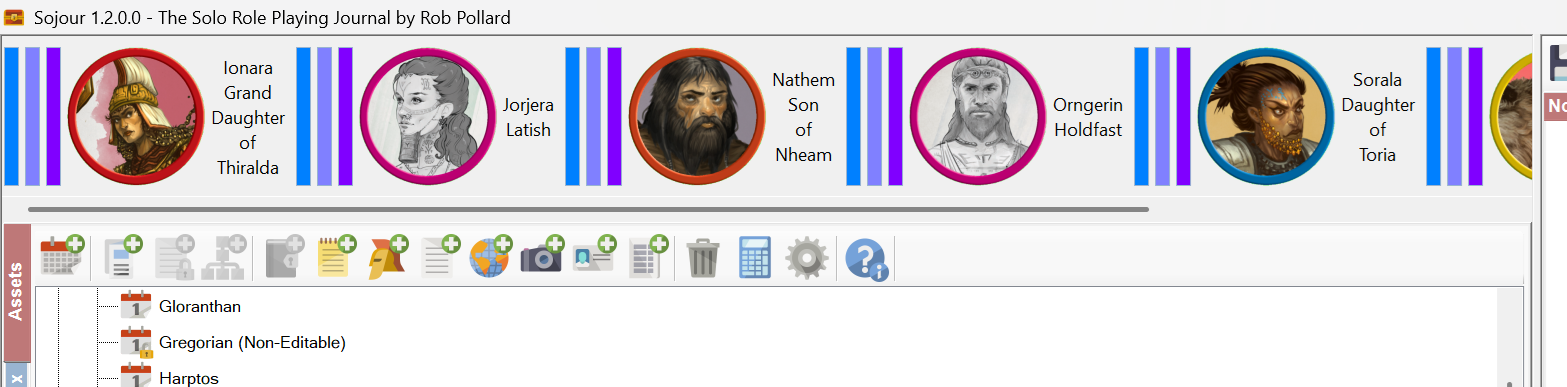
The main character toolbar now gets the same scroll bar enhancement that the NPC toolbar received!
The main character toolbar now gets the scrolling treatment!
This scroll bar operates in exactly the same way as the new updated NPC toolbar’s scroll bar does. It will appear only where necessary.
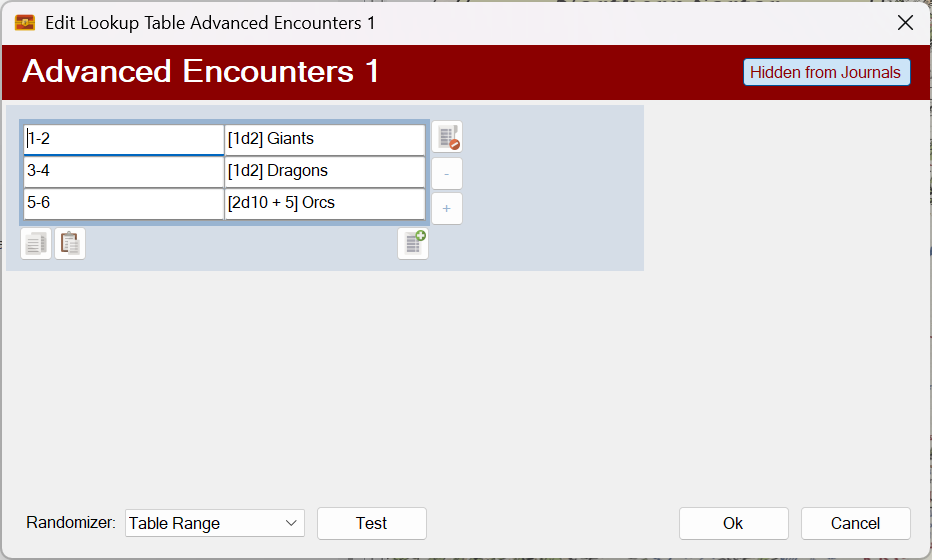
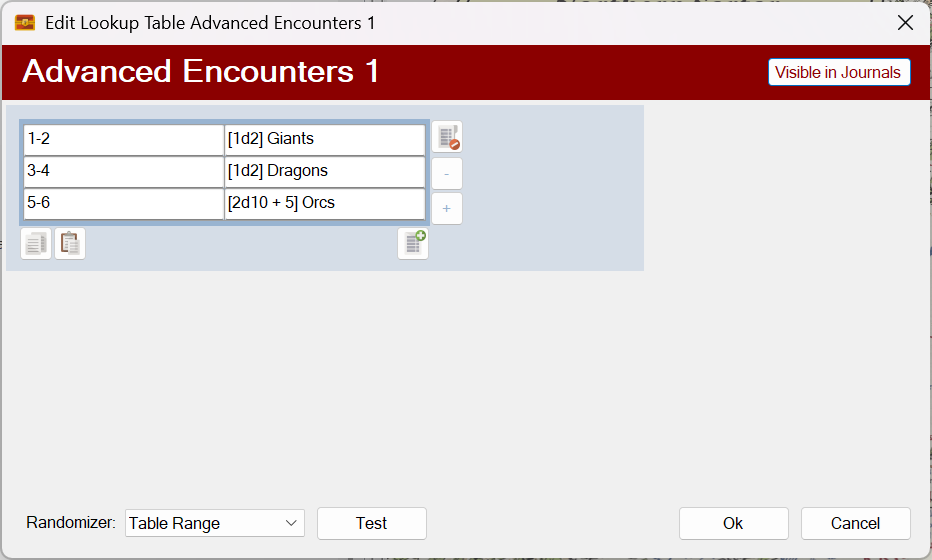
The next requested enhancement is for tables. These can now be selectively hidden or shown from the Journal’s main drop down by toggling a new button on the upper right of the table:
Hidden from all journals!
Available to all journals!
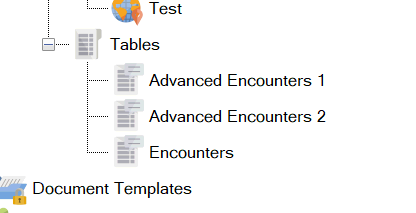
For example, consider this scenario, we have three encounter tables:
Three encounter tables!
The user is only meant to roll on the Encounters table. The other two are simply sub-tables that the Encounters table will occasionally roll on and are not meant to be directly accessed by the user.
Both of the Advanced Encounters tables have been set to be hidden from all journals.
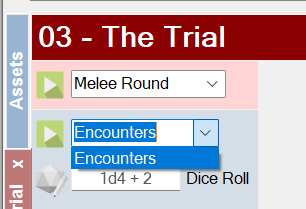
From a journal, the result is this:
Only the Encounters table is available!
The two Advanced Encounters tables are now hidden!
This functionality will help streamline the list of tables available in the journals drop down to only those a player should be using!
That’s it for this fly by post. Only two additional enhancements, but I think they will make all the difference and I would like to thank the customers for providing the feedback.
From tomorrow onwards, I’m updating the manual, so I will have to freeze this release.
The result of this is that there will be no further new features in this release.
However, if you have ideas for new features, keep them coming! They will appear in a subsequent release.
I have decided to temporarily put down the calendar Mk2 work to get out some fixes and enhancements out to you good folk. This is exactly what I did last year before Christmas for custom folders.
The idea is that once this release is out I will be going back to calendar system.
The reason the calendar system is taking so long is due to its flexibility. This leads to an inordinate number of corner cases each of which have to be tested. It’s amazing how many of them are exhibiting issues. The calendar work is headed the right way, but it’s going to take time!
Version 1.4 primarily focuses on how Sojour saves your data, though there are other enhancements that will be discussed below.
Why a new save mechanism?
It’s because over Sojour’s two years of public releases I have had 3 or 4 reports of users losing data due to the main Sojour.dat file being corrupted. This seems to happen when a network drive goes away during a save, or when Sojour itself crashes – which can happen during large image imports due to limitations with the Windows GDI.
To that end I decided to completely revamp the save system in order to prevent the core Sojour files ever being corrupted.
Sojour has moved away from an opaque system of saving frequently in the background, to one where the user has to explicitly choose to save their data – though there are exceptions to this.
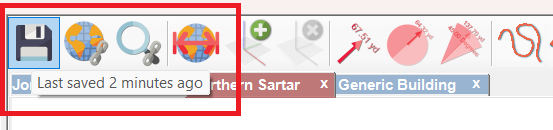
To achieve this, Sojour got a brand new Save button on the main toolbar:
The new save button!
This save button saves almost everything, except PDF’s. This is a limitation of the free PDF component that Sojour uses. To save the PDF’s you have to use the save button directly on the PDFs themselves. (I’m looking at replacing this component with a more expensive commercial one, but that is a future endeavour)
Hovering over the new save button displays how long it was since your last save. We can see that this was 2 minutes ago in the above image.
If you change anything significantly within Sojour, the save button will change to let you know:
A warning displays when content has been changed!
It might seem a backward step to remove the continuous background saving, but there are two main reasons for this:
Transparency – The user now knows when their work is saved because they are having to explicitly do it themselves. This should lead to a greater peace of mind as the user will know that their work has been saved.
Speed – The new save system now performs data verification, this makes the saves take a little longer, thus making them unsuitable for use in a continuously saved model – trust me, it would annoy you!
The loading and saving now takes long enough that you will see a window telling you what’s going on:
The new save window
Sojour has similar windows for loading and updating.
Although the system is now primarily a manual one, there are some occasions where Sojour will automatically save your data. These are:
Closing Sojour
Just prior to a map import – either by file or screenshot
As part of the user defined automatic saves.
Closing Sojour is an obvious use case, the other two items below it will need further explanation.
First up the map import.
Sojour initially imports all images using the Windows GDI’s Image class. I think it would be fair to say that this class is somewhat flaky when it comes to large images and it does occasionally crash. Sometimes, the crashes are so severe that they can take down Sojour (even with protective code to prevent this).
Performing full saves prior to the map imports mean that in the event of anything going wrong, you do not lose your data.
As for the latter item – automatic saves – they have always been in Sojour, but they are now a little more in-your-face as they display a window when the saves are happening.
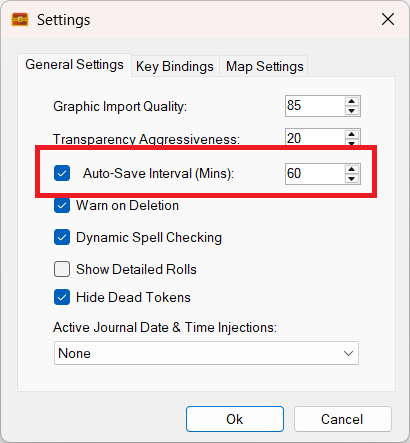
By default, Sojour is set to automatically save every hour, but you can change this, or even disable it if you want to:
The auto-save settings
What makes the new system safer?
Simples, it’s the way it saves the three most important files within Sojour: Sojour.dat, AssetTreeView.dat and AppStatus.dat.
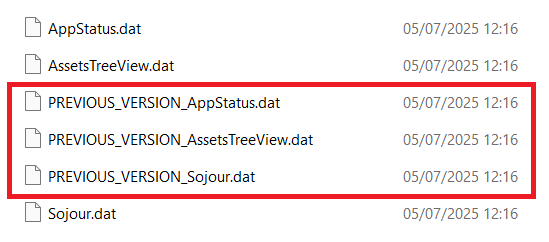
The first thing that Sojour does is to create duplicate versions of the files it is about to save. These duplicates are pre-pended with ‘PREVIOUS_VERSION_’. These can be seen below:
The automatic file backups
The next thing that happens, is that Sojour will then save its data into a temporary file which will be prepended with the words ‘VERIFICATION_TEST_’.
This is a file that the user will never normally see – unless something goes wrong.
Saving to a temporary file rather than directly to the original offers us the opportunity to verify its contents prior to overwriting the original file.
The screenshot below shows a paused Sojour within the debugger so that you can see this temporary file:
The temporary verification file
Sojour then verifies that file’s integrity by loading it in the background. If this verification step succeeds, the verification version of the file is copied over the original file – in this example it would be Sojour.Dat.
This system has several advantages over the old system:
Sojour’s critical files are never overwritten directly until the data has been verified to work. This means that if Sojour crashes or a network drive goes away during a save, this is not an issue. The only file that can be potentially corrupted is the verification one. The files that Sojour actually uses will be intact.
If the final copy from a verification file to an original file fails, that is still not an issue for Sojour. It has already made a backup of that file called ‘PREVIOUS_VERSION’ and Sojour can then automatically opt to use that one in the event that the original file has some how been corrupted (this should be nearly impossible due to item 1 above).
This is a much more ‘enterprise’ level system than the original and one that I could not break, even under some rather arduous conditions.
That’s the new file system mechanism. What else got added?
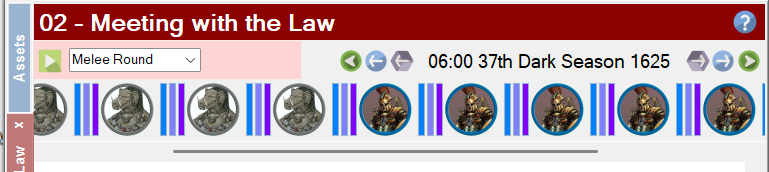
First up is a new NPC bar for the journals:
The enhanced NPC Bar
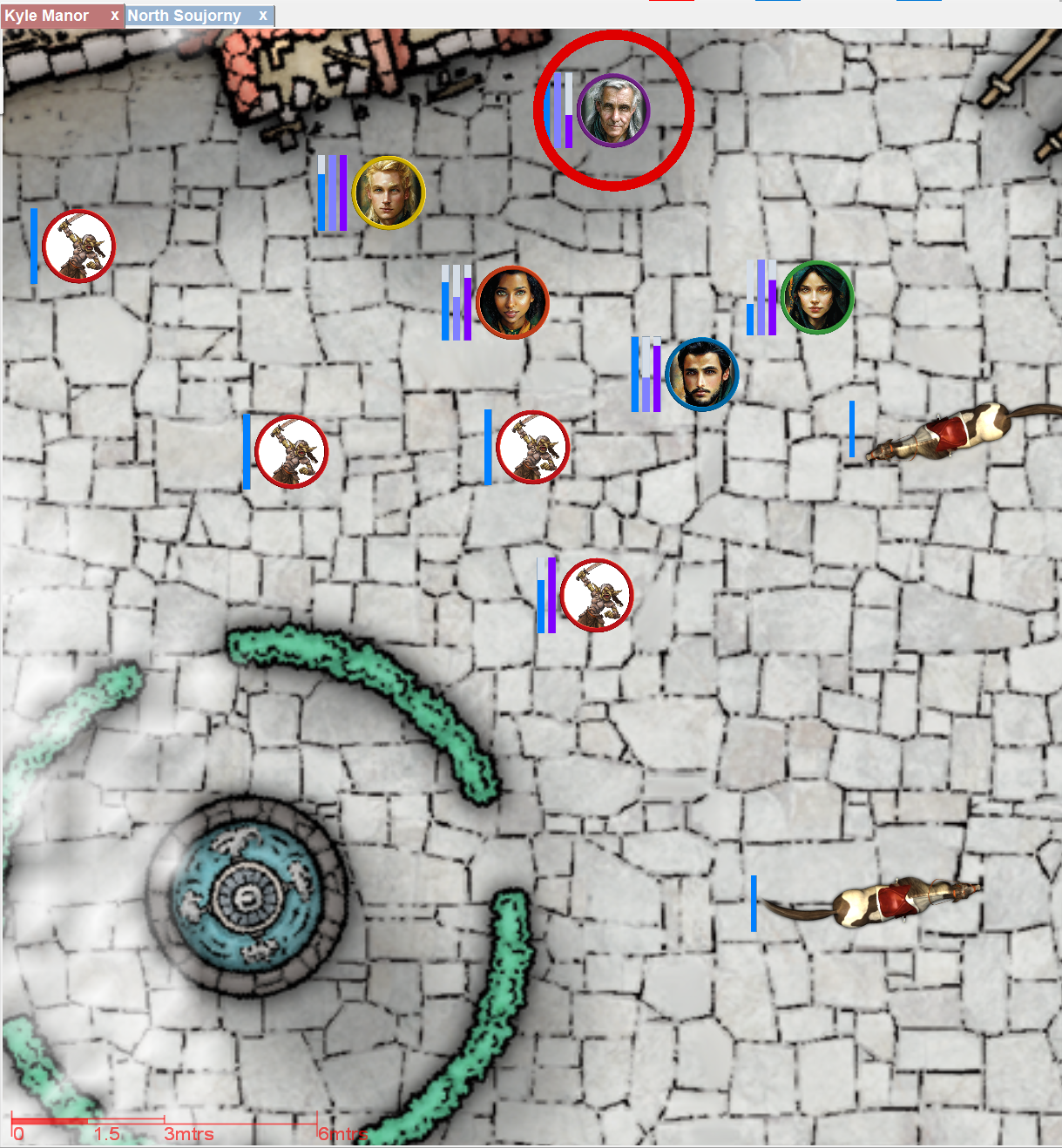
The new bar is much larger than the original and now incorporates a scroll bar that will automatically appear and disappear as needed. This means that you can add as many NPC’s to your map, without the NPC bar cutting them off.
Waving your mouse cursor over an NPC on the map will scroll the NPC bar to bring the relevant NPC into view whereupon it is temporarily highlighted in light blue. The same also happens in reverse too.
This should make it much easier to associate NPC map tokens with their toolbar counterparts and vice-versa.
Another change added to Sojour is a new ‘Dice Roll’ field for lookup tables.
This field allows a user to enter external dice results, rather than have Sojour roll the dice:
The new Dice Roll field
A typical use case for this field is for when the user wants to roll physical dice on one of Sojour’s tables. Simply pick a table, roll your physical dice, then enter your dice result into that field along with modifiers. This will activate the chosen table with he results of your physical dice!
As an aside, the reason for the new UI colours is to enable users to easily associate the tables drop down list with the dice roll field – as one directly affects the other.
Another enhancement added to Sojour’s tables is the ability to insert dice expressions into your table results:
Dice expressions can now be used in table results!
When this table is run a few times you could get results similar to this:
The results of running the table!
Thanks to the dice expressions, we how have a variable number of creatures that can turn up for each table row!
The tables support all four dice expression formats that the journals do (it’s the same code) and you can make those expressions as simple or as complex as you like.
Before we finish with tables and dice expressions, there is one more thing that you can do with them and it is exceptionally powerful!
You can now use dice expressions with table name redirects:
Dice expressions for table redirection!
For the above screenshot, if the system (or user) rolls a 7 on the Encounters table, Sojour will then roll a 1d2 dice (an impossible dice in real life, but one that Sojour can roll). The result of this 1d2 dice determines which Advanced Encounters table the Encounters table will refer to.
For example, if it rolls a ‘1’, it will refer to the ‘Advanced Encounters 1’ table and if it rolls a ‘2’ it will refer to the ‘Advanced Encounters 2’ table.
This is a very powerful mechanism that allows you can go completely nuts and link as many tables together as you want! 🙂
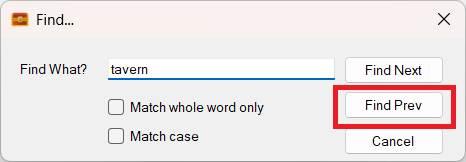
Another new feature that got added is a ‘Find Prev’ button to the Journal Find window:
The new Find Prev button!
This should make finding things in your journals a lot easier!
The new table’s features and the find enhancement were both customer requested enhancements. If you have any ideas, send me an email using the address at the front of the manual and I’ll see what can be done!
Another thing that got upgraded is the image import function.
As noted earlier, the Windows GDI is somewhat flaky, especially with bigger images.
To get around this, Sojour now compresses all images imported into it via file or screenshot.
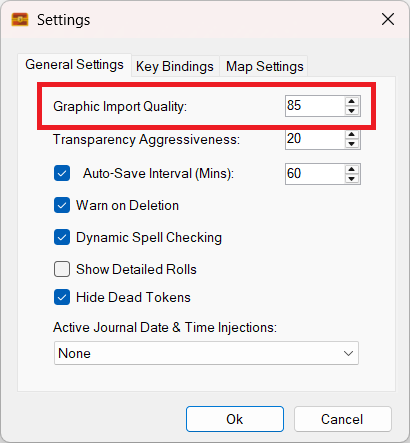
The compression setting can be set using a new setting within the Settings dialog called Graphic Import Quality:
The new Graphic Import Quality setting
Image compression makes a huge difference to memory usage.
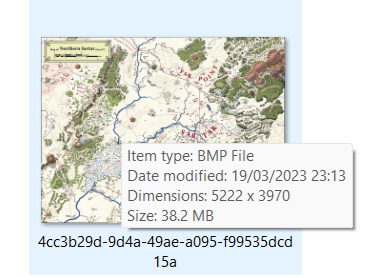
For example, here is a large map imported with the previous version of Sojour:
A map imported with the original version of Sojour. Note its size: 38.2Mb!
38.2Mbs! That is a large image file.
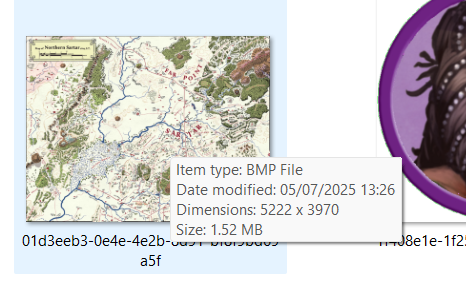
Here is the same file imported with this new version of Sojour:
The same map imported with the new version of Sojour!
Note the difference in size.
The newly imported map is 1.52mb vs the 38.2mb of the original import. That’s quite a saving – around 25 times smaller for no appreciable loss of quality!
This vast reduction in image size should make Sojour a lot more stable when importing large images.
A full list of changes and fixes will be produced nearer the time of release.
I guess the next question is: ‘When can I get this version?’
The answer is in around 1 or 2 weeks time, assuming a fair wind.
The coding is done, but that leaves the large manual and all its screenshots to update – this is why the release is getting delayed. On the plus side, it gives me more time to exercise the new functions.
Also, for those that don’t know, all Sojour enhancements are free for paying customers!
A quick fly-by update to let you good folk know where we are.
Development has been slow, mainly because I’m finding trouble getting the time together. That’s completely my fault, as I have far too many hobbies!
I’m still working on the Mk2 Calendar system but we have progress!
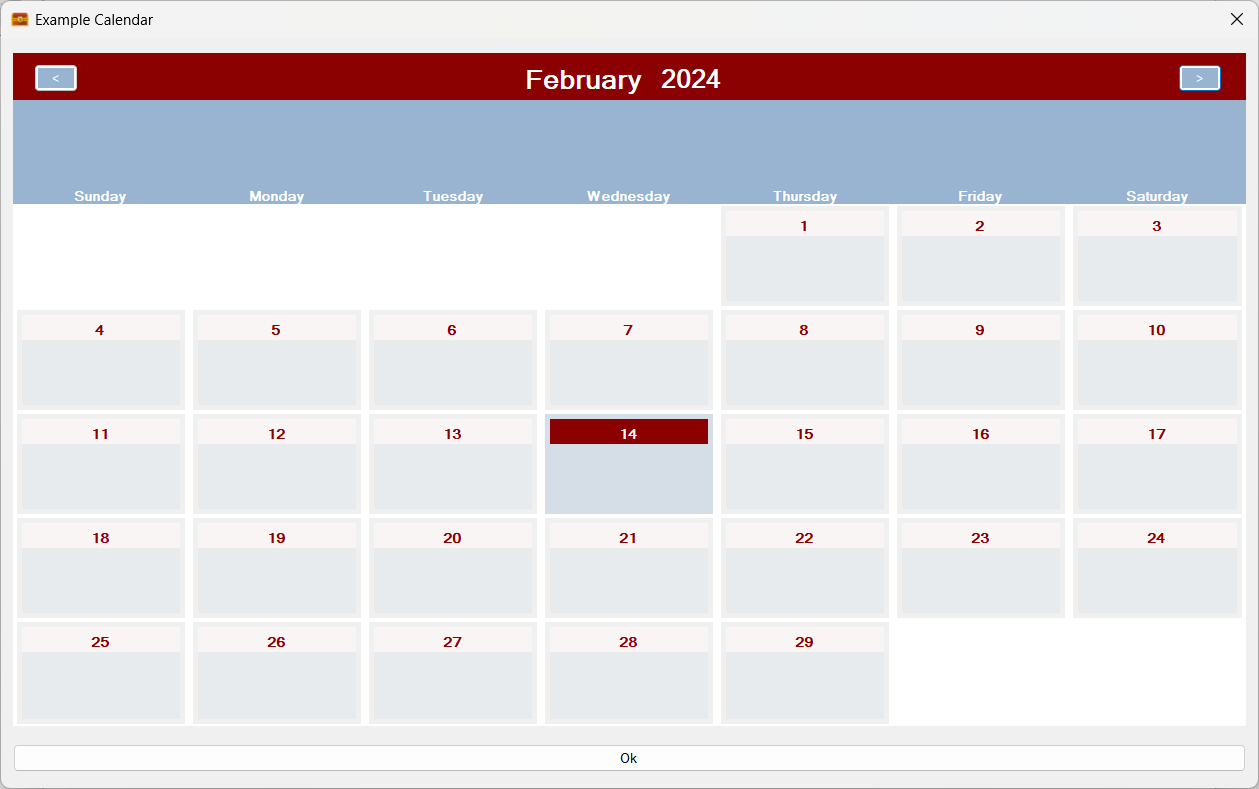
Firstly, we are back where we were – in that the calculation and display systems are now fully operational again:
The calendar is now working again!
In addition, multiple rolling entities can now be added. In the above screenshot we are just using one set of rolling entities called ‘Days of the Week’. But what if we also added phases of the moon?
It’s a little artificial in that I have only included 4 phases, but it’s a great example!
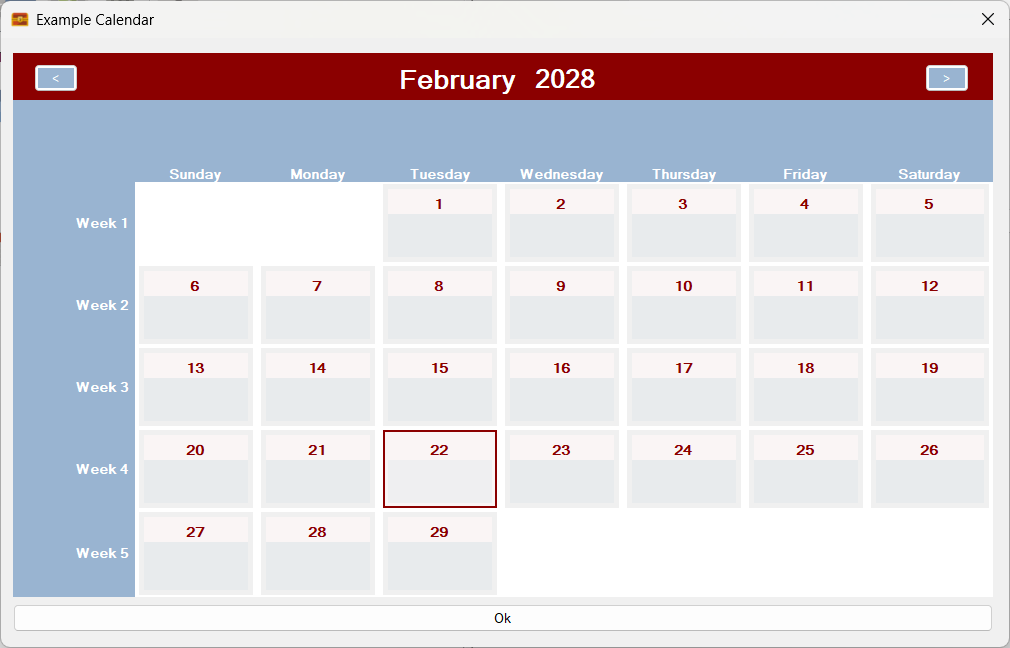
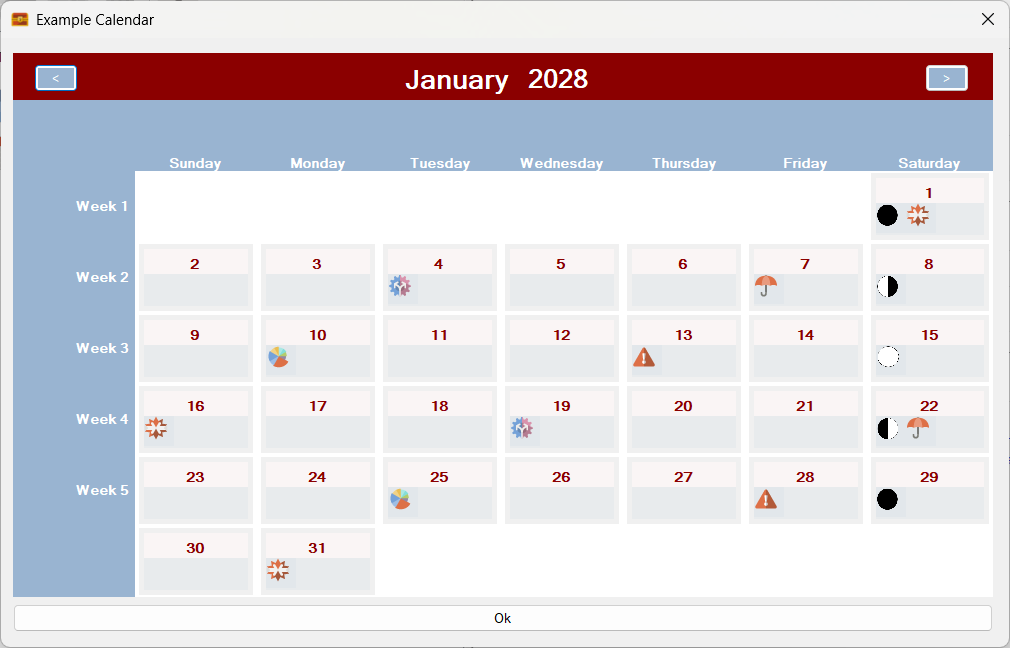
Here is what the calendar looks like with phases of the moon added:
Two sets of rolling entities! Days of the week and phases of the moon!
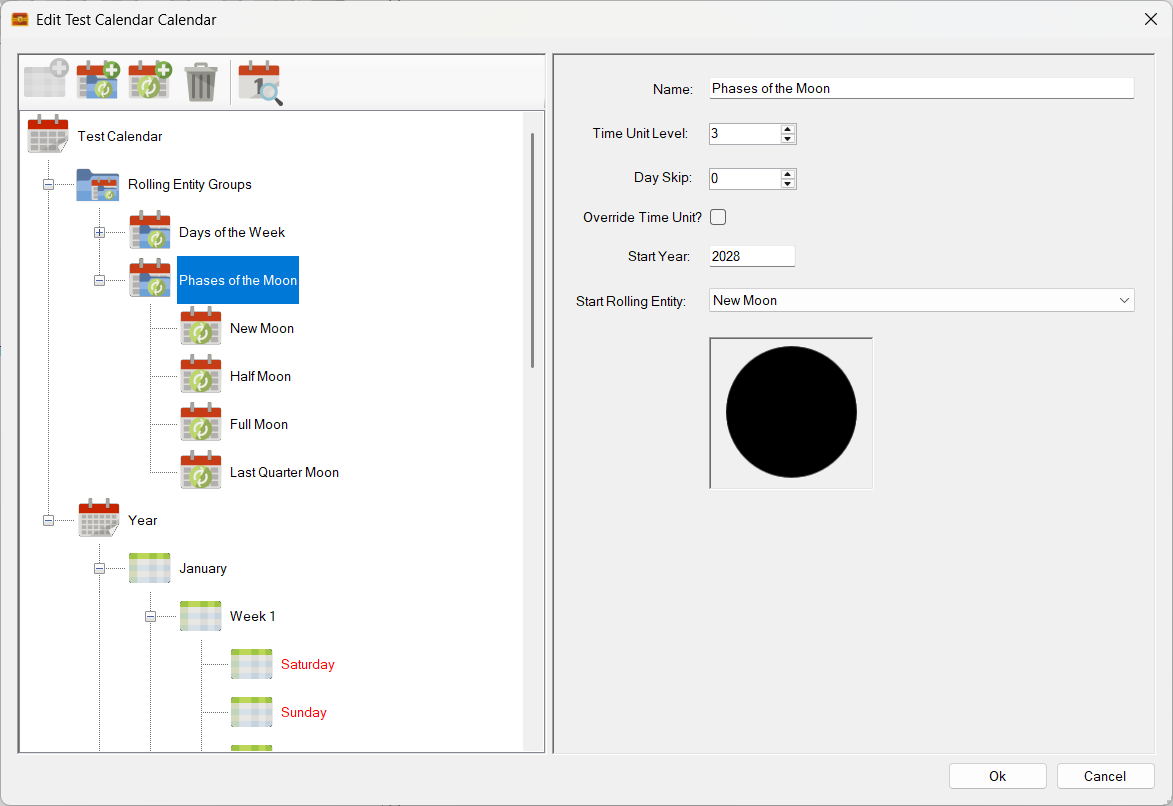
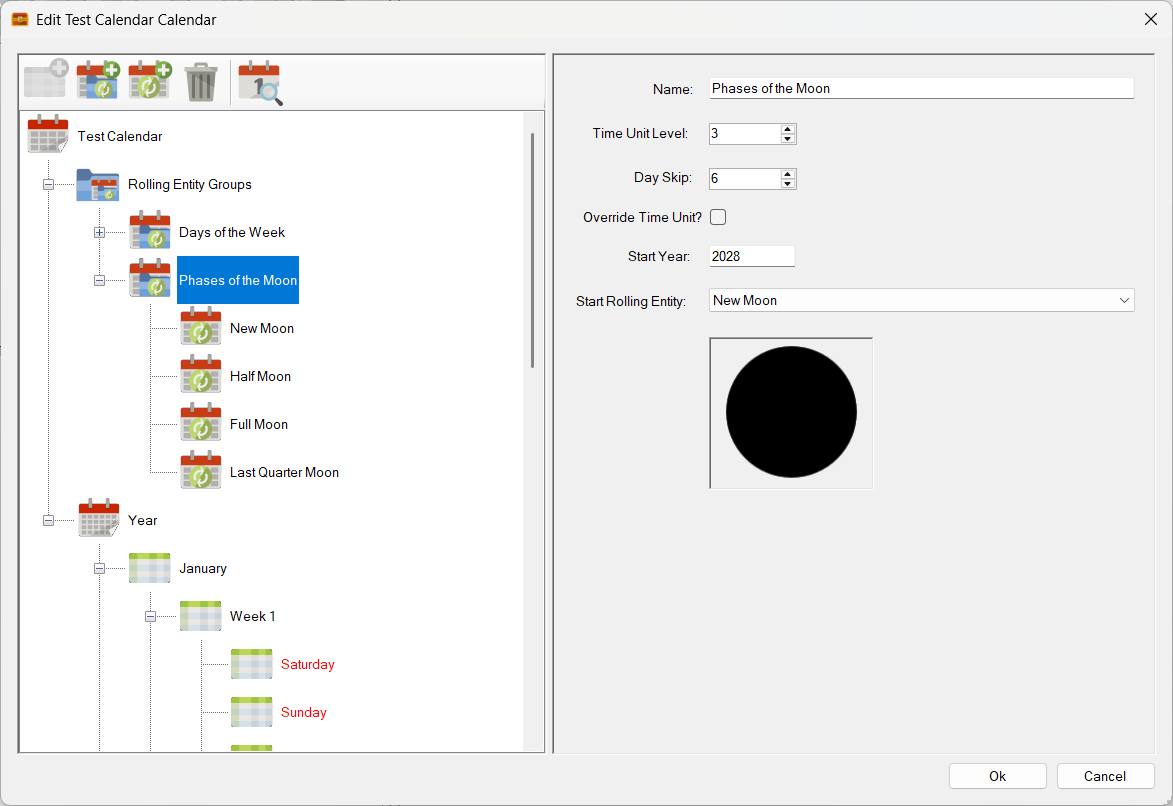
Not entirely realistic. However, rolling entities do support a skip function. Given that these phases tend to happen every 7 days in real life, I have decided to set the ‘Day Skip’ to six. eg there will be six skipped cells before the next rolling entity triggers.
Sets the day skip – 3rd field down – to six!
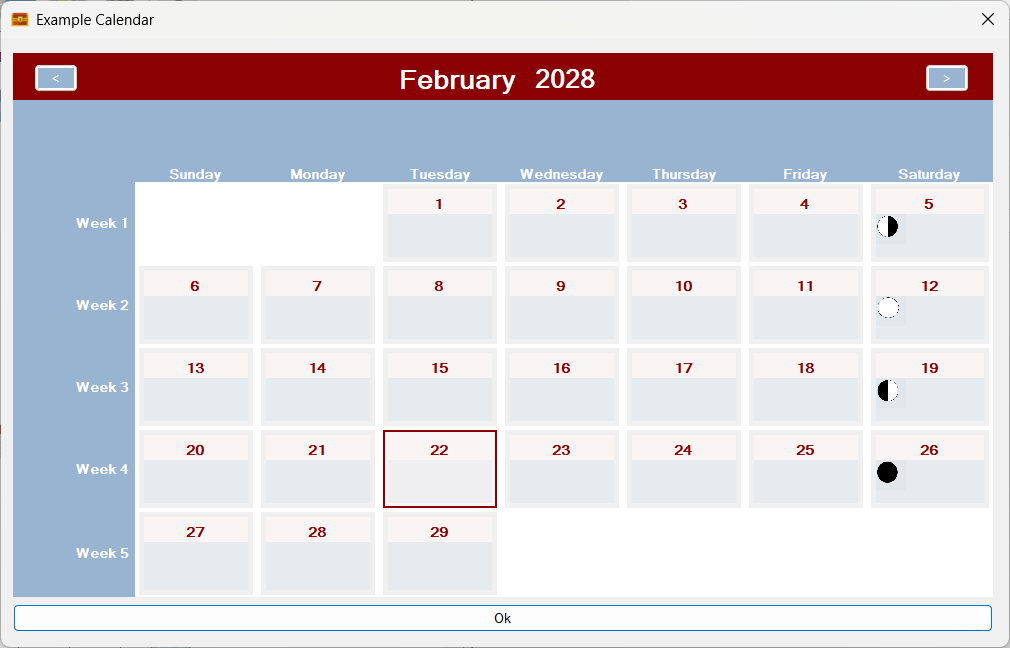
The results?
The phases of the moon rolling entity now skips every six cells!
It is starting to look a little more ‘real’, though I did randomly set the synchronisation point on the previous screen (aka Start Year and Start Rolling Entity), so these moon phases will not be the ones you will see in real life – unless I’m very lucky.
The above functionality will enable people to to add special rolling events in the form of iconography or text to their calendars. This should benefit many RPG calendars. For example the Runequest Gloranthan calendar should show the phases of the Red Moon as that moon directly affects the strength of Lunar magic. This system makes it very easy to add those phases!
Can we go further? Maybe by adding a third rolling entity?
A third set of rolling entities? Why not?
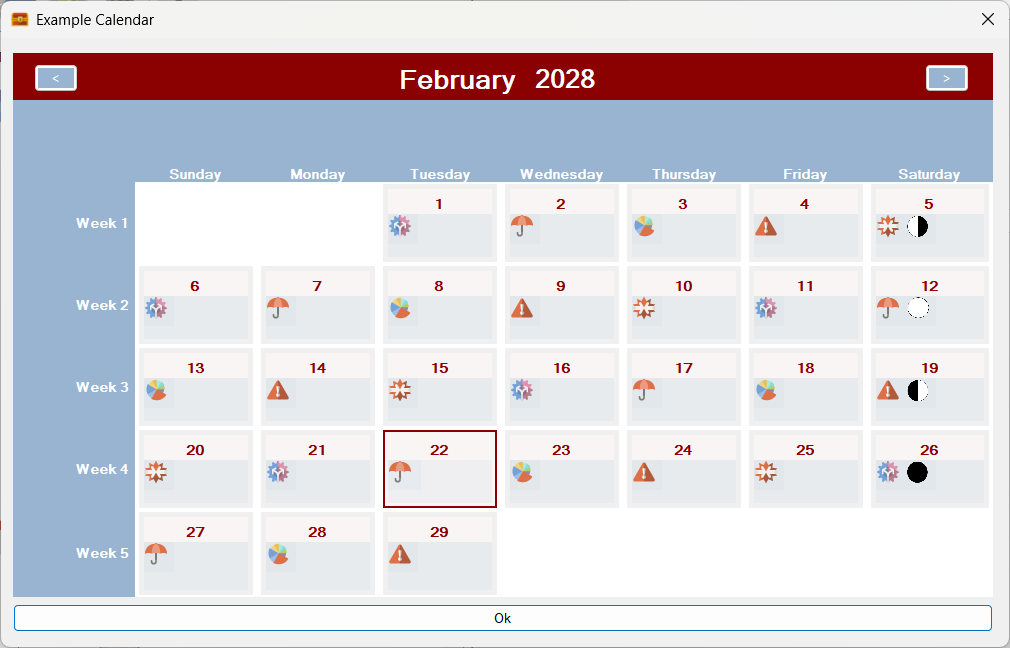
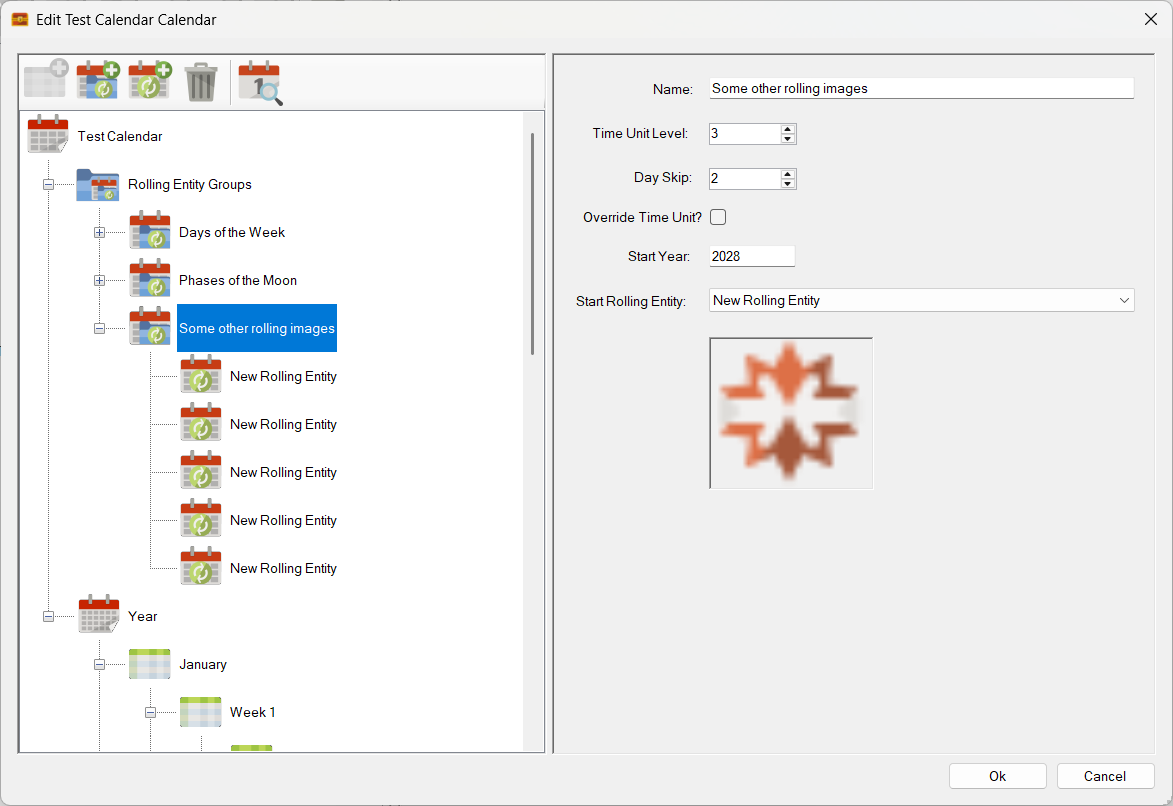
This new set comprises of 5 random pictures in a fixed sequence. Adding the new sequence results in a calendar that looks like this:
Three sets of rolling entities! Days of the week, Moon Phases and another random image sequence!
In addition, I can also apply an independent ‘Day Skip’ to the new rolling entities. In this case I will specify a skip of 2 cells:
Skip set to two fields!
The result?
All working as expected!
As you can see in the above screenshot it all works perfectly!
Plus, as you would expect, these rolling entities roll properly across month boundaries.
Here is a screenshot of the previous month:
The previous month!
Note that the sequences of rolling entities, the days, moon phases and the other images carry over across the month boundary!
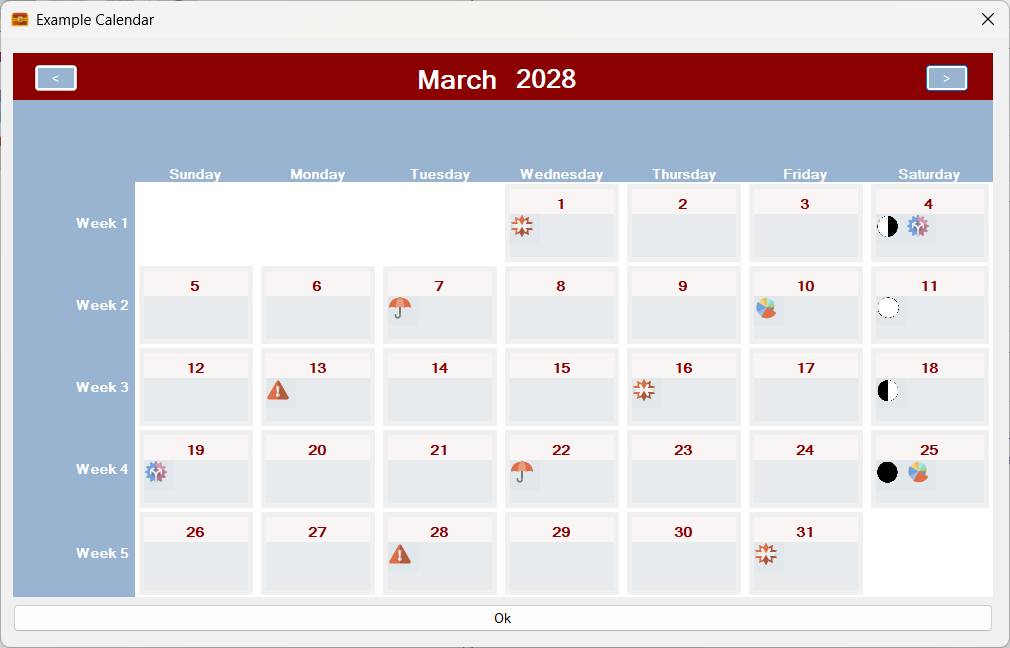
What about going a month forward?
Forward a month!
Going forward a month also results in the three sequences from each rolling entity group carrying on correctly across the month boundary 😎
Plus, remember, that the Gregorian calendar that you see in the above examples is created from first principals using time units and rolling entities – no operating system calendar components are used! Sojour’s calendars also go a lot further forward and a lot further backward in time than the Windows calendar too – see this post for more information.
None of this post probably makes much sense right now, but it will do when I put a video together explaining this new powerful system and how it will help you create any calendar that you can imagine!
A lot of progress with the Mk2 Calendar system, but still a lot more to do.
And for those that don’t know, if you buy Sojour, all updates are free 🙂
Rather than stay in a black hole whilst working on the Calendar Mk2 system, I thought, that instead, I’ll provide some regular updates.
These updates might not necessarily prove useful in of themselves, but at least they’ll let you folk know that I’m still working on things.
In the last post I alluded to the fact that I had refactored the code in the calendar backend without having updated the UI to use that code (Doh!). This resulted in various UI elements simply not working, or in extreme cases crashing!
A bit of a backward step considering we did have a mostly working system!
I’m now at a point where the UI is starting to work again.
Although a hard slog, I think the detour is worth it. The result is that the new code runs faster and because it is better encapsulated, the higher level code in the UI is also a lot simpler!
The hard bit is working out what needs to stay, what needs to go and what needs to be modified. This is quite a difficult task when one considers the complexity of the modelling (it’s complex because it can model any calendar you can imagine!)
Here are some screenshots that show the UI is now back and working… mostly….
Firstly we can now view mark 2 calendars again:
The UI is now showing calendars again – without crashing out!
The above screenshot shows a Gregorian Calendar created with Sojour’s built in tools.
At this point, the structure of a year has been defined, but the Days of the Week rolling entities have not been switched on. The result is a calendar month with the correct number of days but no real context.
Next up, I switch on the Days of the Week rolling entities:
Days of the Week rolling entities activated!
Straight away we can see a number of things have kicked in.
Firstly, days of the week now appear in the calendar and you can see that the relevant time units in the tree-view have been properly overridden by the rolling entities.
The other notable feature is the way the month view has automatically added space elements to allow all of the same days of the week to align in the correct column (the additional blank row at the bottom is an existing bug that will be fixed).
The fact that this is working at all, is somewhat miraculous, given how different the new backend code is.
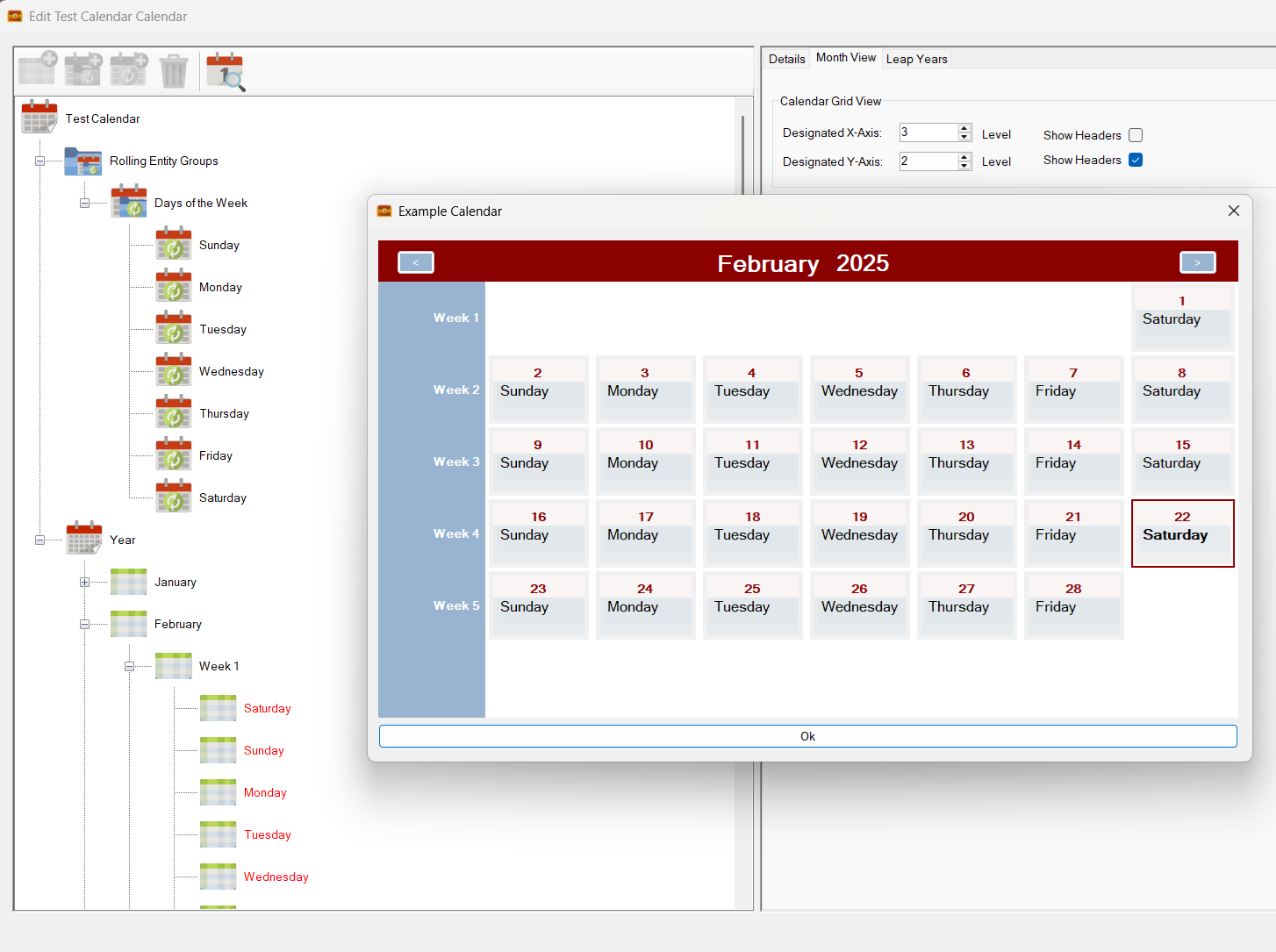
Next up I tried turning off the upper header bar to see what would happen:
Upper header bar turned off!
Right away, the system removes that header bar.
It has also realised that with no column headers, the calendar cells no longer have context – i.e. the day of the week. The system remedies this by automatically adding the day of the week to each calendar cell.
Speaking of calendar cells, these are not the finished product. The cells are currently rudimentary and are designed so that I can check the calendar calculations are working correctly. They will look a lot better and incorporate a lot of new functionality once completed.
Everything seems in order, although the ‘spare-row’ bug is still there.
Finally I turn off Days of the Week to make sure the tree-view reverts back to its original settings:
Days of the week turned back off!
And it does! All good!
There is still a huge amount of work to do as I keep identifying additional use-cases that need to be covered off by the code. The good news is that the newer code is much better segregated, which makes adding new functionality like this a cinch.
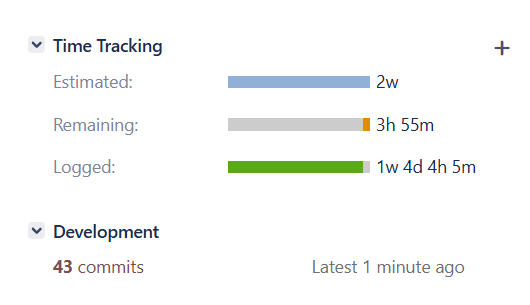
The effort ploughed into this feature, so far:
That’s a lot of commits!
That’s a lot of commits and development time!
Whilst this feature takes me away from Sojour’s more regular updates, I’m a firm believer that it is essential for Sojour’s longevity.
Sojour needs a calendar system that can model rolling calendars, which right now it cannot do. The current version cheats with regard to this feature by having the Gregorian calendar use the Windows Calendar! In contrast the new system does not do this and recreates all calendars from first principals.
This is a small bug fix that one of my customers reported:
RPG-440 Drag and drop in the Assets Tree-View now works when there is no map loaded.
That’s it for the release.
Work is still underway on the Mk2 calendar system, though it turns out I have more work to do than planned.
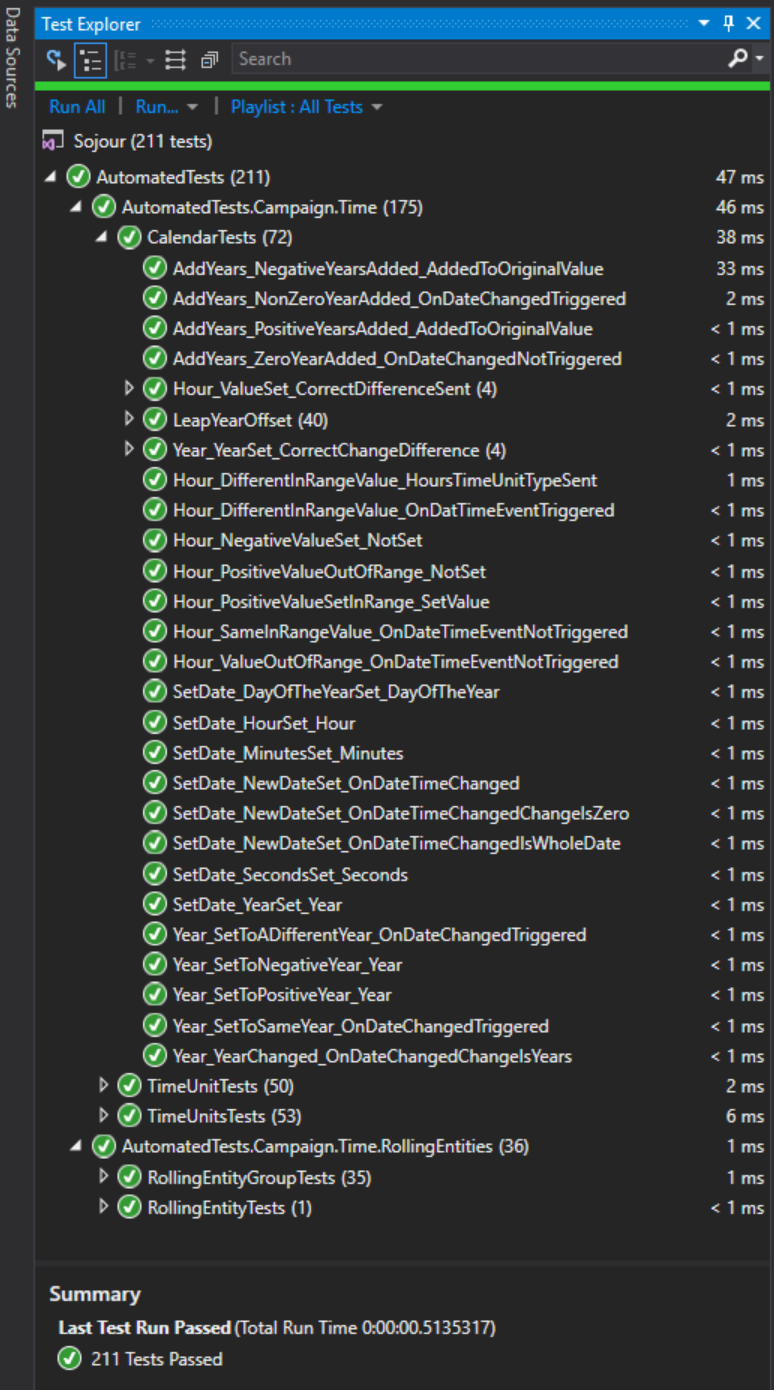
Last year, before I added the custom folders system I had added a whole bunch of integration tests to Sojour to support the MK2 calendar – 211 of them in total!
Integration Tests for the Mk2 Calendar System!
What I hadn’t realised was that whilst writing these tests I had actually performed a large refactoring of the code to ensure that each class was focused on its job, and solely on its job.
Architecturally, it’s a great idea and it will also make the system easier to maintain in the future.
However, these changes were put in without updating the UI layer to use the new updated system(!) – “previous Rob” has a lot to answer for!
This has meant a lot of rework in the UI layer. We are headed in the right direction, it’s just I’m a little further behind schedule than anticipated.
I’m now back in the saddle after some time off over the Christmas period.
I hope that everyone had a great Christmas holiday and is feeling refreshed for 2025!
The first part of this year’s development effort will be focused on completing the work on the calendar Mk2 system for which there have already been a number of posts.
The Mk2 Calendar System!
For those that want the TLDR, the new system supports rolling calendars which means that calendars such as Pathfinder’s become a possibility. It also means that the Western Gregorian calendar can start using the same calendar technology as everything else (it currently uses Windows Operating system components).
Once the work is completed, users should be able to create any calendars that they can imagine – all from within Sojour itself.
I feel that the Mk2 system is important because Sojour is primarily built upon three cornerstones:
Time tracking
A sense of place (aka mapping)
Journaling.
I have always considered the time tracking part to be the weakest subsystem of the three which is why it is being upgraded. There are also plans for the other two, especially the journal, but I don’t want to go into that just yet.
The Mk2 Calendar System is one of those tasks that I know is big and that I’m already quite far into it, but alas, I don’t really know how much farther there is to go. All I know is that there is a tangible sense that I’m over the hump.
This is a release that contains a number of minor enhancements as requested by customers. The intent is to get as many customer requests in before the Christmas Holiday, then switch back to the Calendar Mk2 work which will take a significant amount of my time and thus reduce my public output.
This release contains the following enhancements:
RPG-423 Added a new global setting to allow users to enable or disable automatic token centering. The option can be viewed under Settings->Map Settings:
You can now choose to enable or disable auto-token centering! (Click for larger image)
This setting affects character centering when waving the mouse over a character in the main toolbar, NPC centering when waving the mouse over an NPC in a journal toolbar and also token centering from any running turn sequence.
When disabled, the focused character / NPC will still have a focus ring drawn around them, it’s just that the map will not move to centre them:
When centering is disabled the map will still show the focus ring, but will no longer centre the map on that token.
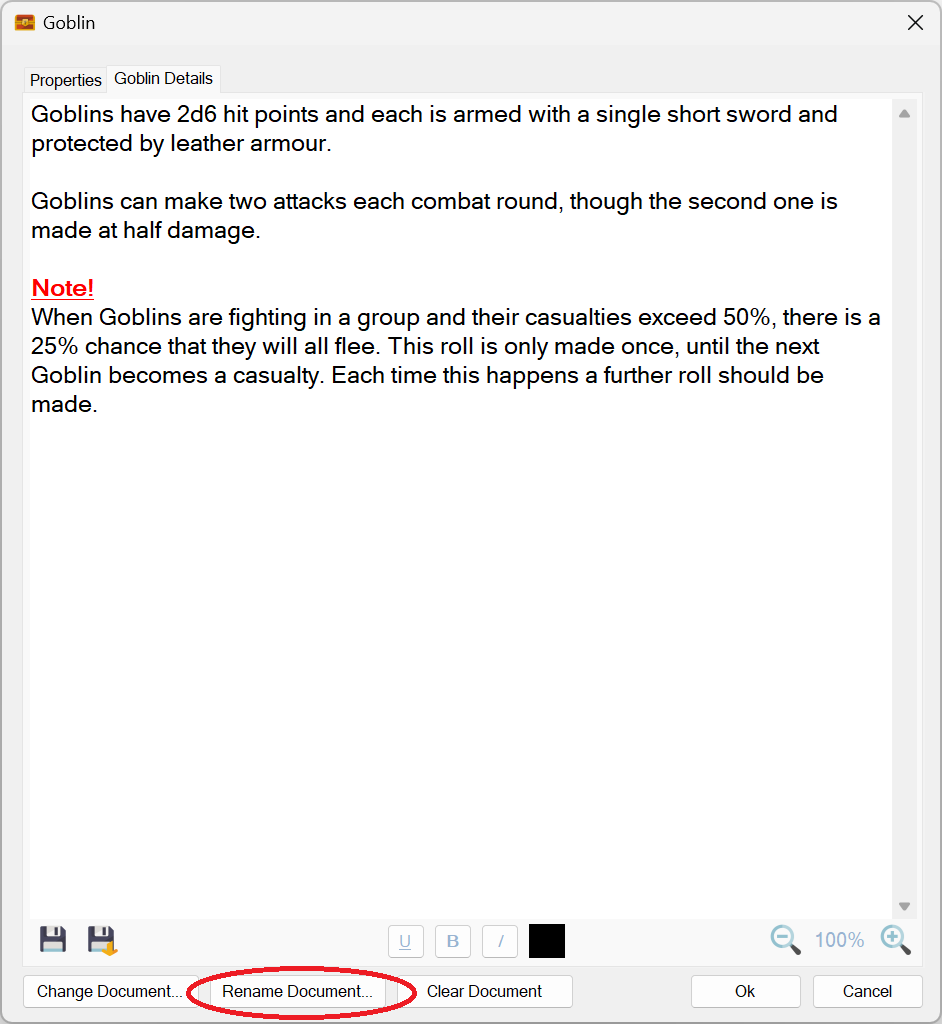
RPG-426 Documents already attached to characters, tokens and campaign assets can now be renamed using a new button:
A new rename document button has been provided!
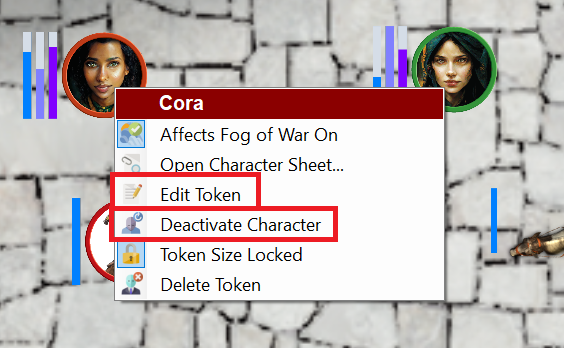
RPG-427 The on-map context menu now has additional context sensitive options that more closely align with other context menus used in Sojour. The new menu options are highlighted in red rectangles:
Two new context sensitive menu options from the map context menu!
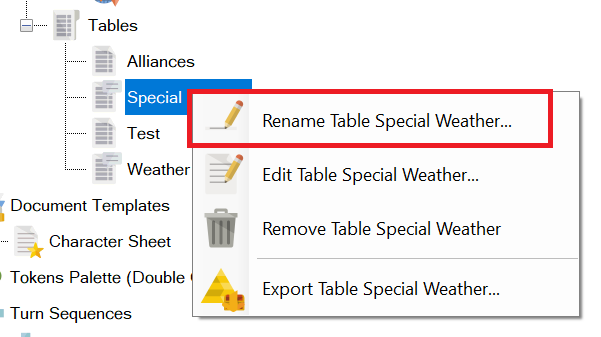
RPG-432 The assets browser’s ‘Rename’ option in the context menu is now consistently shown for all assets. In the past, assets that had an associated editor window would not offer this option – the thinking being that a user would just click ‘Edit’. However, ‘Rename’ is now offered for all assets including those with editors.
The Rename menu option is now available for everything!
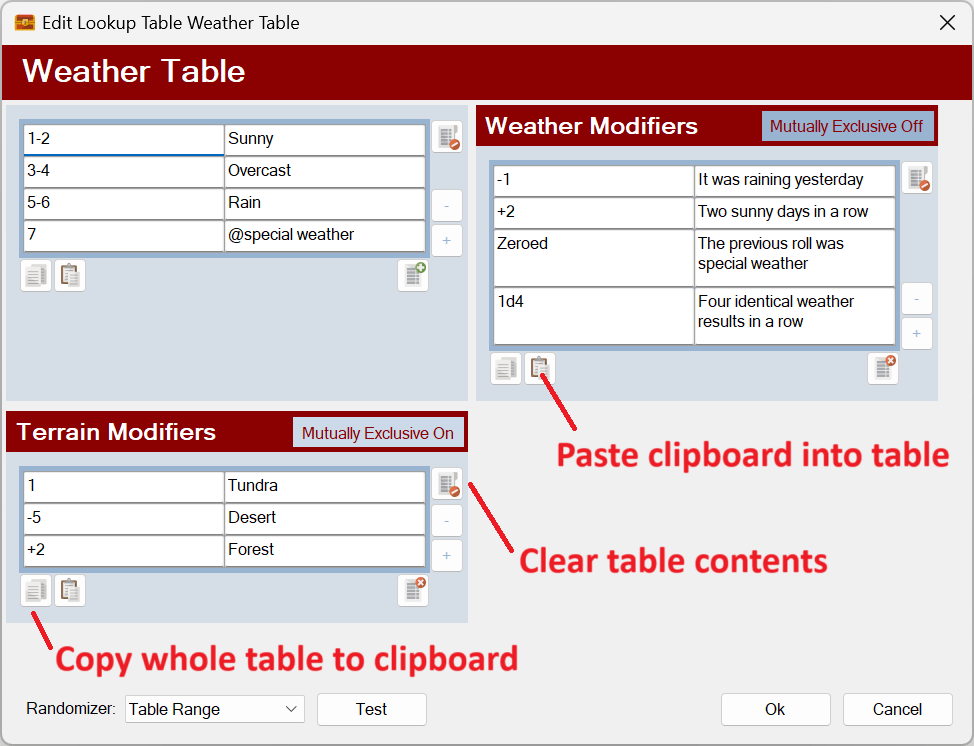
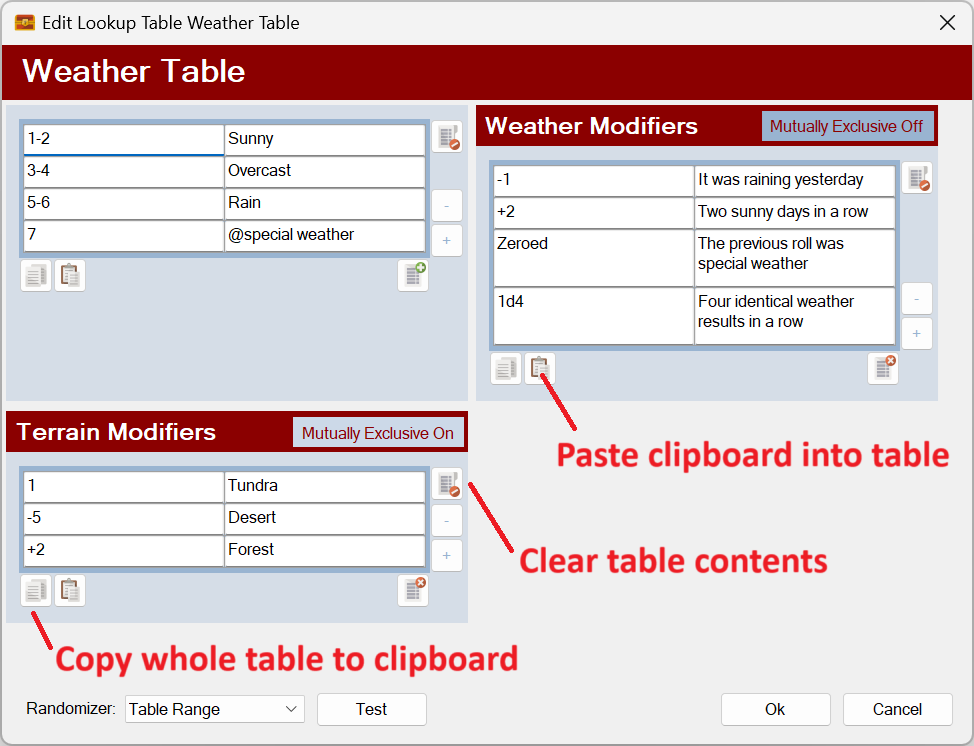
RPG-433 Three new buttons have been added to all Sojour tables that will let you do the following:
Paste data into a Sojour table from the clipboard. Tables will automatically expand their sizes to accommodate any additional pasted rows or columns. Note that modifier and event tables will never expand their column count as these are always two column tables. However, their rows will expand to accommodate new data. Data is pasted in so that the top left of the data is inserted into the currently selected cell.
Copy all data from a Sojour table to clipboard.
Clear a Sojour table.
The new buttons are as follows:
Three new buttons! (Click for larger image)
Note keyboard shortcuts have also been coded to support CTRL-V for paste, CTRL-C for copy whole table.
Users might experience issues pasting tables from PDFs as these are not real tables in a programmatic sense. An easy way to tell is to try and paste those ‘tables’ into a spreadsheet such as Excel and observe the behaviour! (Just mitigating potential bug reports ahead of time!)
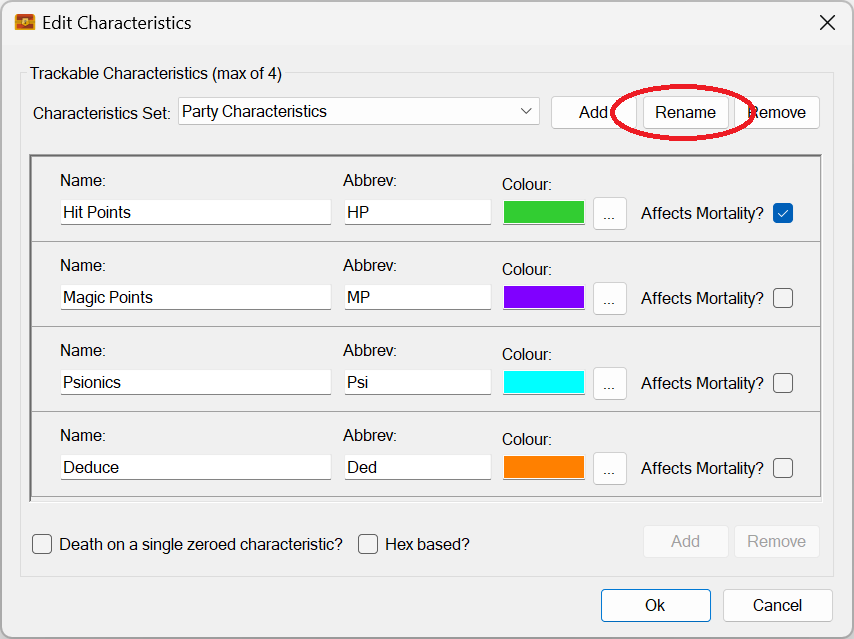
RPG-435 Characteristics sets can now be renamed using a new button:
Characteristic sets can now be renamed!
RPG-436 Tidied up assets browser context menu by ensuring that the correct number of menu separators are shown at all times. The folder rename menu has also been moved to be near the other folder commands and has had a new icon assigned to it:
Neater context menus!
That’s it for this release! If you need further information on the new functionality, please consult the updated PDF manual.
Before I go, I’d like to take this opportunity to thank all the customers that took the time to contact me with these requests!
RPG-421 When dragging campaign assets to the map, Sojour used to register two drag and drop events, this resulted in the drop event being called twice, which in turn resulted in two identical tokens being dropped on the map. This only affected campaign assets that were set as not unique. This has now been fixed. The drag and drop event is now only registered once, resulting in only one token being dropped.
This is the only reported bug after the rather large release on Friday (touch wood). I was expecting a torrent of bug reports and angry customers with pitchforks on the Saturday morning, but luckily for me, that never materialised!
I guess the testing was good after all! 😎
If you folks do find anything else, please do get in touch and I’ll see what I can do!
















 Sojour