This is a fly by update to let folks know that development is still ongoing in the Sojour world despite time pressures.
As per previous posts, the current development focus remains with the Calendar Mk2 system (which I should really give a name!).
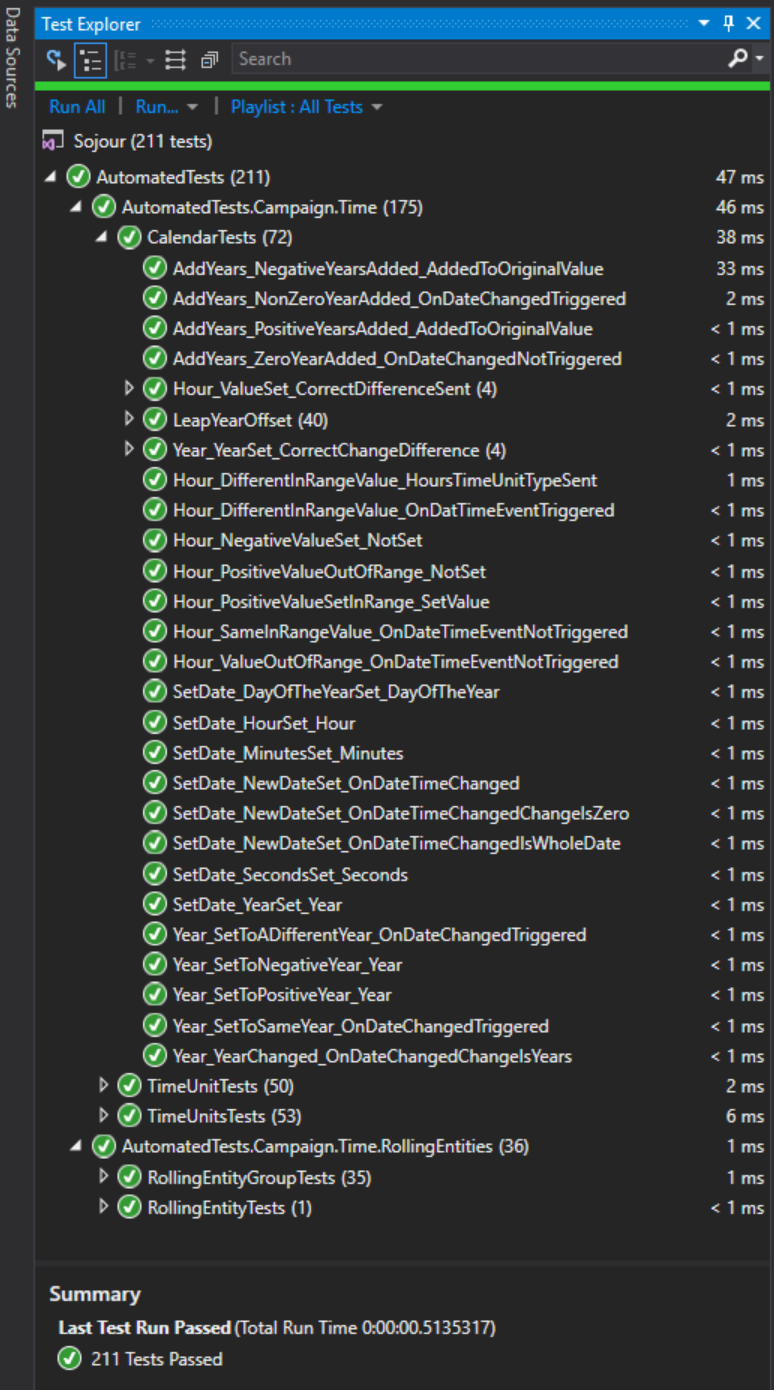
One of the things that I have realised whilst developing this system is that it has many complex algorithms that interact with each other. As a result it can be quite easy to upset them and not know that they have been upset.
In the end I decided that this is an area of Sojour that absolutely needs some automated testing around it.
Automated tests will automatically ensure that the complex algorithms in the Mk2 Calendar are performing as they should. These tests also highlight existing potential issues and pitfalls – many of which have since been fixed after being identified by these tests.
The ever expanding test suite for calendars Mk2 (Click for larger image)
We are now up to 134 integration tests that are automatically run by my development environment every time I merge code:
The build server automatically running the new tests! (Click for larger image)
Writing the tests takes a fair bit of time, including the time required to integrate them with the automated build pipeline – it’s why the build server screenshot above shows a lot of red as I try to get the server to run the tests correctly.
Despite the time cost, these tests enable me to write code faster and more efficiently.
If I do break something it will be flagged on the build server and also in JIRA as shown below, top left (the red rectangles are builds where tests failed):
The builds show up top left in JIRA! (Click for larger image)
If any of the tests do fail, they will provide detailed information as to why they failed that should speed up my job and also help to produce a warm fuzzy feeling that things are working properly and headed in the right direction.
Ok, so that’s what I have been doing on the new calendar system, but, what’s Dorian when it’s not at home?
Dorian is a new graphics engine that I’m working on. It will replace Ionian which is the one currently used by Sojour (and by Ancient Armies).
A very early version of Dorian strutting its stuff!
Why a new graphics engine?
The primary reason is that Ionian is preventing Sojour from being a 64 bit application, which limits the memory it can access. This can lead to limitations with image sizes etc.
Dorian will be fully 64 bit compatible, it will support Direct-X 9, 11 and 12, plus it will allow rendered surfaces to be embedded in WinForms – much like the current Ionian engine.
The above demo shows it running successfully in a 64 bit application in a WinForm – a big milestone for the engine.
There is still a lot of work to do and once the engine is ready, Sojour will need to be updated to be able to work with the new engine. It will be a non-trivial job, but it’s a piece of tech debt that has to be tackled to allow me to take Sojour to the new places it has to go.
Sojour uses Time Units to model any calendar from first principles.
Here are a selection of calendars created using these Time Units (Click the images to see full sized versions – you can do this for all images in this post):
A Gloranthan Calendar
A D&D Calendar
A Third Imperium Calendar
As you can see, the calendar system is pretty flexible!
However, there used to be a limitation with the system. It couldn’t support calendars that roll their days relative to their months. For example in the Western Gregorian calendar, the 1st of February will start on a different day of the week dependent on the year.
Given that Sojour couldn’t model this, it used to cheat and provided the user with the Windows Operating System’s Gregorian Calendar.
But not any more! Sojour can now model rolling calendars too! 😎
I thought the best way to test the new rolling calendars functionality was to build the Western Gregorian Calendar from first principles using only Time Units and Rolling Entities. If I could get Sojour to model this relatively complex calendar, it should be able to model any calendar!
A few months back I had thought I was nearly there. But detailed testing showed that my calendar always seemed to be a day out here or there. Tracking down these issues took a lot of time. But they are now all fixed!
One problem (of many) were the leap years. I had thought they were simple.
Every four years is a leap year, right?
Wrong.
Turns out there are additional rules…
If the year is divisible by 100, then it must also be divisible by 400 to qualify! So 1700 and 1800 would not be leap years, but 1600 would be.
To allow the modelling of this and other rules, I added the concept of leap year rules, which consist of a triggering condition and any number of rules associated with that trigger:
We now have leap year rules!
For the moment the system only supports divisor triggers and rules, but it is designed to support any mathematical expression should the need arise.
To model the Gregorian calendar Sojour only needed one trigger and one rule. The trigger is activated when a year is divisible by 100. Once triggered, its associated rule – the year must be divisible by 400 – is then invoked.
I suspect that most gamers will not use this functionality as RPG calendars tend to be relatively simple affairs . However, these rules are incorporated to allow the user to be able to create complex calendars such as the Gregorian one.
Why bother trying to model rolling calendars?
Rolling calendars, or in Sojour’s parlance Rolling Entities, allow for a lot more flexibility and will allow users to create their own custom rolling calendars such as the Golarian one used in the Pathfinder RPG. Without this ability, such calendars would be impossible to create.
How are the rolling days of a month created and modelled in Sojour for the Gregorian calendar?
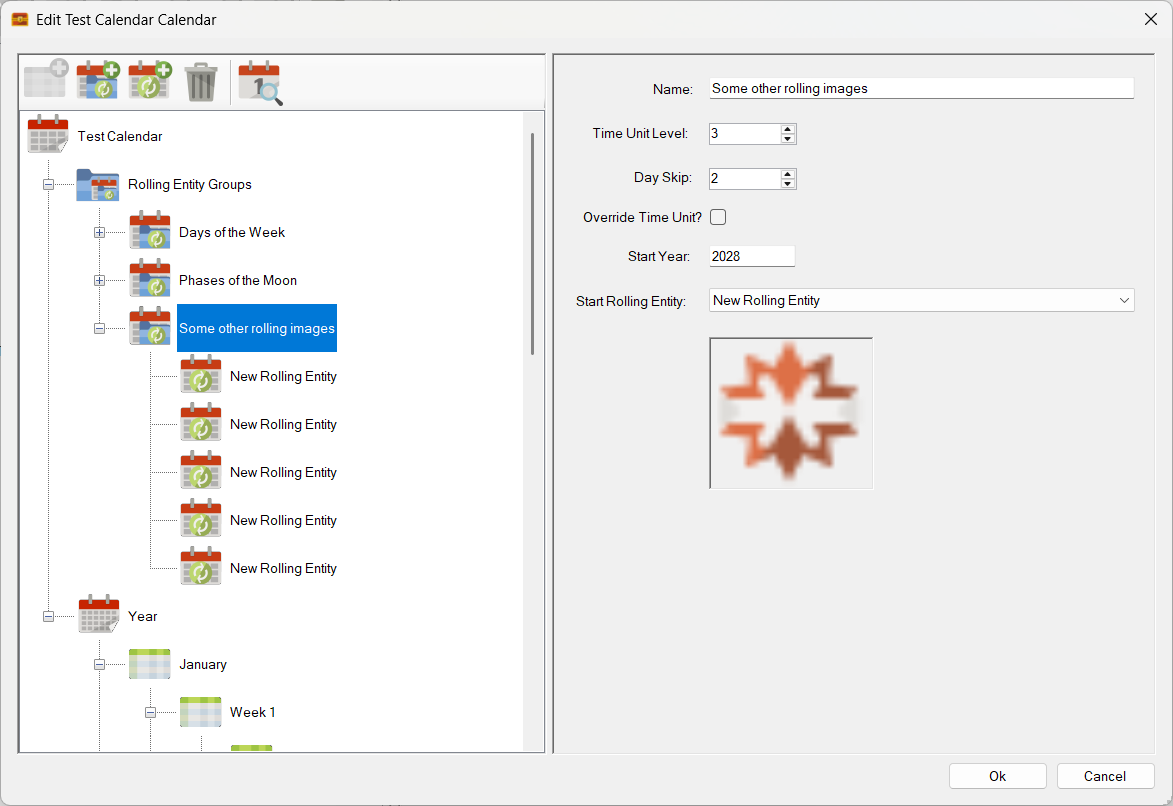
You need to create a Rolling Entity Group, call it days of the week, add the seven days and then associate that Rolling Entity Group with a Time Unit level:
Rolling Entities in Action!
The screenshot above shows our days of the week Rolling Entity Group. We have also ticked the ‘Override Time Unit?’ option so that these Rolling Entities replace the names of their target Time Units.
If you examine the screen shot closely, you can also see that these Rolling Entities target the third level of Time Units, which in this calendar’s case equate to days (as seen in the tree view on the left).
The ‘Start Year’ and ‘Start Rolling Entity’ fields are simply used to determine how the Rolling Entity Group is synchronised with the main calendar. In this case we are saying that for the start of the year 2024, its first day of the week will be a Monday. Sojour will then automatically calculate all the other days of the week!
Rolling Entity Groups and Rolling Entities are extremely powerful. They aren’t just limited to modelling days of the week. A calendar could have as many of these as required and each of them could be applied in a myriad of different ways.
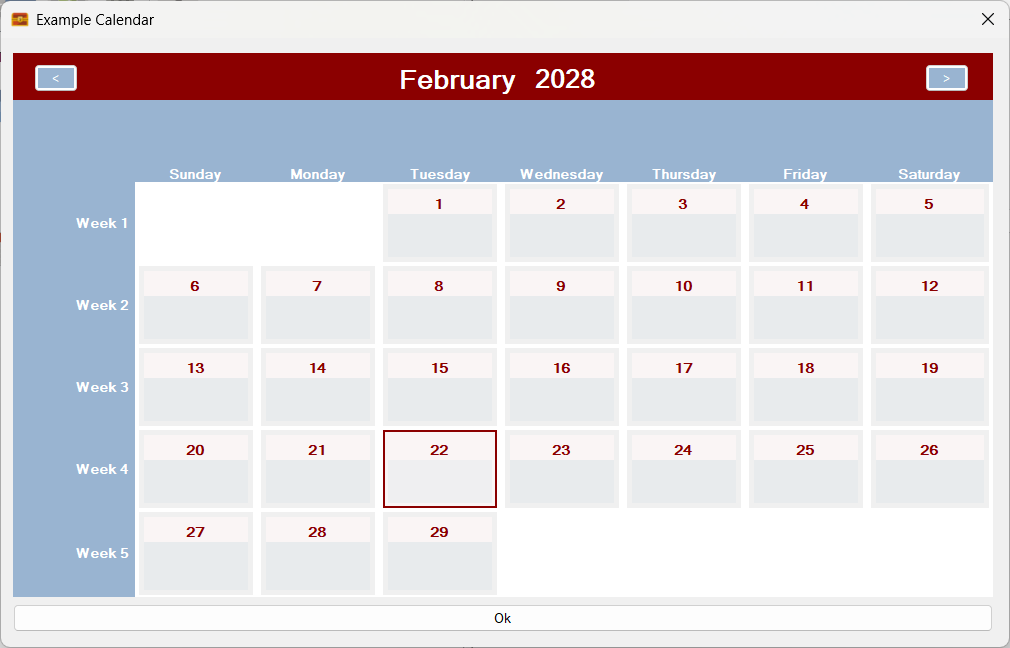
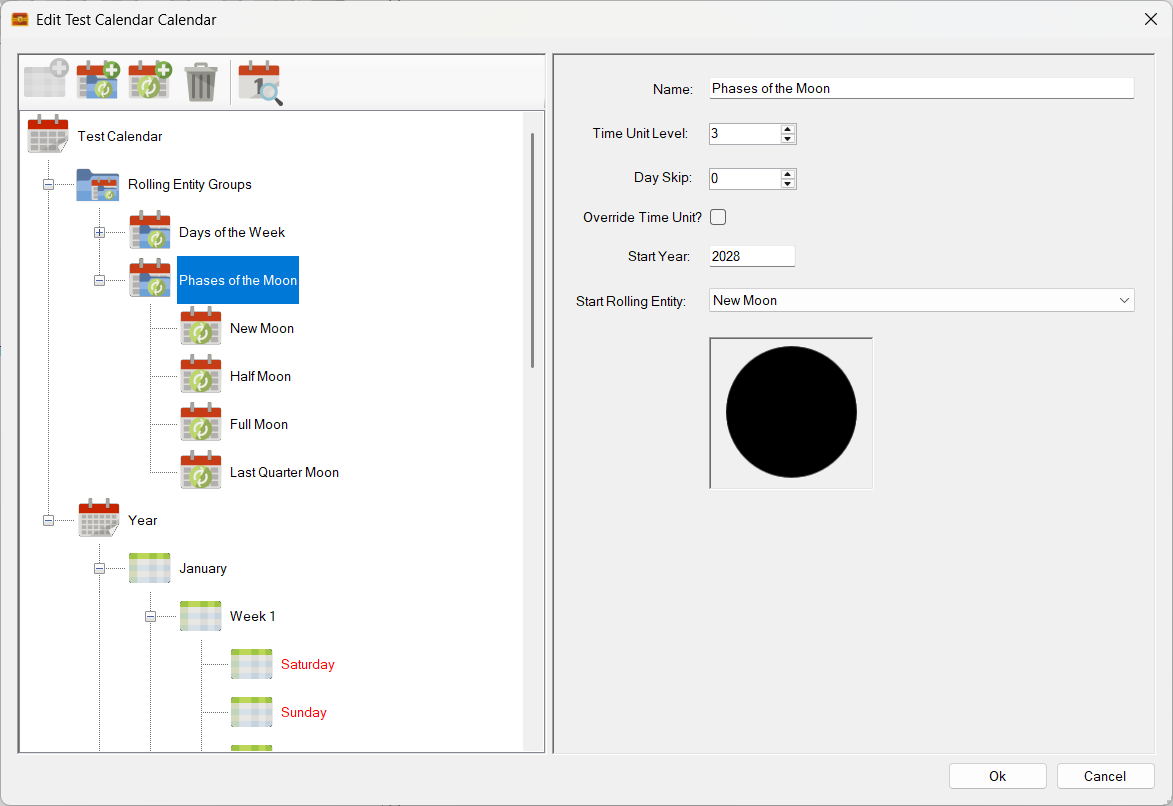
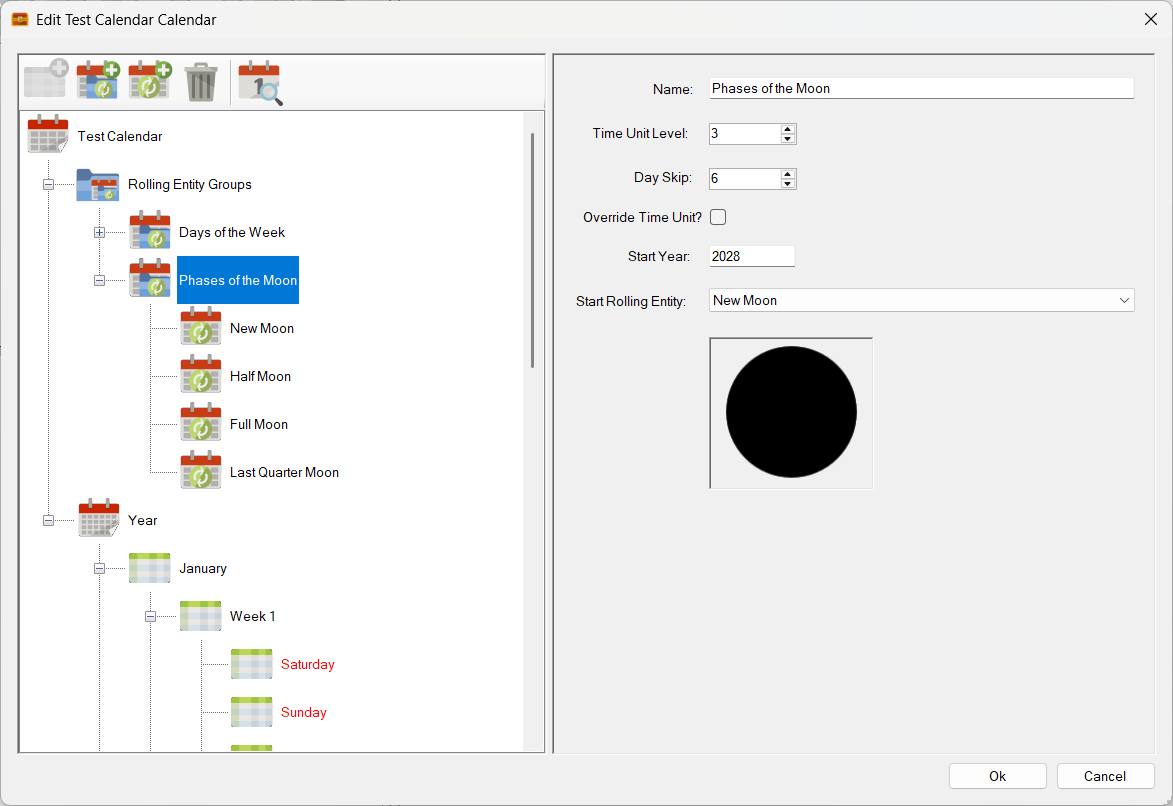
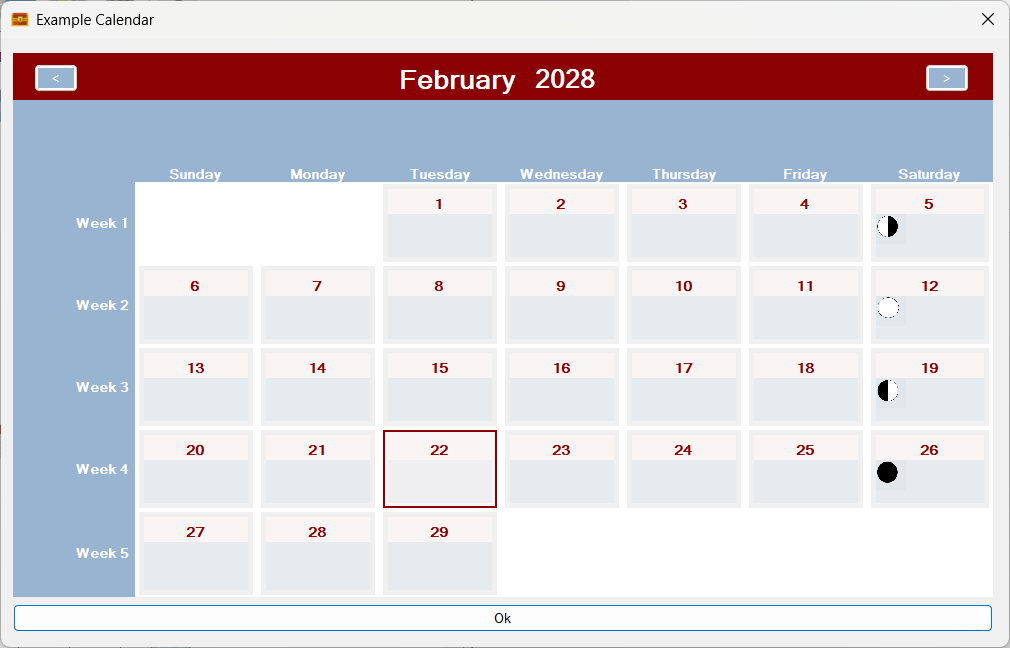
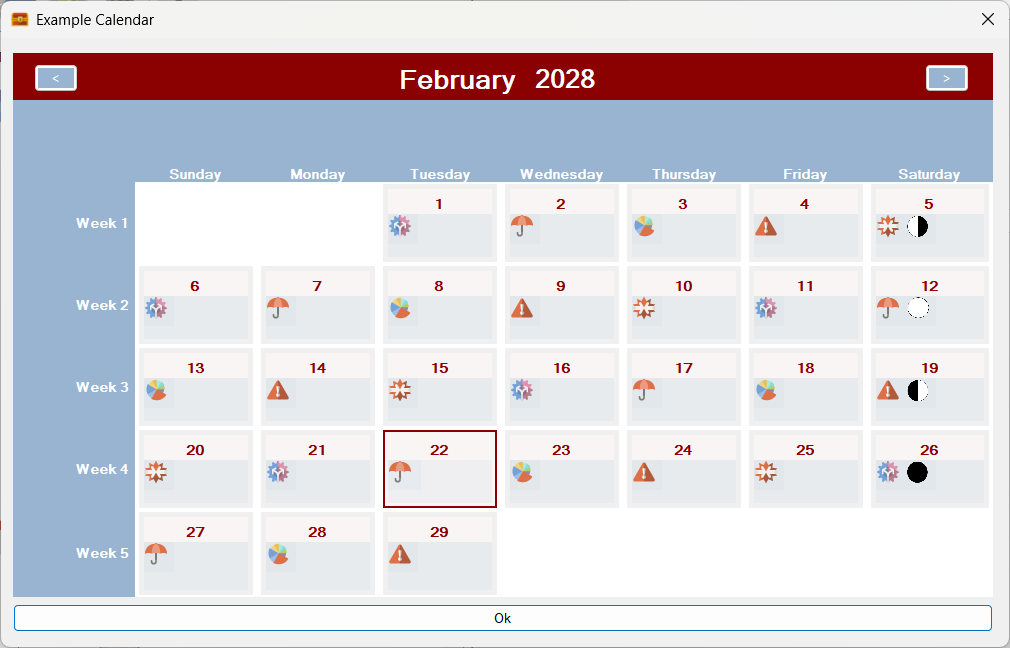
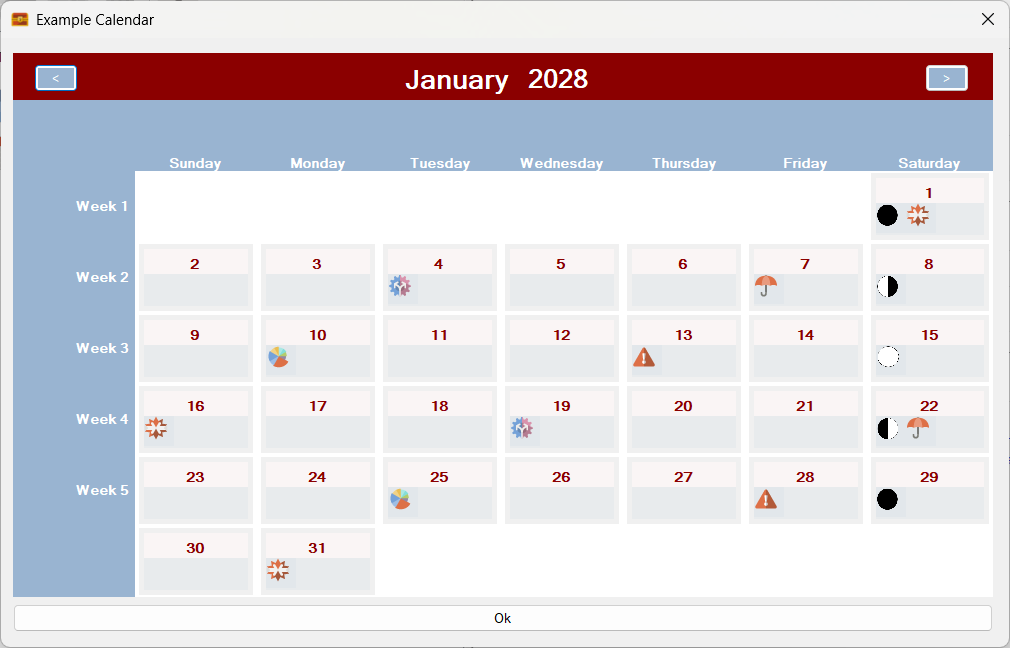
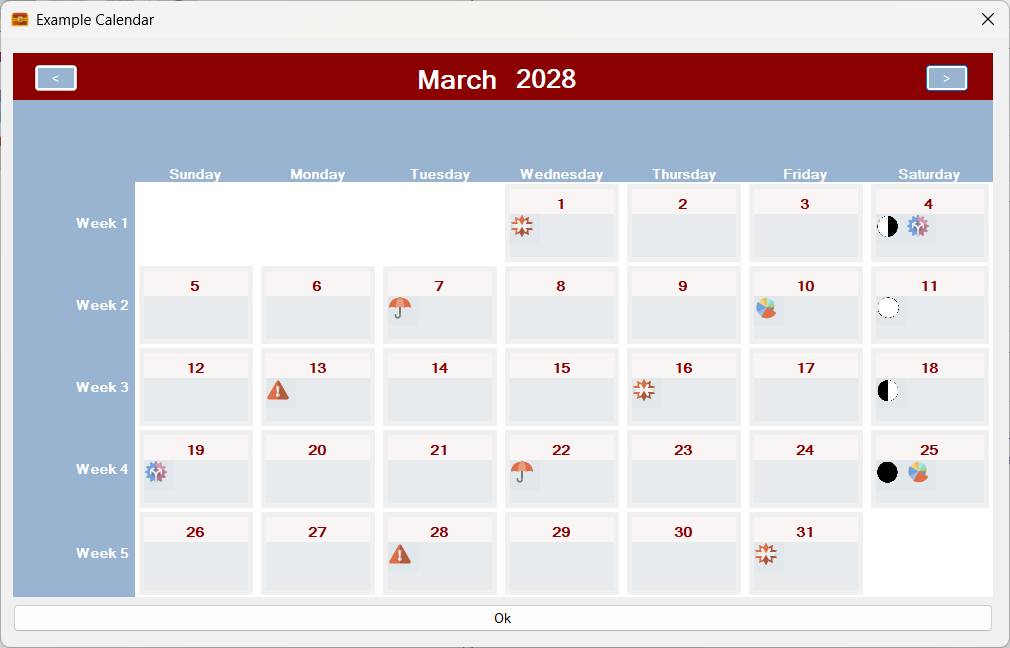
For example, in the Gregorian Calendar, we could add an additional Rolling Entity Group to model the phases of the moon. These moon phases would then show up on the relevant days!
For the rest of this post I will show you Sojour’s Gregorian calendar from first principles using Time Units and Rolling Entities, along with proof that Sojour’s calculations are correct!
First up, an easy one, today’s date:
So far so good…
Lets try the earliest year that Windows 11 allows its calendar to go – 1924:
Still good!
What about a long way in the future? Say the Year 4765?
Alas, the Windows 11 calendar won’t go that far in the future, so we will have to check our calendar against what the Internet says:
Sojour is still delivering the goods!
What about the crazy leap year rules? Will Sojour show 1600 as a leap year, but 1700 and 1800 as non leap years?
Leap Year
Non-Leap Year
Non-Leap Year
Yes. Yes it does!
As an aside, any Time Unit or group of Time Units can be leap year enabled to allow you to create some truly unique leap years for your calendars. These are already used to great effect in the D&D calendar.
Those leap year screen shots look impressive, but how do I know that the actual days of the week shown are correct? Let’s pick 1700 at random. Here is what the internet says:
All good here too!
How about a crazy early year? Say the year 15 AD?
Sojour is still rocking!
Can we go earlier? Oh yes! But alas I haven’t found an online resource to verify the days of the week for such early dates. However, I am satisfied that the internal mathematics are calculating the days of the week accurately.
Here is 426bc:
As noted above, there is no reliable way to confirm that the calculations for this date are correct, but given that Sojour is using the same calculations as used in the previous date examples, I have no reason to doubt its accuracy.
This post might not seem impressive until you consider that this Gregorian calendar is not using any operating system components for its calculations. Instead, it is using Sojour’s Time Units and Rolling Entities from first principles.
These Time Units and Rolling Entities can be used to create any calendar that you can imagine. I’m pretty certain that there is nothing like this in the software market right now and I’m only just getting started!
Why the blog post?
Firstly I wanted to show you folks that I’m still hard at work!
Secondly, I wanted to celebrate getting over the big development hump – the hard bit – the actual calculations themselves. Everything else should theoretically be a lot simpler to implement (famous last words!).
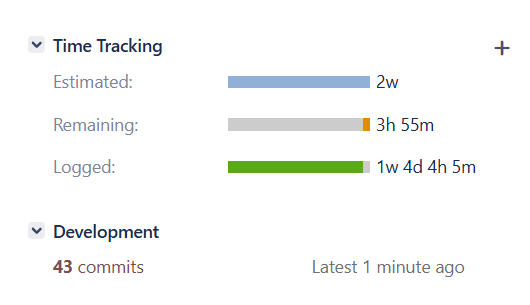
In terms of the development effort so far, I’m up to 25 code commits and 69 hours and 35 minutes of coding and testing!
Quite a lot of time has been sunk into this. But I think it will be worthwhile as it will provide Sojour with a world class leading calendar model.
There is still a long way to go as there is a lot more that I want to add to version two of the calendars system.
As with all other enhancements, this calendars update will be free of charge for all existing Sojour customers!
Sojour has had a good year in 2023 with numerous enhancements added and many bugs squashed. (As an aside, all updates and enhancements are offered free of charge to all existing customers!)
Despite many new features being added, there is still a huge list of enhancements that I want to incorporate!
For those new to Sojour, the key take away from this retrospective is that nothing stands still! Sojour will continue to improve based on customer feedback and my own designs.
Here is a list of some of the major achievements and enhancements that Sojour attained in 2023:
Sojour got released!
This was a huge milestone. It’s one thing to code Sojour for personal use, but quite another to make it ready for commercial use. Over 200 hours of testing and refinement got pumped into Sojour to ensure that it would work under a much expanded use-case regime.
In addition, a manual had to be created – and subsequently re-written to avoid copyright issues – which itself took several weeks of effort. This illustrated manual currently stands at 166 pages!
At that time, everything I did was focused on getting Sojour released and I had naively assumed that once released the journey would be over and I could then re-focus work on my other project Ancient Armies. (Sojour borrowed a lot of technology from Ancient Armies)
But as it turned out, the release marked the start of a whole new journey – one that I hope many of you will join me on! If you are interested, Sojour can be bought at DriveThruRPG for a one off payment of $10USD with no DRM or servers needed.
Map Scale Assistant added!
The map registration system got a complete overhaul. It was replaced by a new wizard called the map scale assistant that allows one to directly scale their maps using the actual maps rather than a separate window.
The original blog post covering this new map scaling assistant can be read here. Please note this is an earlier version of the assistant and things have progressed!
Custom Health Bars added!
These are known as trackable characteristics and are extremely flexible. The user can create up to four health bars for each token and these can be defined in characteristic sets. This allows one to have multiple health-bar configurations in one ruleset!
The intent is to allow for more health bars in the future. The core technology already supports this. The hold up is figuring out how to make a large number of health bars a practical proposition in the user interface.
This video demonstrates an earlier version of trackable characteristics:
3D Map Tilting added!
Sojour uses a custom graphics engine called Ionian. This engine was originally written for Ancient Armies and one of its hidden secrets is that it is really a 3d engine!
I decided to take advantage of this by offering map tilting which makes many maps really shine.
In addition, there is built in functionality to allow the user to accurately align the tilt of a map so that it is in the same plane as a 2d isometric drawing – this results in an uncanny 3d effect!
Here is a video that goes through map tilting:
Fog of War added!
This was a huge piece of new functionality. It enables the user to add fog of war to any map!
The backend code is super configurable. However, only a small proportion of its functionality has been surfaced to the user interface – so expect more enhancements in the future!
There are two videos covering fog of war.
The first is for the original iteration:
Whilst the shorter follow-on video describes some enhancements made to the fog of war system as a direct result of user feedback:
File System Manager added!
This was a major piece of work that provides users with a number of useful functions for dealing with their data. These functions also include the ability to backup and restore games.
A video covering its extensive features can be viewed here:
Tutorial Videos added!
These might seem unimportant, but many users rely on these to gain an understanding on how to use Sojour and how to solo scenarios designed for multiplayer games.
Producing videos takes a lot of effort, but I think the results are worthwhile!
All the tutorial videos can be found in this You-Tube playlist. The playlist is incomplete. There are many more planned videos to come!
In addition to the Sojour tutorials, I also released a handy video describing how to solo multi-player RPGs!
Well over 300 sales!
It would be fair to say that Sojour has sold a lot more copies than I envisioned.
The reason for my low expectations is that I have done no real advertising. I was kind of hoping to make it ‘feature complete’ before really pushing it out there.
This low profile combined with the fact that the product is in a niche of a niche (a solo VTT, in a VTT market), meant that my original sales expectations were generally a lot lower.
In fact, truth be told, Sojour was never really meant to go on sale!
I originally wrote it to satisfy my own personal needs for a VTT. I had tried many of the popular ones out there and each one of them was great for multi-player gaming (their design intent), but not so good for solo play.
As Sojour developed, and I started using it, I got an inkling that many others might have a need for a solo VTT too. That’s when I decided to commercialise it.
I’d like to thank everyone that took the plunge and bought Sojour!
Not forgetting the minor enhancements!
A huge number of enhancements got added to Sojour. Here is an incomplete list of some of them:
Static Campaign Assets. The user can now create tokens that are part of the map – for example discovered caves.
Ability to create on-map custom names for multi-instanced tokens or campaign assets. For example, you could drag 4 goblins to the map and then set about giving them custom names to add more character to them.
Sojour’s default automatic token scaling can now be altered by the user on a per-map basis.
Improved map context menu. It now looks better and is much more context sensitive based on what’s been clicked.
Dead tokens can now be optionally hidden – or not….
Tokens can now be double clicked to view their associated documents.
Sojour’s installer got many improvements, including the ability to directly upgrade an existing installation in-place without needing to manually uninstall it first.
Various improvements to the journal, including the conversation system (now more flexible) and enhanced dice rollers (in fact the original version of Sojour had no dice rollers at all!)
The Failures….
No one likes to talk about failures, but every software project has its share of failures. They are an intrinsic part of the natural evolution of the software. If one doesn’t take the risks, then the software can never hope to improve in any meaningful way.
Sojour suffered from two setbacks in 2023, both of which cost a lot of development effort and ultimately lead nowhere:
Dark Mode
An attempt was made to give Sojour a dark mode. Alas, this ill fated attempt failed because the technology underpinning Sojour doesn’t really support it.
The aim is to re-write Sojour at some point in the future using a more modern technology stack, but this will only occur once the current feature pipeline reduces somewhat.
A re-write would require considerable effort and take me away from general Sojour enhancements and bug fixing – which is why I need the feature pipeline to dry up a little first!
The trials and tribulations of this doomed feature can be read in this blog post and this one.
Custom Folder System
This was to be a system to allow users to completely configure Sojour’s asset browser in any way they saw fit. It even allowed one to create custom views that could show combinations of assets.
The problem with the system is that it was complex and took too long to write and test. Alas, it got to a point where its code base was too far behind the current version of Sojour to make any kind of integration a viable possibility.
I still have the code on its own test branch, so it’s not completely dead. I will probably resurrect this feature as a simpler cut down version sometime in the future.
You can read about my initial aspirations in this blog post.
A final thanks!
Finally, I would like to personally thank each and every customer that took the punt and bought Sojour from an unknown developer. It means a lot to me and helps instil a sense of responsibility that I have to all my customers.
Customer feedback has been really good thus far. Thirteen reviews, all maxed out at 5 out of 5 stars.
One quote that makes me particularly proud is this one from DriveThru RPG:
Overall, Sojour Solo RPG VTT offers a level of functionality and ease of use that is unmatched by any other VTT platform. – David S.
It’s quotes like this that provide some feedback that we are headed in the right direction! 🙂
I hope Sojour has provided for a lot of fun and enjoyment. There is more to look forward to in the future. The version of Sojour that you have in your hands right now is only the beginning!
This is a hotfix release to address two issues and to add two minor improvements.
The big calendar v2.0 release will still happen, but it will be early in the new year.
There are four changes in this release:
RPG-369 Hot Fix – When a map is set to hide token health-bars, the cursor will no longer change nor allow you to alter these health-bars as if they were still visible.
RPG-371 Minor enhancement – Double clicking a token on a map will now directly open its associated document, if it has one. This should save having to right click a token to get its context menu displayed first.
RPG-376 Hot fix – Static campaign assets no longer appear in the initiative tracker. This was a very serious bug that got reported to me yesterday and the main driver of this hot-fix release.
RPG-377 Minor enhancement – The installer has been updated so that it will automatically replace previous earlier versions of Sojour – your data is safe. There is no longer a requirement to manually uninstall earlier versions of Sojour first! Note, this installer will not let you downgrade Sojour to an earlier version. That is something you must do manually.
The hotfix can be downloaded from your DriveThruRPG library and installed over any previous version.
That’s it for this small release. I’d like to thank all my customers for Sojour’s first year of release. A lot got added to Sojour since it released and I anticipate a whole lot more in the new year!
I wish you all a Merry Christmas and a Happy New Year.
It’s been a while since I have posted. This is due in part to not being able to get enough time on Sojour and also due to the size of the current task in-hand. That said, progress has been made!
I guess the first question for me to answer is ‘What are rolling dates?’
I feel that the easiest way of answering this question is to firstly explain what non-rolling dates are.
Calendars that have non-rolling dates are characterised by each month starting on the same day of the week:
A Gloranthan Calendar – with Non-Rolling Dates! (click for larger image)
The above example shows two different seasons from the Runequest Gloranthan calendar. Each season starts on a very specific day – Freezeday. This would still apply even if I was to go to a different year: Sea Season’s first day will always be Freezeday.
It’s this lack of relative motion between the days and their months that make this Gloranthan calendar a non-rolling calendar (otherwise known as a fixed calendar).
It turns out that many role playing game systems use non-rolling calendars as they are the simplest to use in terms of gameplay. Examples of games using non-rolling calendars are Runequest, Dungeons & Dragons and Traveller.
In direct contrast, the Gregorian calendar, as used in the West on Earth has months that do not start on the same day. This is the case even when looking at the same month over many years.
For example, April 2023 starts on Saturday, whilst April 2024 starts on a Monday.
These variations in the start day occur because the day of the week, Sunday to Saturday, roll independently of the month that they are in. They always form a full seven day week even when crossing monthly boundaries.
It’s this that makes the Gregorian calendar a rolling calendar.
Now, it might come as a shock to most people, but Sojour has never natively supported rolling calendars!
Some of you will be reading the above paragraph in disbelief and will be pointing to Sojour’s built in Gregorian calendar as evidence to the contrary.
However, Sojour’s Gregorian calendar is a special case. Sojour does not use its calendar system’s time-units to model the Gregorian calendar. Instead, it uses the default Gregorian calendar provided by the operating system. It then seamlessly integrates that calendar with Sojour’s user interfaces to provide the illusion of rolling date support.
The big give away is that unlike other calendars, you cannot edit it:
The Gregorian Calendar is a special case – it’s why you can’t edit it!
Much of the recent work has been centred around getting Sojour’s time-unit based system to be able to model rolling calendars like the Gregorian calendar. Enabling this will allow users to literally invent any calendar that they can imagine!
Today is a special day in that I finally cracked it! :
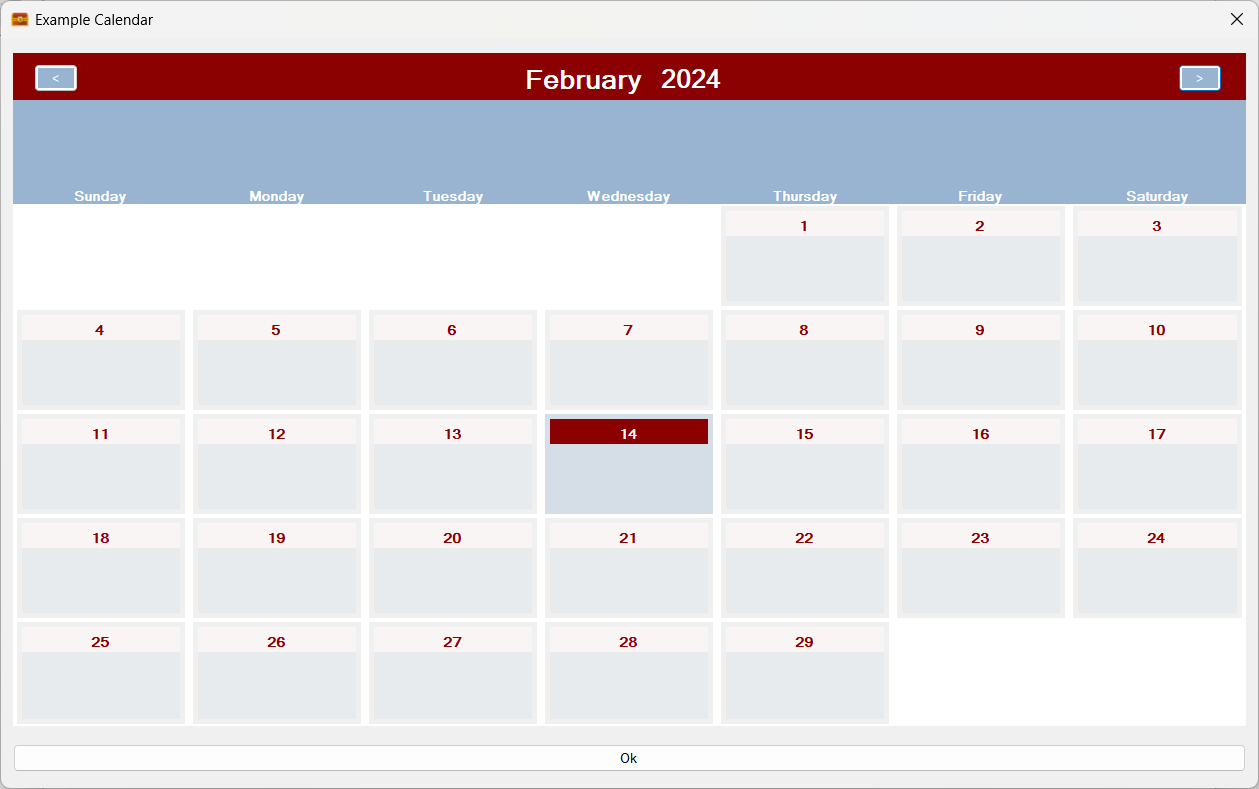
A Gregorian Calendar, but not as you know it! This time it is constructed and modelled with Sojour’s time-units! (Click for a bigger image!)
The above screenshot doesn’t look too significant, however it represents a huge step-up in Sojour’s calendar modelling capability. That’s because it has managed to model a rolling calendar – the Gregorian Calendar – using its own built-in editor and time-units!
The system even takes leap years into account:
A leap year!
A non leap year!
As an aside, Sojour can model leap days, weeks, months or whatever else you can imagine. For example you could easily invent a calendar that has 4 leap days that occur every 6 years 🙂
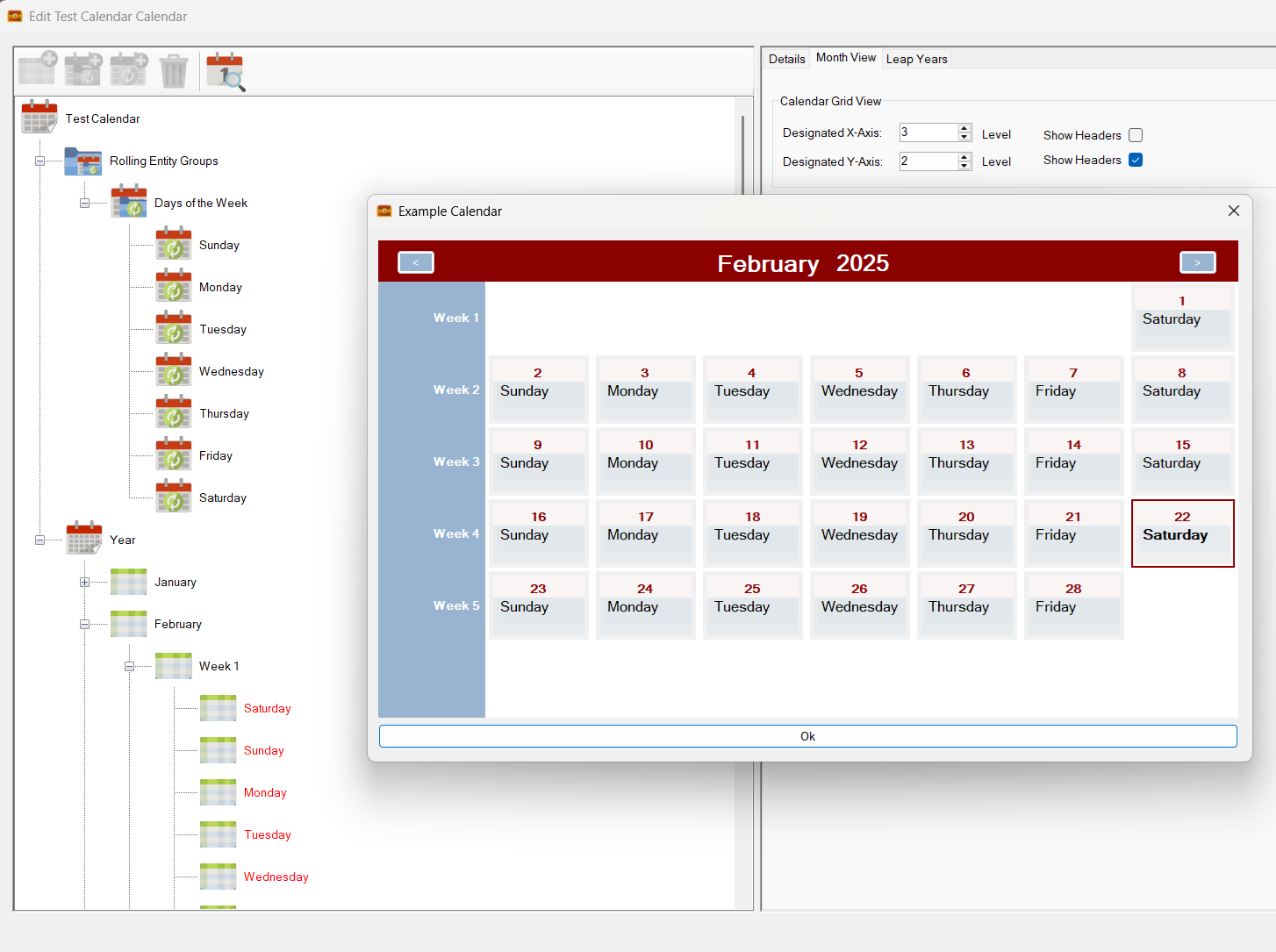
Coding the month view to support rolling calendar dates was a right royal pain. The first issue is that the 1st can occur on any day! So the 1st will invariably not start in the first cell of the month view and will tend to move around.
In addition, some months will have more, or less rows (weeks) than other months and all of this has to be calculated:
For example April has six rows of days, whereas most other months will tend to have five. The code has to be able to account for this!
Sojour’s rolling dates are really powerful. In the above Gregorian calendar it only has one set of rolling entities to drive those dates and that is a rolling entity group called ‘Days of the week’. However, I could quite easily go on to add many more rolling entity groups and map those to different time-unit levels.
In fact, you can even assign multiple rolling entities to the same level! For example, with the Gregorian calendar I could create another set of rolling entities called ‘Moon Phases’ and then assign those to the day level. The moon phases will then roll around independently of anything else as the days go by!
Sojour even allows you to associate images with your rolling entities and these will end up being visible on the calendar’s month view. In the above example we would see the different phases of the moon on each day.
The Gregorian calendar I created here is simply a proof of concept. I figured that if Sojour’s time-units could model the Gregorian calendar successfully, then in theory a user could create any calendar that they can imagine!
Whilst I have made a lot of progress, there is still a huge amount of work left and I suspect I will be on this feature for quite a while yet.
Hang on in there and have patience! Once released, Sojour will have one of the most powerful and flexible calendar systems ever released in a VTT!
I have started working on the improved calendar modelling as alluded to in the previous post.
However, this all came to a grinding halt when my trusty development machine of 8 years finally gave up the ghost. It was a first generation Surface Book Pro:
Here it is in better days when developing Ancient Armies – another one of my projects. (Click for larger image!)
I loved everything about this machine. It had a touch screen that could be detached and used as a tablet – complete with stylus.
It also had one of the best screens and keyboards I have ever had the pleasure of working with. The uncommon 3:2 aspect ratio was perfect for coding too – wide enough to see everything, but also deep enough to see many lines of code at once.
One of the best things about this laptop is that it kept my coding honest. It housed an old Intel dual core I5-6300U processor, 8gb of RAM and it had a very poor GPU – an Nvidia 940M. These low specs forced me to think about Sojour’s performance – something that can be neglected when working on a super-machine!
What went wrong with it?
The battery….
Looks like the battery is trying to escape through the underside! (Click for larger image)
A few weeks back I noticed the laptop couldn’t sit flat on the table top anymore. It was a noticeable issue, but I couldn’t see anything physically wrong with the Surface Book, so I carried on using it.
It’s only in recent days that the expanded battery’s size has started to create a large bulge in the base of the laptop. This bulge has got to the point where it has forced the base away from its mounting points, hence the crack shown above.
The general consensus on the internet is to stop using it right away! It now represents a fire hazard and a fume risk if the battery blows.
Further research also indicated that battery bulge problems are a fairly common issue with Surface Books.
There is no need to worry about Sojour’s source code, it is perfectly safe and sound!
A new laptop has just been ordered from Lenovo as the Surface Book’s replacement.
Once I receive it, the new laptop will need a little TLC to integrate it with my development environment, but once that is done, I’ll be good to go again!
In the meantime, farewell Surface Book! – You have been a sturdy and reliable companion for over 8 years! You will be missed!
This release addresses some issues with Sojour’s User settings.
In the past they never carried over between installs.
In v1.2.34.0 they were always carried over, but Sojour would tend to overwrite current user settings with the previous ones due to a misunderstanding with how Microsoft’s upgrade mechanism works.
In this version, I have versioned the user settings. They should now only get upgraded if Sojour detects that the current running version is later than the version number assigned to the settings.
This should enable such things as user data directories to be better remembered, both from previous Sojour versions and from any new changes.
In addition work has now started on Sojour’s Calendar System V2. The intent is to add a concept of rolling entities to it. This will allow users to assign entities that naturally roll. Good examples are day names and moon phases!
I know this probably doesn’t make much sense right now, but it will when I release a tutorial video on completion.
In the meantime, if there is anything you want to see in Sojour’s calendars, now is the time to ask 🙂
This is a minor release that I thought I’d get out of the door as the new drag and drop code makes for a much smoother user experience.
Changes for this release:
RPG-365 Enhancements to all drag and drop code. In the past, a drag would be initiated the moment the left mouse button went down on an object. This caused the UI to be a little squirrelly – especially in the treeview. One example where this this would manifest itself was when double clicking a treeview node only to have a partial drag and drop start – this was always a little disconcerting. In addition, Sojour used to need safety code to limit dragging actions on the map. This code had the occasional unwelcome side effect of making map tokens undraggable on the very first click – this issue was plain annoying. All of this has now gone away! The drag and drop code now follows Microsoft’s recommendations and all drag and drops should now perform smoothly, with no missed or unwanted drags!
RPG-366 Sojour’s user settings and preferences, which also include the directory you are using to play your games are now migrated across upgraded versions of Sojour. This should reduce the kerfuffle during upgrades!
Before I start with this post proper, I’ll just go over the results of a question I asked in my previous blog post:
“Would you prefer a slower release cycle – say once a month – to allow for more testing? Or do you prefer the current weekly cadence with an increased risk of bugs being introduced?”
Thank you all for your responses – it’s been much appreciated.
The result was that an overwhelming majority of you – 84% – wanted me to stay with the current release cycle.
To quote from one of the respondents:
“I like the current “Elon Musk like” fail forward releases. Your hard work is very much appreciated.”
This fills me with some relief, as one of the issues of being a lone software developer is the perpetual dread of dropping ‘that’ release that breaks everything.
Whilst the perpetual dread is probably a good thing, it’s good to know that my customers are allowing me some slack to occasionally drop the ball in the name of progress.
I know the results aren’t going to make everyone happy, but on the plus side, you could just skip a few releases. Sojour’s built in updaters are designed to automatically work from any prior version, so skipping releases will not present an issue – you will not miss out on anything!
Now back to the release!
v1.2.28.0 saw Sojour’s filing system getting a massive upgrade thanks to feedback from many customers.
In the past, you were stuck with having your data saved under Documents/PollySoft/Sojour.
Not any more! 🙂
Click for larger image!
If you closely examine the above screenshot you will notice that the status bar now shows where Sojour is accessing its data from! In this case I’m using some folders on my D:\ drive.
Sojour’s data can now be stored practically anywhere. Sojour will perform the relevant checks to see if it can access your chosen folder and if it can, that folder is in!
When you first start Sojour you will be presented with this screen (if it can’t find any data):
Most users will click ‘Yes‘ and have Sojour store its data in the usual place of Documents/Pollysoft/Sojour.
However, if this is not a suitable location, you can click ‘No‘ whereupon you are presented with this dialog window:
From here you can pick or create a folder for Sojour to use anywhere that your system can access!
But that’s not all….
Sojour now has a new File Manager:
Click to view a larger version!
This file manager lets you do many things! You can move your current data somewhere else, you can back up and restore data and you can even point Sojour to a different set of data files!
The latter would allow power users to have several sets of Sojour data and allow them to switch between them at will!
Alas, this was no easy feature to code, it took a lot of effort to implement:
22 code commits over 29 hours of coding! (each day is 8 hours)
The reason it took so long was in part, due to some poor initial design choices from my previous self! (As an aside, my previous self has a lot to answer for and if I could go back in time, I would be having some serious words with him! :p )
With the original design, I had encapsulated the ability for each object within Sojour to know where its data was stored. This was a good thing. However, I had coded this system to use rooted paths rather than relative paths. This was a really bad design choice as one cannot move data around with rooted paths!
Undoing the above and designing a new system that would work with both the old and new filing systems really pushed my brain into overdrive! But it’s now done and I think Sojour is all the better for it.
The new functionality is really flexible, so to that end I have produced a You-Tube video that will take you folks through some of the things the new filing system can do!
The full list of changes in this release is:
RPG-354 New enhanced file system, which adds a whole bunch of new features and additional flexibility to Sojour.
RPG-358 Tokens no longer show their health bars when dragged from or to a map that has them disabled.
RPG-363 A tentative code alteration that may alleviate occasional crashes when using the screenshot tool.