-
Work has been underway on Sojour 2.0 for quite some time now — most of it focused on the new 64‑bit graphics engine, Dorian.
The video linked above walks through the high‑level plan for Sojour 2.0 and should give you a clearer picture of what’s coming next.
Key Points
- Development has been ongoing for a while, with the majority of work centred on the new Dorian 64 bit graphics engine.
- This is a full rewrite, so it won’t be quick — current estimates put the timeline at around two years.
- When Sojour reaches version 2.0, the price will increase to a one‑time cost of $20 USD. The video explains the reasoning behind this.
- Until 2.0 is released, Sojour will remain at $10 USD.
- Existing customers will receive Sojour 2.0 for free.
- The 1.6.x branch will continue to receive bug fixes and small quality‑of‑life improvements.
- Bug fixes for 1.6.x will take priority over 2.0 development.
If you have any questions, feel free to post them here, on Reddit r/Sojour, or on the YouTube video — I’ll do my best to answer everything.
That’s all for now.
Have fun!
RobP
-

Today is a major milestone for Sojour. It just earned DriveThruRPG’s Electrum badge for 251 sales.
I’d like to take this opportunity to thank each and every one of my customers for taking the plunge and joining Sojour on its onward journey!
Have Fun!
RobP
-
This is a bug fix release and as usual is free to all customers.
The following issues were addressed in this release:
- RPG-337 The treeview will now better remember its last state. It will now also focus on the last selected campaign and/or ruleset prior to shutdown. This should ensure that when you restart Sojour, you will always start in your last played ruleset/campaign.
- RPG-348 Fixed a number of issues with regard to tokens from the token palette. Looks like these issues got introduced when the new drag and drop system was put in place two or three releases back. Issues fixed are: 1) Tokens that use dice expressions for their characteristics are now back to rolling their dice only once that token has been dropped onto the map. In addition, Sojour won’t re-roll them when Sojour has been restarted. 2) Tokens that have been rotated, now correctly show their rotation when dragged off map. 3) Dragged token health bars are now back to showing the actual health of the token (this never affected the token itself – just its dragged representation).
- RPG-356 Fixed a PDF issue and upgraded the WebView2 component to the latest version. Sojour always tries to restore opened PDFs when you start it. However, minimized or maximized documents prior to shutdown could confuse Sojour when it tries to re-open these documents. This has now been fixed and Sojour now respects whether documents were maximized or minimized prior to shutdown and will now leave those documents in the appropriate state when restarted.
I have been putting my thinking cap on with regard to these bug fixes and have forwarded all my customers a question:
“Would you prefer a slower release cycle – say once a month – to allow for more testing? Or do you prefer the current weekly cadence with an increased risk of bugs being introduced?”
It’s a pretty important question as the answer will affect the way I work and how often you folks get new releases. I’ll go with whatever the consensus is and post the result here!
That said, I am expecting a new release this Sunday that will provide much more flexibility with regard to where Sojour saves its data. This should be the next release, unless any critical bugs are detected between now and then.
In the meantime…
Have Fun!
RobP
-
This is a hotfix that fixes the Map Scaling Wizard that got broken in v1.2.11.0. All users are urged to upgrade to this version.
In addition, the following story got addressed:
- RPG-333 Vertex buffers, Index buffers and Textures are no longer initialised unless the map holding these models is loaded. This should speed up overall loading times and vastly reduce resource usage on startup.
(I discovered the map scaling wizard issue whilst working on the above story)
Apologies for the breakage.
Have Fun
RobP
-
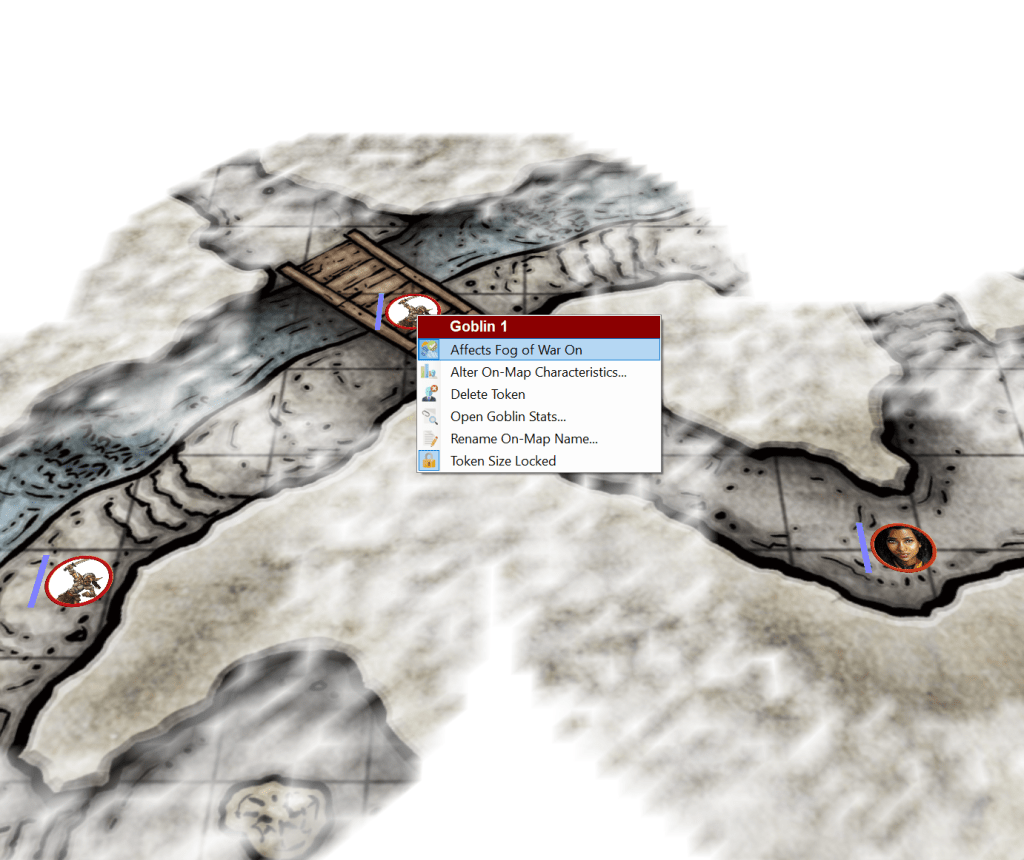
This version includes fog of war enhancements added as a result of customer feedback.
Once again, thank you for this feedback, it is invaluable.
If you want to know more about the Fog of War enhancements pop over to this You-Tube video:
Fog of War Enhancements! Here are the full list of changes for this release:
- RPG-335 Fixed an issue that could occasionally crash the journal when changing between font types.
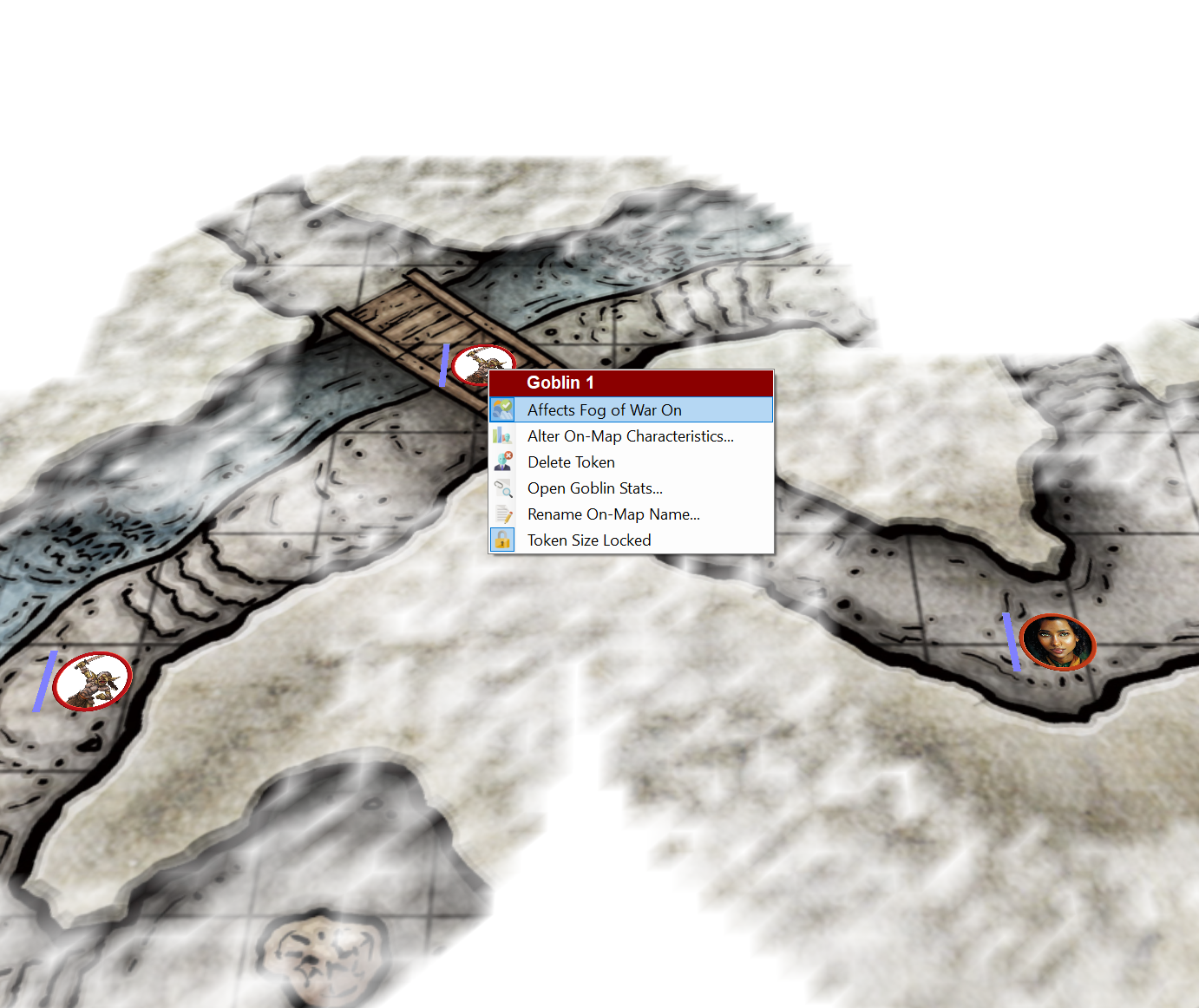
- RPG-336 Tokens can now have their ability to affect the fog in fog of war toggled by using a right click context menu item. See the manual and the video for each token’s type defaults.
- RPG-341 Sojour’s file handling code has been tightened up. However, note, that windows file paths default to having a maximum length of 260 characters. If you go above that, you will need to enable it with this registry tweak.
- RPG-347 The map preview is now left on for the duration of map scaling and the map scaling token now always appears above the fog. This makes custom token scaling easier on maps with fog.
- RPG-348 This is a corner case fix. If you drag a character to a map that the character is already on, then drag your cursor off the map, Sojour could crash in certain circumstances. This has been fixed!
- RPG-350 The map free draw function has had code added to it to smooth out drawings (they used to come out quite jagged!)
That’s it for this week!
Have Fun!
RobP
-
With the Fog of War release out of the door, I thought I’d get some metrics together!
This is a technical post for those that like numbers and might be especially interesting for those that write software.
I should probably preface this post by saying that my views on software development are my own and should not be considered the views of any employers that I have worked for, either past or present.
First up, the code itself. How big is it?
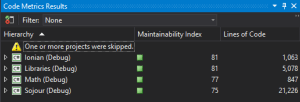
Basic code metrics (click for larger image) Sojour consists of 4 main components, not including the installer. These 4 components have a total line count of 28,214 lines of code! The installer would add another 381 lines of code to that count.
However, these figures don’t tell the whole story as Sojour comes with a 161 page illustrated manual and various art assets that also have to be maintained.
Not all of this code was written from scratch. Quite a lot of it had been borrowed from my other project Ancient Armies.
The maintainability index has a range of 75–81. This index is a broad indication of code quality. Microsoft suggest anything from 20-100 is good, so I guess Sojour’s scores put it at the higher end – which is good news 🙂
How long did it take to write?
That’s a more difficult question due to the fact that when Sojour started I never took it seriously! It was considered a ‘quick’ and ‘dirty’ project reusing Ancient Armies code classes to deliver a VTT that was more suitable for my style of play. It was never originally intended to go on sale!
There was sporadic development between December 2021 and July 2022, but I don’t know exactly how much development took place in that time period as Sojour had no development pipeline setup for it.
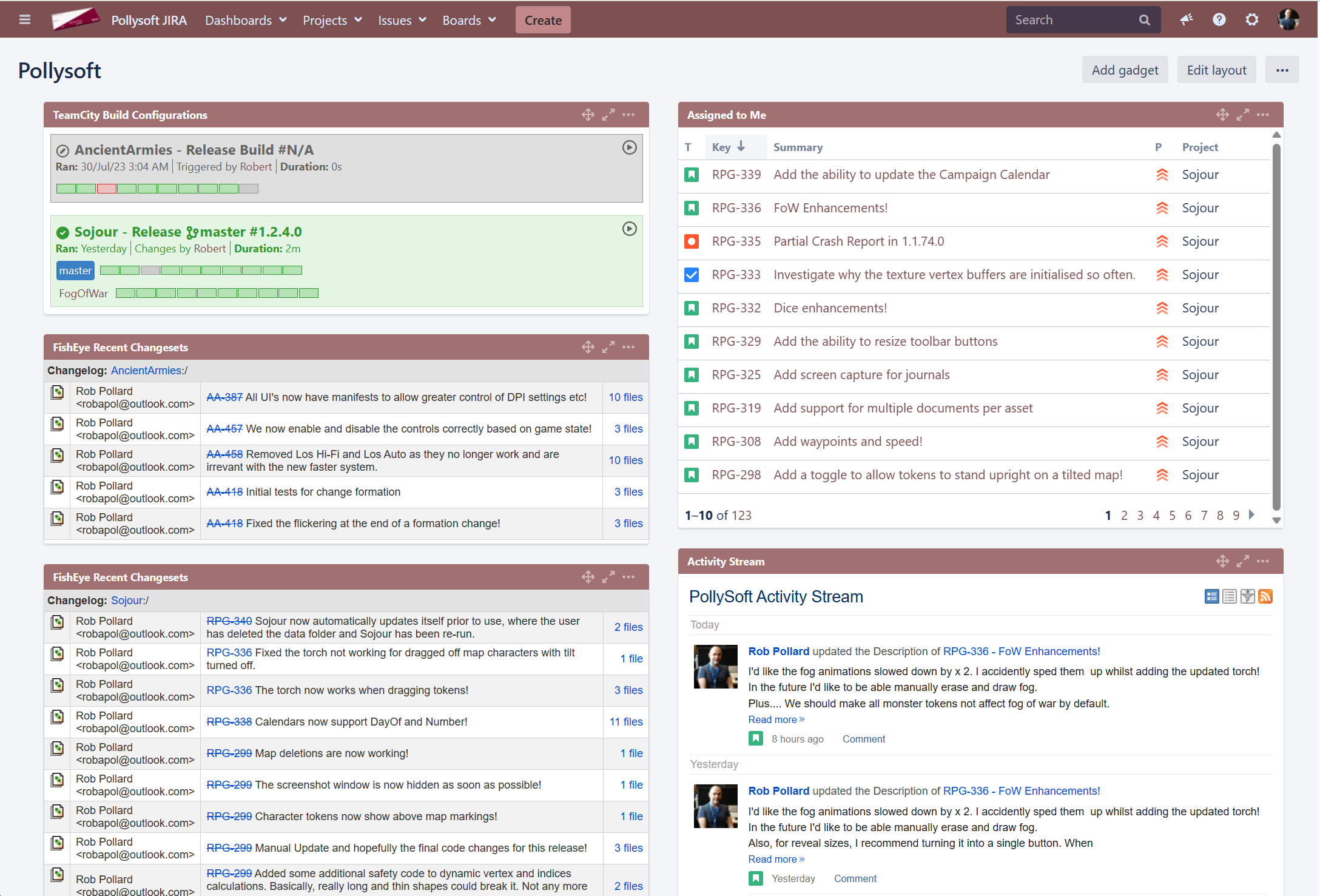
It wasn’t until July 2022 that I started to see its potential and take it seriously. At that time the full development pipeline was put in place. This pipeline is fully automated and allows traceability from stories to code and then on to released binaries and vice versa. It provides an internal Wiki which is also linked to stories and it can build any specific version of Sojour at a whim (handy for testing). It’s this environment that’s also responsible for Sojour’s seemingly random version numbers (not all builds are released).

JIRA is at the beating heart of my development pipeline! (Click for full size image) Despite the lack of metrics prior to July 2022, I do have very accurate measurements subsequent to that period. All figures are from that point on and do not consider the sporadic work prior to that.
According to my system a total of 490 hours has been sunk into the project. That’s around 61, 8 hour days in little more than a year! Not bad considering that this was all done in my free time!
How good was I at estimating time for my work?
It turns out I was pretty pants.
I tended to get my work done at approximately 64% of the original time estimate. So I’m over-estimating to a tune of 36% on average!
What about story/work break down? What have I actually been up to?
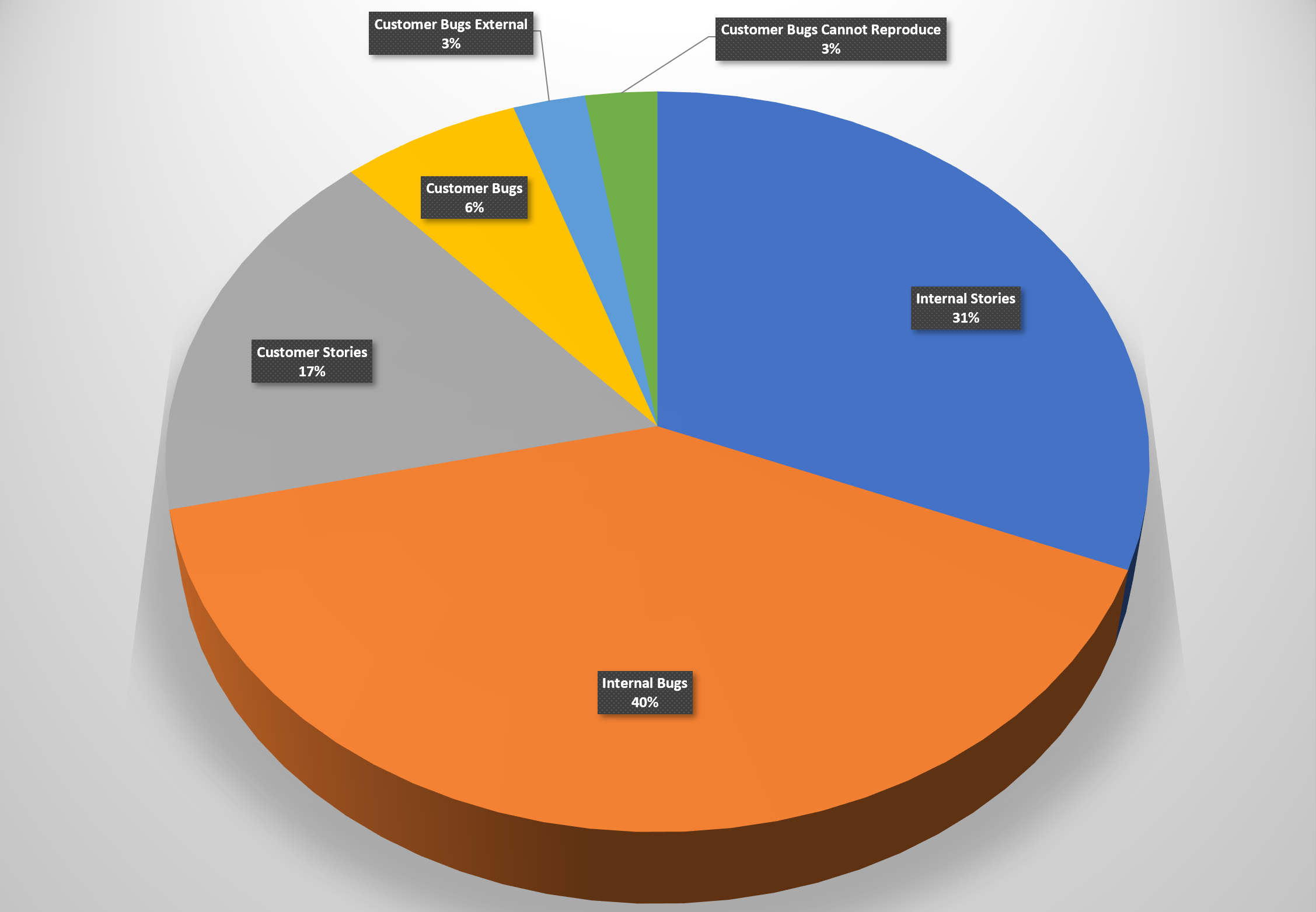
For this I will show the metrics post-release as the pre-release metrics would seriously skew what’s presented, mostly because there were no customers pre-release!
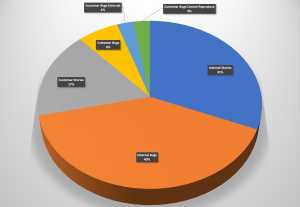
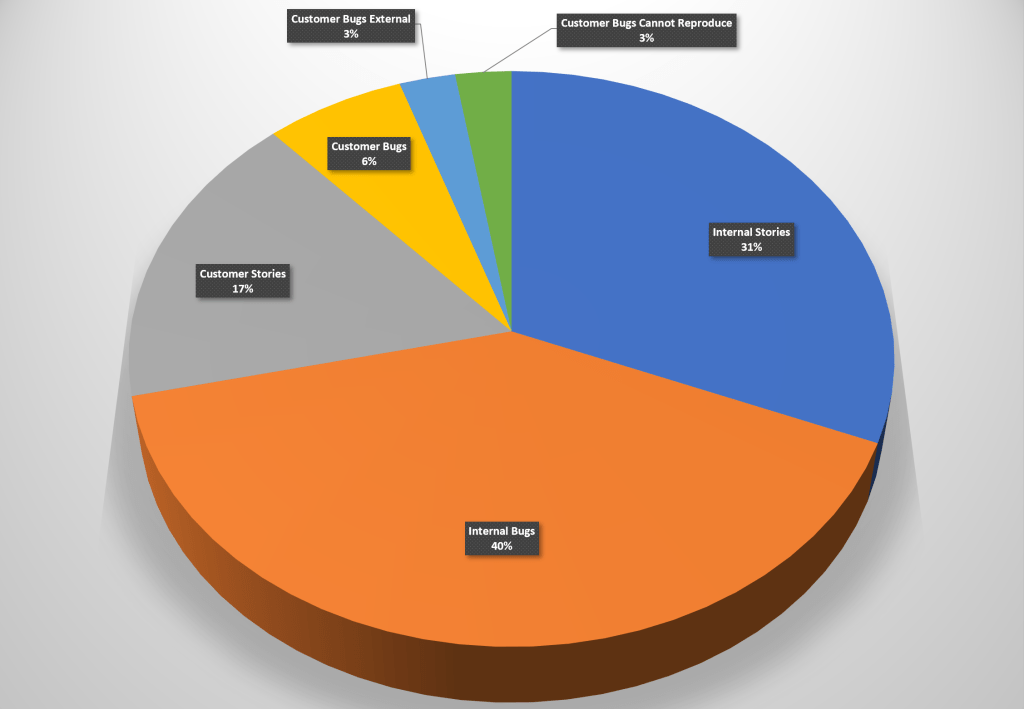
All stories breakdown (Click for full sized image) From here we can see that the story breakdown is almost equally divided between 50% bug fixing and 50% new functionality. Note that this chart and the others below are broken down by number of stories and not time. As such they don’t represent effort.
Unlike Ancient Armies, Sojour has no automated tests, at least not yet. The way development works is that a story is tested whilst it is being developed. Then I change my hats and the story goes in for internal testing. It’s at this point that the internal bugs are raised and fixed.
I suspect that the lack of automated tests is down to the fact that Sojour’s design and feature set have been extremely fluid and volatile. If I were to have put in automated tests right at the beginning, those tests would have created a resistance to change that is directly proportional to their numbers – they would have hindered more than helped.
In addition, their inclusion would have pushed the release date right by at least 6 months. Adding full test coverage to any software project tends to multiply its codebase’s size anywhere from 200% to 400%, sometimes more!
The inclusion of automated tests is on the cards. But the time invested in those will take me away from time required to implement the new features that the customers want. I will need a strong business case to switch feature time out for automated test time.
For that to happen, I would need some consistently problematic areas to appear within Sojour – but thus far, they have failed to materialise.
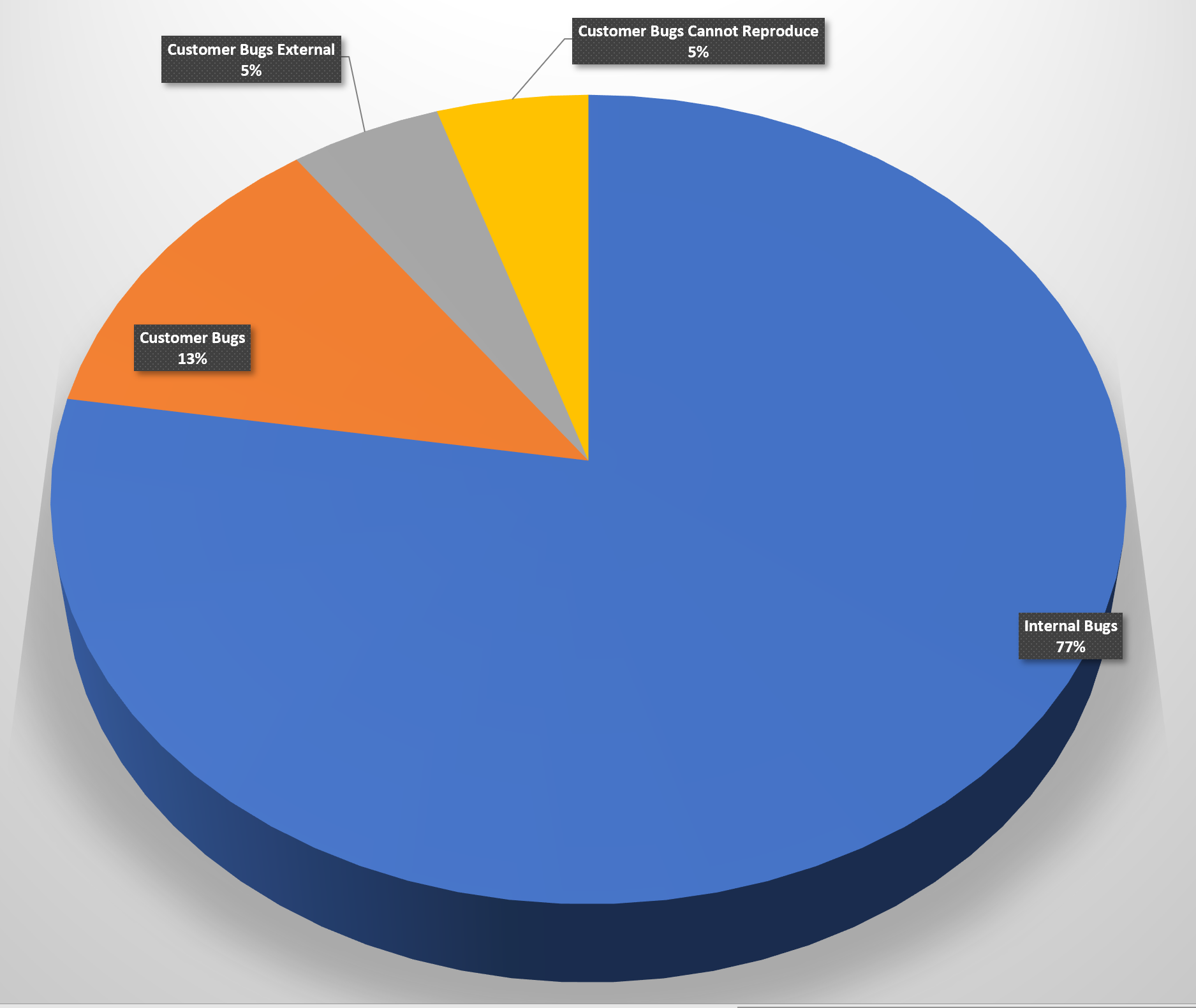
Lets take a closer look at the bugs:
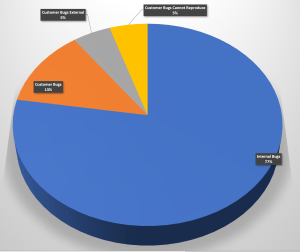
Bugs story breakdown (click for larger image) Before we start, I should probably air my views with regard to bugs and specifically how they relate to Sojour’s development.
Controversially, I consider bugs a natural and intrinsic part of the software development cycle. I view them as a form of iterative feedback. Addressing them is simply addressing that feedback and iterating on an initial code design and implementation.
One could debate that automated tests could reduce the number of internal bugs, but I could debate that for Sojour, manual testing, raising the bugs and fixing them is a faster and a more flexible iterative process than writing and maintaining rigid tests. This is especially true when the majority of the detailed features of Sojour’s stories tend to be discovered during the manual testing phase – after all, the best way to test the flow of a system is to actually use it!
With that out of the way, we can concentrate on the chart’s results 🙂
The results indicate that the internal testing effort has been reasonably effective. 23% of all internal bugs made it to the outside world, of which 43% of those are either unreproducible (normally singular reports) or the result of external factors beyond Sojour’s control (For example Microsoft releasing a broken operating system component – those bugs tend to need quick workarounds placed within Sojour).
On the plus side, that means that 77% of bugs never make it out of the door! That’s not a bad figure, but ultimately it’s one that I aim to improve upon.
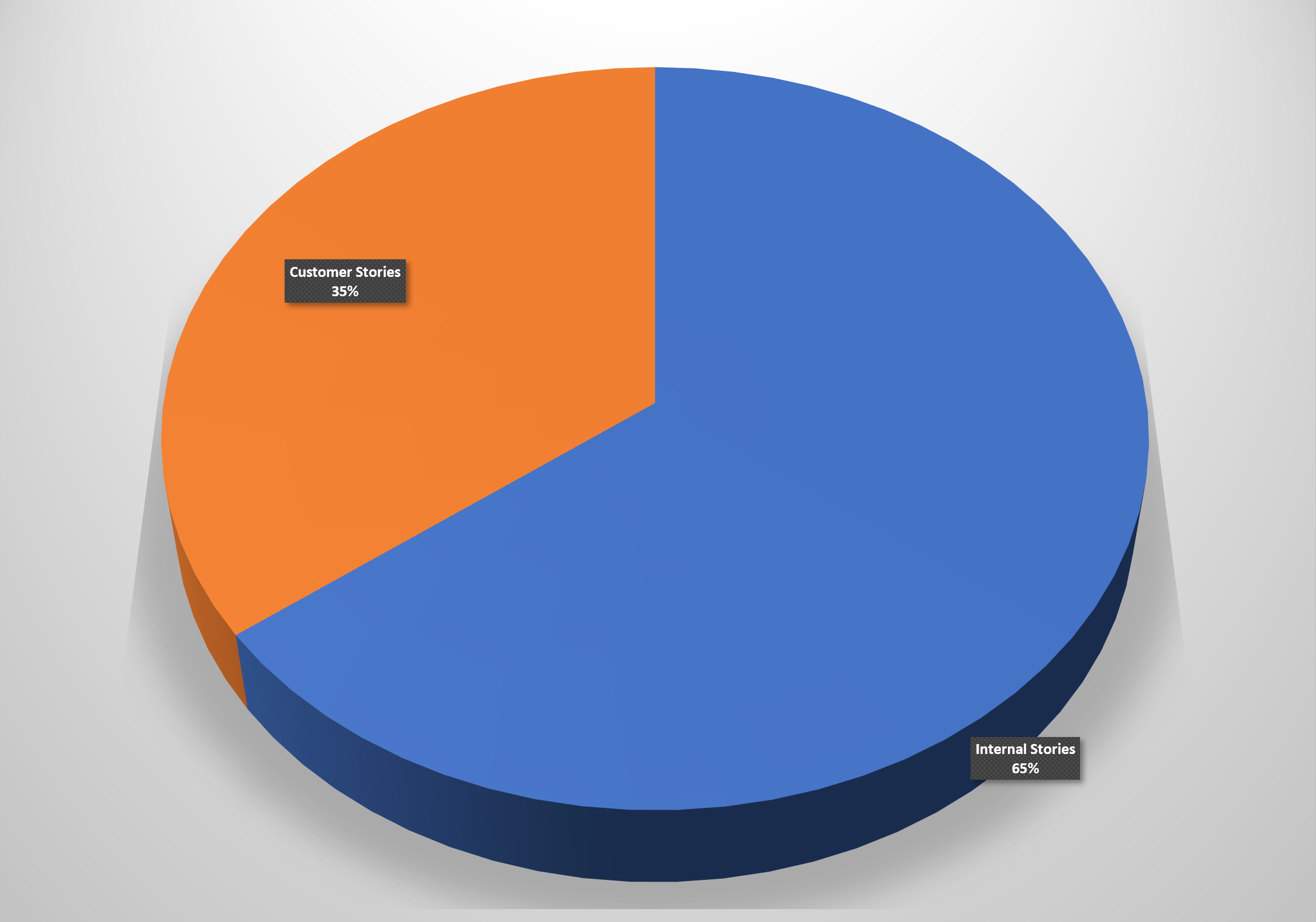
What about customer requests for new features? Are any being actioned?
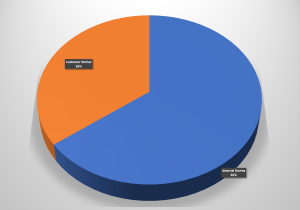
Story breakdown by source (Click for larger image) It turns out that 65% of all new functionality comes from me, with the remaining 35% coming from the customers. This pie chart represents delivered functionality too, so I guess it does prove that I do listen to my customers!
That said, the ultimate aim will be to equalise these figures a little more.
I suspect that the bias is down to my strong product vision. I have so many ideas that I want to incorporate and these tend to bias the story pipeline.
Finally – How happy are my customers?
This is a really difficult metric to determine.
The review comments and social media comments have been really positive and Sojour tends to be favourably compared with much larger and more expensive commercial offerings:
“Overall, Sojour Solo RPG VTT offers a level of functionality and ease of use that is unmatched by any other VTT platform.” – From a review on DriveThruRPG.
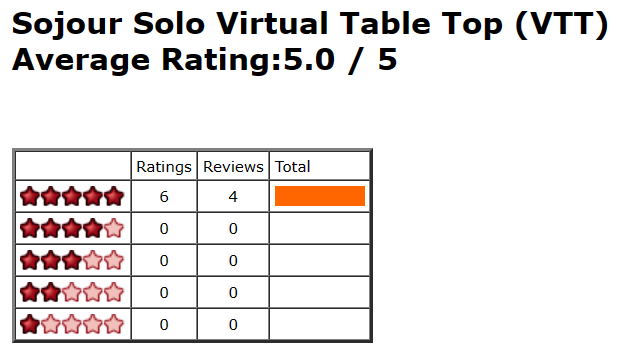
In the case of DriveThruRPG’s review scores, at the time of writing, there are 10 reviews in total, all of which have a straight 100% 5 out of 5 star rating:
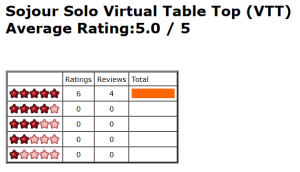
Whilst good, 10 reviews is a tiny percentage of the overall customer base. As a result I don’t know how the other customers feel with regard to Sojour!
(If you are a customer, please let me know how you feel about Sojour! Tell me what you like or dislike about the product. This will help shape the future direction and journey that Sojour needs to take to be the best software that it can be!)
That’s it for this post – I hope it sheds some light on what’s going on behind the scenes!
Have Fun!
RobP
-
This version adds the missing Fog of War function alluded to in the earlier video – the ability to have the mouse preview / torch switched on whilst dragging tokens. I eventually figured out how to do it, so for the moment, this first iteration of Fog of War is now feature complete!
The old video will be taken down as it is no longer representative of what one can do.
You are encouraged to view the new one below as having the ability to use the mouse preview whilst dragging tokens is a game changer for ease of use!
Have Fun!
RobP
-

This is a hotfix for custom calendars. Current calendars will automatically be upgraded and customers shouldn’t see any change of functionality.
This fix separates the concept of TimeUnit number and day of at n level.
Warning! The next few paragraphs are highly technical and only really applicable to customers that are using Sojour to create custom calendars!
Previously, the n.number command did not return the TimeUnit number at level n. Instead, it used to return the day of number at that time unit level.
This is a little misleading to say the least.
To fix this all n.number commands have been renamed to n.dayof and n.numberth commands have been renamed to n.dayofth.
These names better represent what those commands are doing.
There is no need for you to change your existing custom calendars! Sojour’s auto-update system will do this for you automatically! 🙂
The n.number command has then been re-introduced, except that this time it actually reports the number of the selected TimeUnit at the chosen level.
I know this is going to sound like absolute gobbledegook to most people! The intent will be to put out a new custom calendar tutorial video that will make this a lot more clear.
Have Fun!
RobP
-
This version has Sojour’s first iteration of Fog of War for maps.
(I have taken the video down from this post. The Fog of War video has been replaced with a new one on the v.1.2.4.0 post!)
Have Fun!
RobP
-
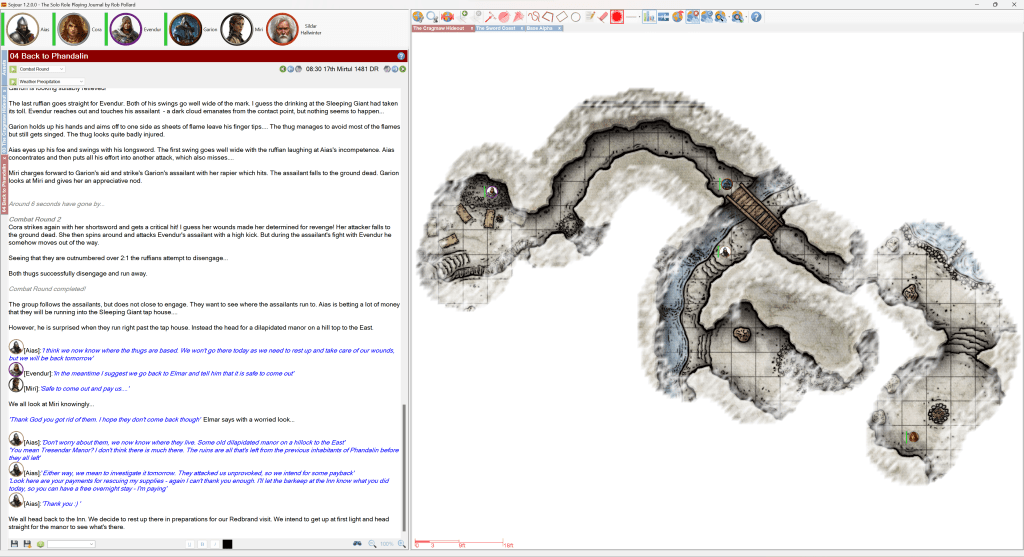
The coding is done, as is most of the testing. The only things left to do are updating the manual and creating a new tutorial video that will take you all through the new Fog of War system.
Not long to go!
Have Fun!
RobP
-

Here is a video showing it working on a map with max fog density:
And here is a video with the fog set to minimum density. This video shows off the fog animations (you will need to look carefully as they are subtle):
Remember, it’s still early days, and “Mum’s” the word!
RobP

Sojour
The solo virtual table top

 Sojour