Dorian now supports PBR (Physical Based Rendering)!
The graphics engine for Sojour 2 has had two quite large enhancements made to it.
Firstly the lighting and materials rendering system now uses Physical Based Rendering (PBR). This is a rendering technique that uses approximations of actual lighting physics to produce more natural lighting.
The other advantage of PBR is that it can simulate practically any material that you can think of with the correct textures and setup.
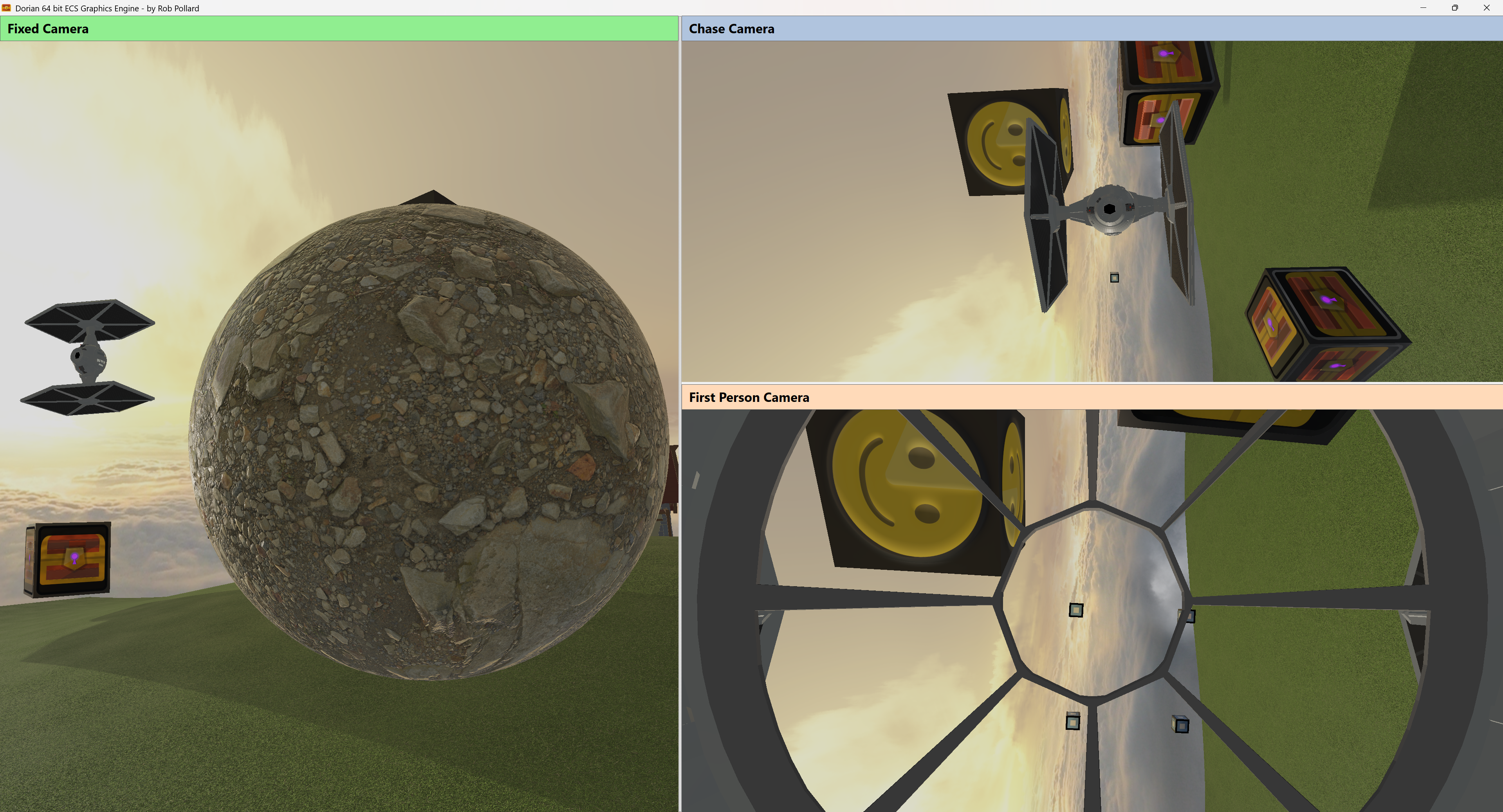
For example, the sphere shown above is actually a smooth sphere, but looks rocky thanks to the textures below combined in magical mathematical PBR ways:
Dorian now accepts many texture types to support its material modelling.
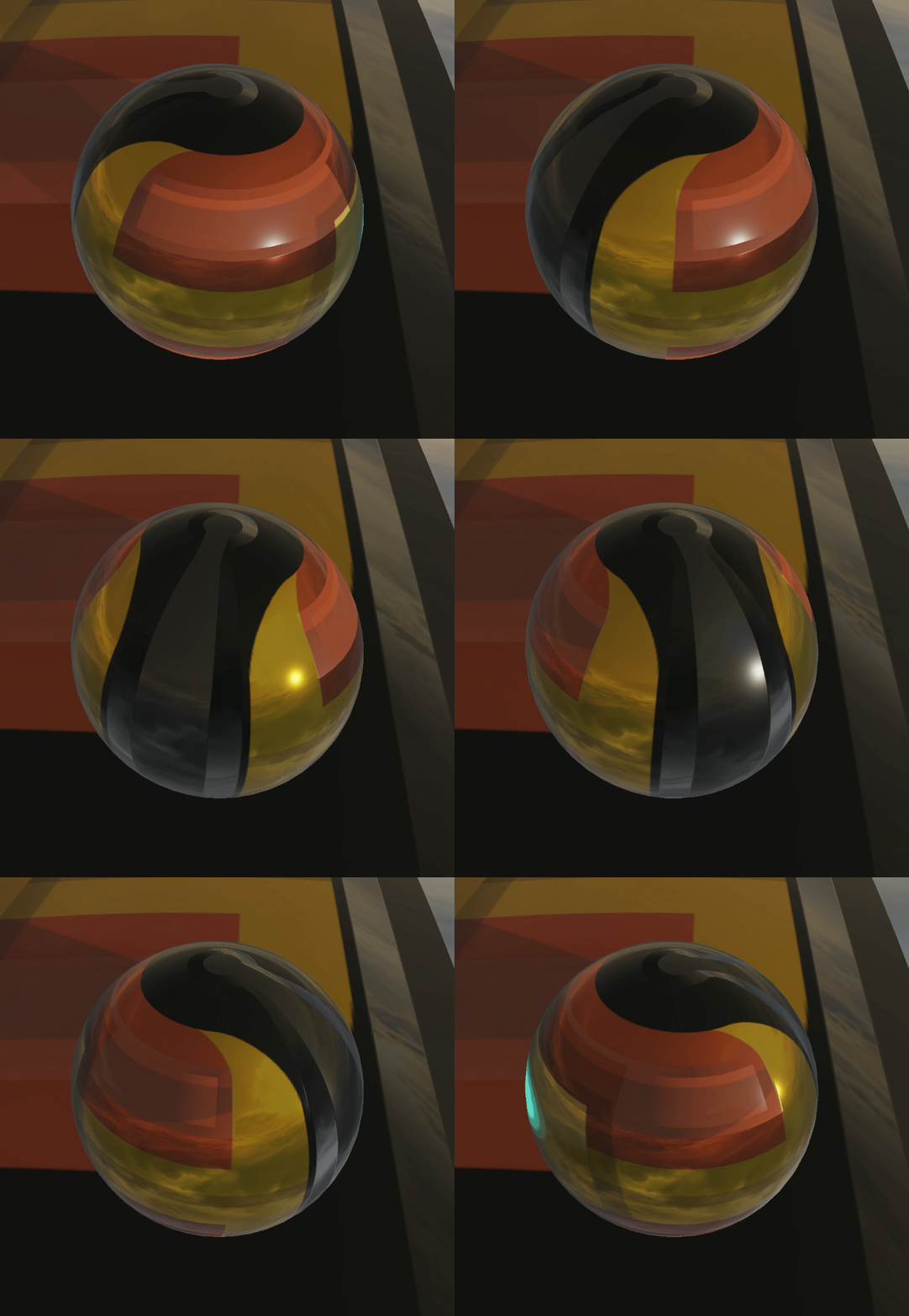
Here is the same sphere with different textures and materials applied, as you can see, it’s totally smooth!:
Applying different materials to anything is a doddle!
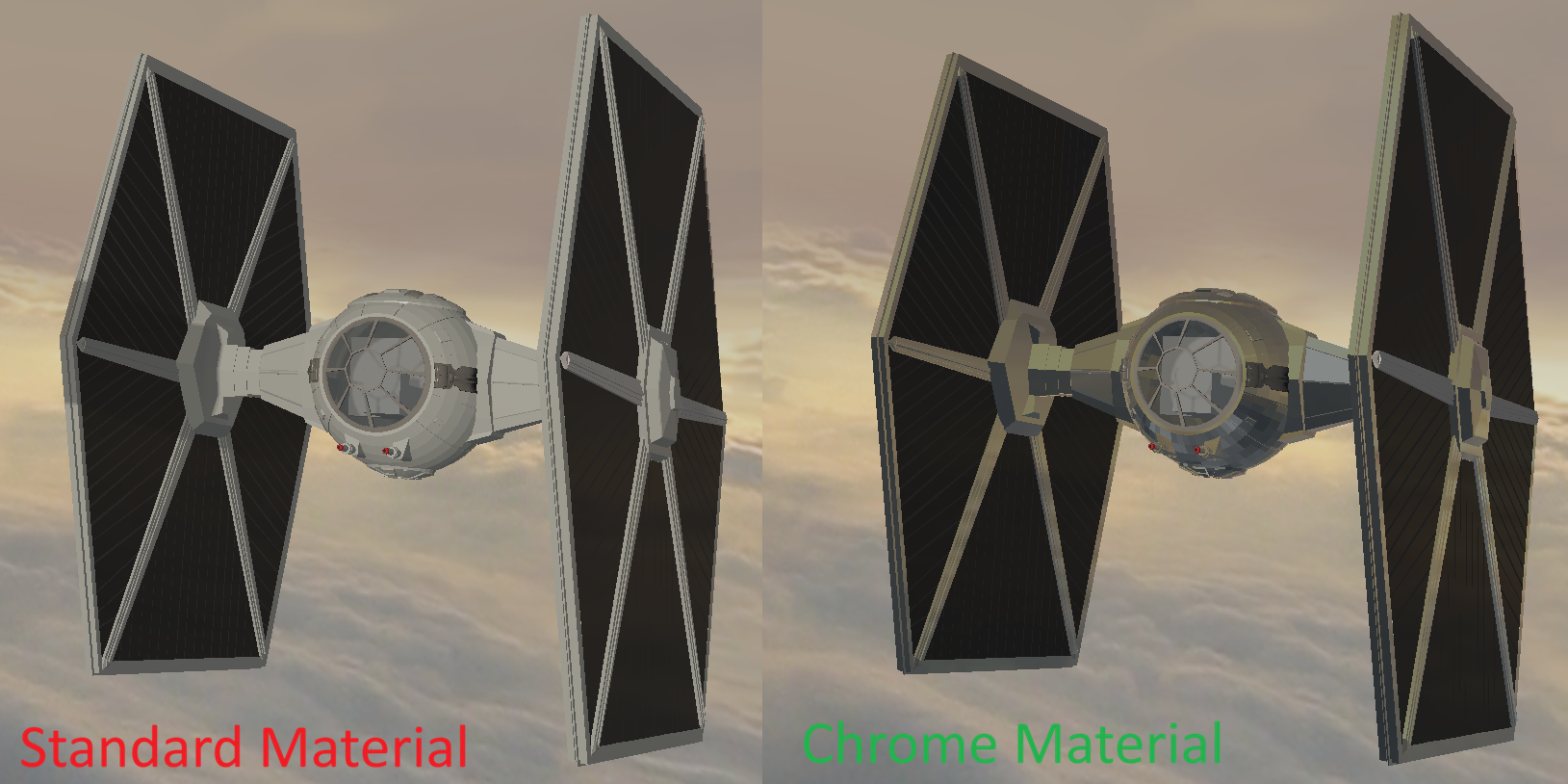
Even where a model has no textures, like the TIE Fighter for example, you can easily change its look on the fly:
I’d like a TIE fighter please Sir! But in Chrome!
The next huge undertaking was removing DirectX from the engine and keeping it completely separate:
DirectX-11 has now been separated from the Engine!
It was a huge job, but it is necessary to allow the engine to support other backend renderers such as DirectX-12 or Vulkan.
This was a huge undertaking as all aspects of the system got altered to support a more abstracted means of rendering.
What makes writing a graphics engine difficult – apart from the complexity – is ensuring performance is not compromised by code changes such as the refactor above.
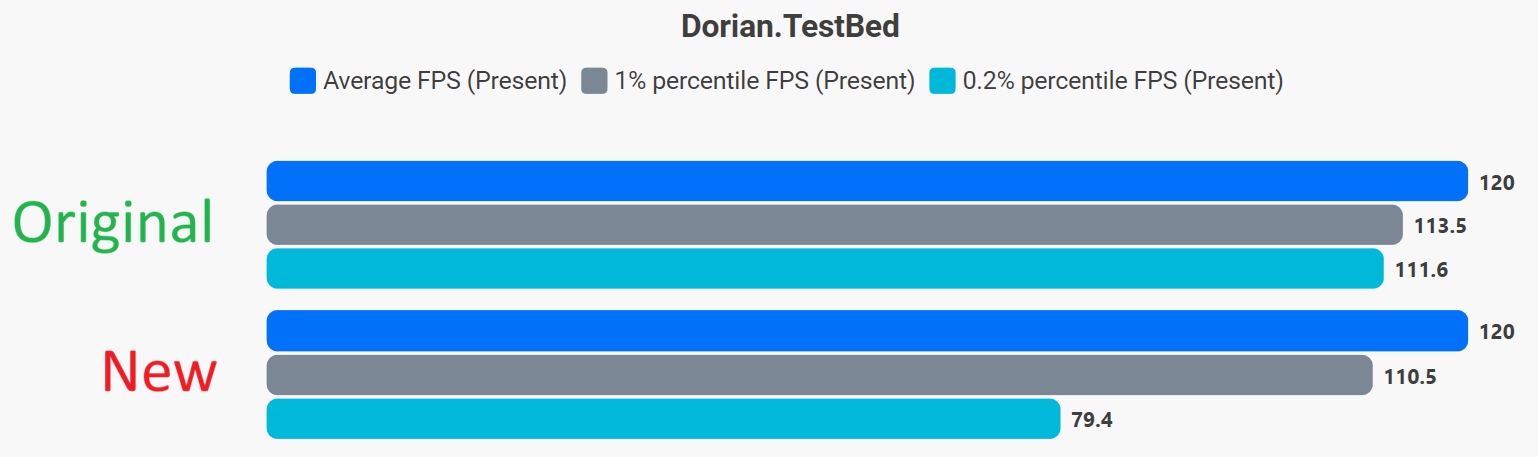
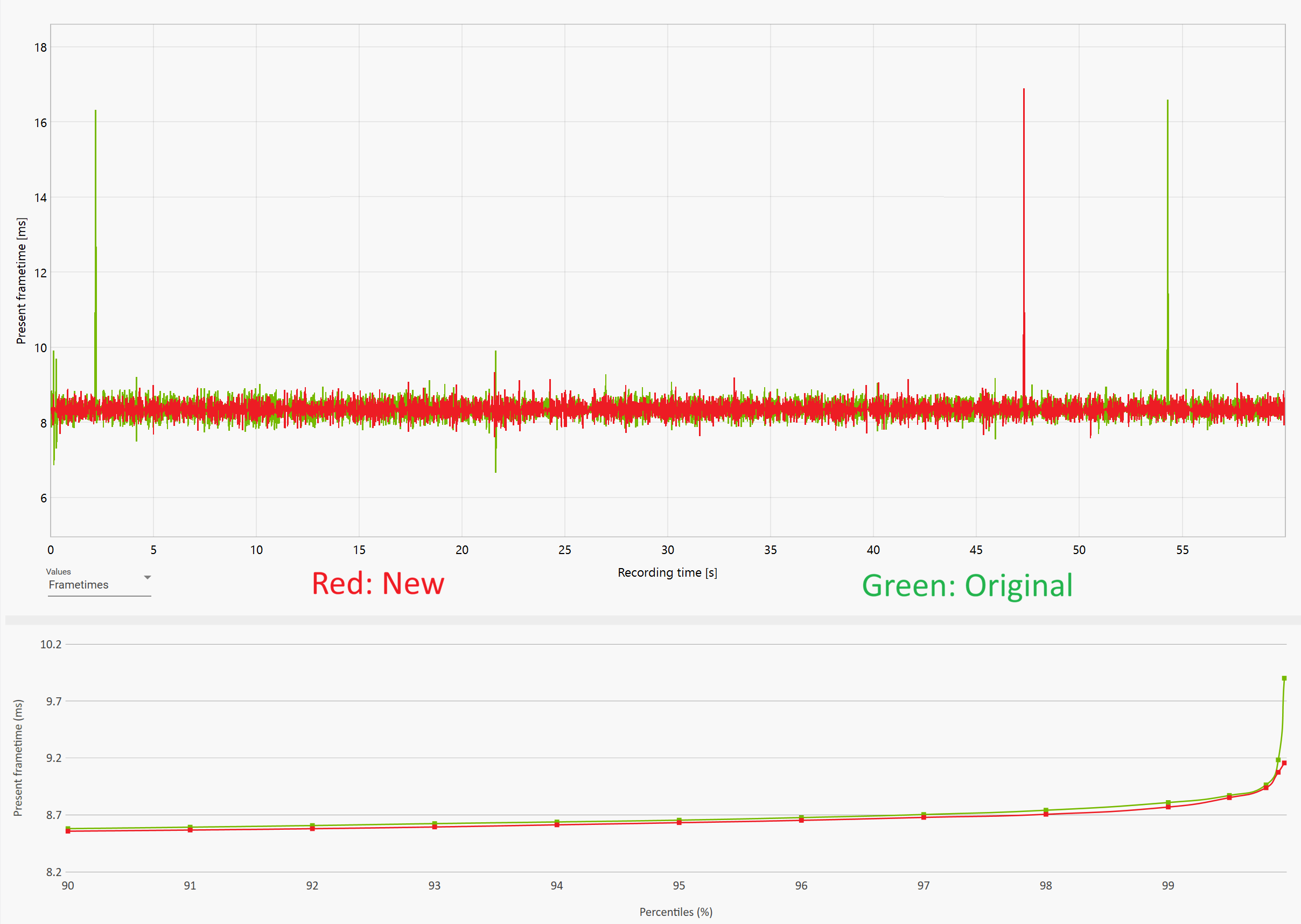
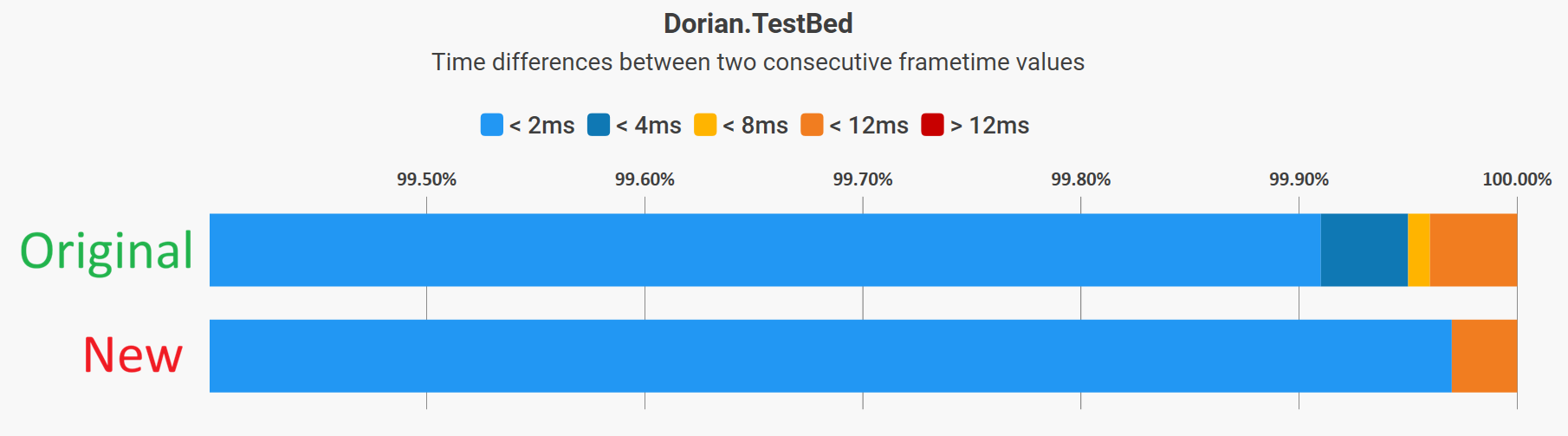
The amount of code changed to separate DirectX-11 was staggering and the initial performance results were not too good (all graphs measure the scene you see above):
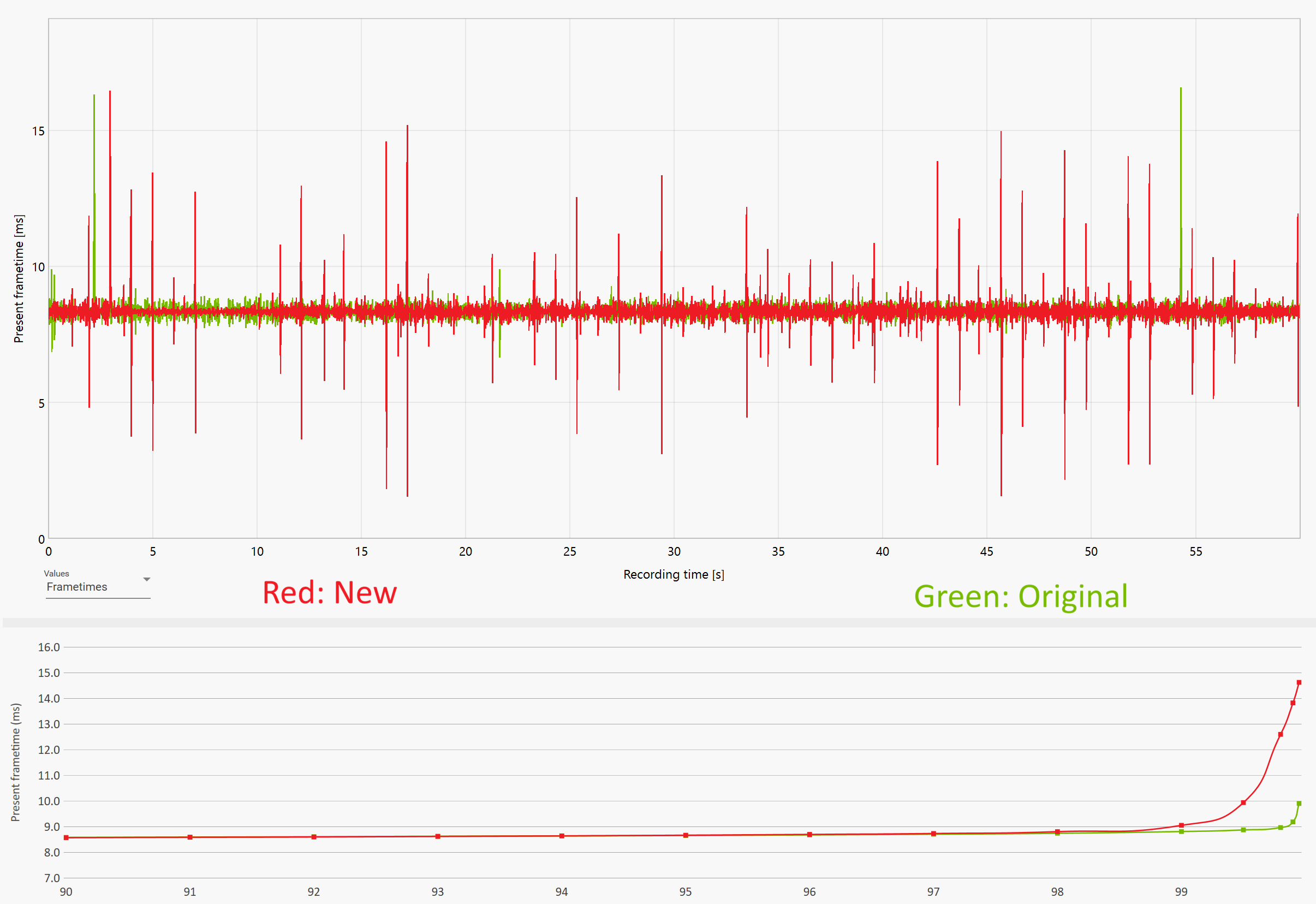
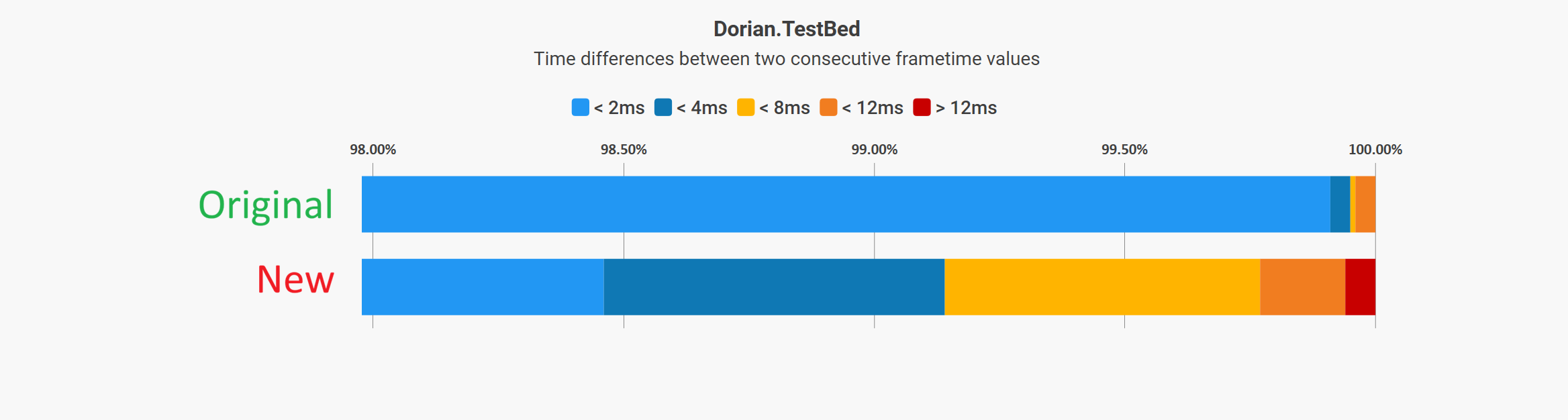
Whilst the new one held 120 FPS (my TV’s refresh rate) – it took a noticeable dip in performance for 1% and 0.2% lows.These are frame times. Lower is better and you can see that the newer version’s performance really falls away compared to the pre-DirectX separated version. It also has a ton of random spikes in frame time. (Frame time is a better measure for performance)This graph really brings home how much worse the newer system was in terms of performance.
Detailed performance measurements when creating a graphics engine are critical. It’s almost impossible to see the above differences by eye – so you must take the measurements before and after each change.
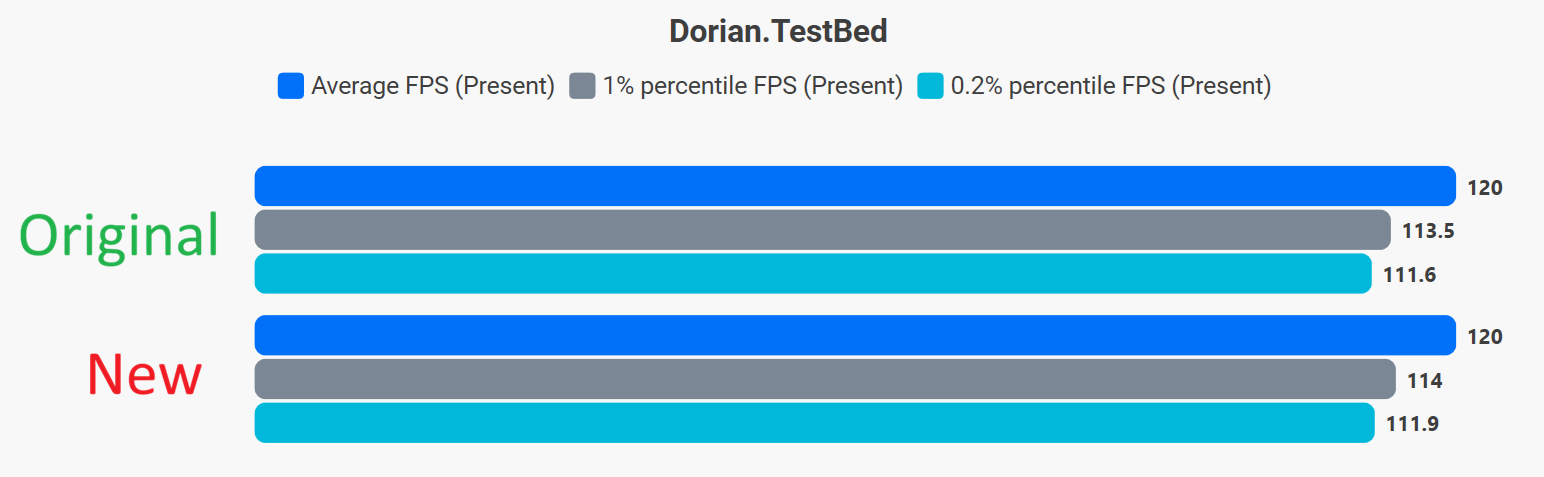
In this case I traced the problem to the fact that material caching had been broken by the refactor. After around a day of coding, everything is now back where it should be (and in fact a little better than it was!):
Much better! In fact we are now performing a little better than the original system!The new version produces lower frame times across the board! The only thing left to investigate are the occasional big spikes.For smooth frame times the newer Direct-X system is way better than the old one! Quite amazing given how much more complex the new version is!
This is one of the reasons why engine development takes so long. You aren’t just writing code that works, you are also writing code that’s highly performant!
I’ll leave you with a You-Tube video showing everything in motion. As usual, the smooth framerates never seem to translate well on You-Tube. If you look carefully, you’ll see me toggling the TIE Fighter to chrome and back!
Dorian in action!
Still a long way to go, but we are getting there.
I know writing Dorian seems like a diversion, but Ionian which is the engine used in Sojour cannot be used in conjunction with the latest technologies hence the re-write. (To be fair, Ionian lasted over twenty years, so it has had a great run for its money!)
Most of my focus is to get Sojour ported to 64 bit and running on a .net 10 platform.
If I pull this off, you get extra performance and I will get access to additional tools that will allow me to do things with Sojour that I have always wanted to do!
The big hold up has been Ionian, Sojour’s custom graphics engine. I wrote it a long time ago for another project of mine called Ancient Armies. It’s not a bad engine, but it is 32 bit and it can only render to one window at a time.
A few posts back I showed off some of my work with Dorian – Ionian’s replacement.
What was probably not made too clear, is that it was a POC:
The original POC! Best viewed on You-Tube to see it in 4k!
What’s a POC?
A POC is a Proof Of Concept. The idea being that for complex tasks – like a graphics engine – you knock up a quick and dirty system purely as a learning exercise. That way when you work on the real thing, you will have a lot more relevant experience under your belt.
The key point of a POC is that you learn what you need to learn, de-risk what needs de-risking and then you effectively throw it away. The lessons learned are then applied to creation of the full enterprise system.
For the last month or so I have been doing just this – working on the real Dorian Engine and not the POC.
The actual engine is way more powerful, expressive and scalable when compared to the POC. It doesn’t look as good – at least not yet – simply because it is at an earlier point in its life cycle.
The biggest difference between Dorian and the POC is that Dorian uses an enterprise grade architecture known as ECS (Entities, Components & Systems).
I think it would be fair to say that ECS takes a bit of getting used to. However, it is massively scalable, simple to use and expressive in ways that are only limited by your own imagination.
I should probably warn you that the next section of this post is going to take the geek factor up to 100! Those of a nervous disposition might well want to bail out about now 😊 (I need to go technical in order to show you the main highlights of Dorian’s ECS system.)
Dorian is now at a point where its architecture is all in place – all I need to do is keep adding features to it – which the new architecture makes exceedingly easy to do.
Here is a short video of me testing three different cameras all pointed at the same world using Dorian. Each window is showing exactly the same thing but from three different perspectives.
This is the real Dorian engine in action. You can see me showing off dynamic window resizing and me trying my best to upset the chase camera, but to no avail! Still work in progress! Best viewed on You-Tube to see it in 4k. (It’s a little dark and flat because YouTube converted a HDR recording to an SDR recording!)
What the video shows are three dynamically resizable windows (Ionian in Sojour can only render to a single window) where each window is pointed at the same world. Dorian allows a lot of flexibility here. You could for example have a few windows rendering world number 1 and another few rendering world number 2 and so forth.
The left hand pane in the video shows the cubes’ actual movement because the camera is not moving. The ones on the right show things from the perspective of the treasure chest cube – one is a follow camera, the other is a first person camera.
In a standard engine like Ionian, coding the animation of all the cubes and the advanced camera behaviours such as the chase camera would have been quite difficult. But, with Dorian’s ECS system it is almost trivial.
What is ECS precisely?
It’s a system where you have Entities and that these entities can represent anything – cameras, models, sound, AI, animations, environments – absolutely anything you can think of.
The key concept of ECS is that they are all treated the same.
The way it works is that the entities are just an Id and that’s it!
Id’s alone don’t do much. However, ECS allows you to dynamically attach (or detach) Components to any entity and these components contain just data. The idea being that if your entity needs to store some specific data, you just attach the appropriate component to it that can store that specific data.
Ok, so you now have entities with data. How is that useful?
Well, the next thing you can do is attach or detach behavioural tags to an entity. Systems within Dorian look out for these tags and operate on the entities that have them using the data stored in the attached components. (I told you we were getting technical!)
This makes the engine very simple to use and incredibly expressive. If you want something to behave in a certain way, just attach the appropriate tag! And that’s it. Very, very simple, but very very powerful.
I don’t normally show my code because it is closed source, but I will make an exception here so that you can see how clean and easy Dorian is to work with – please bear in mind these are very early days!
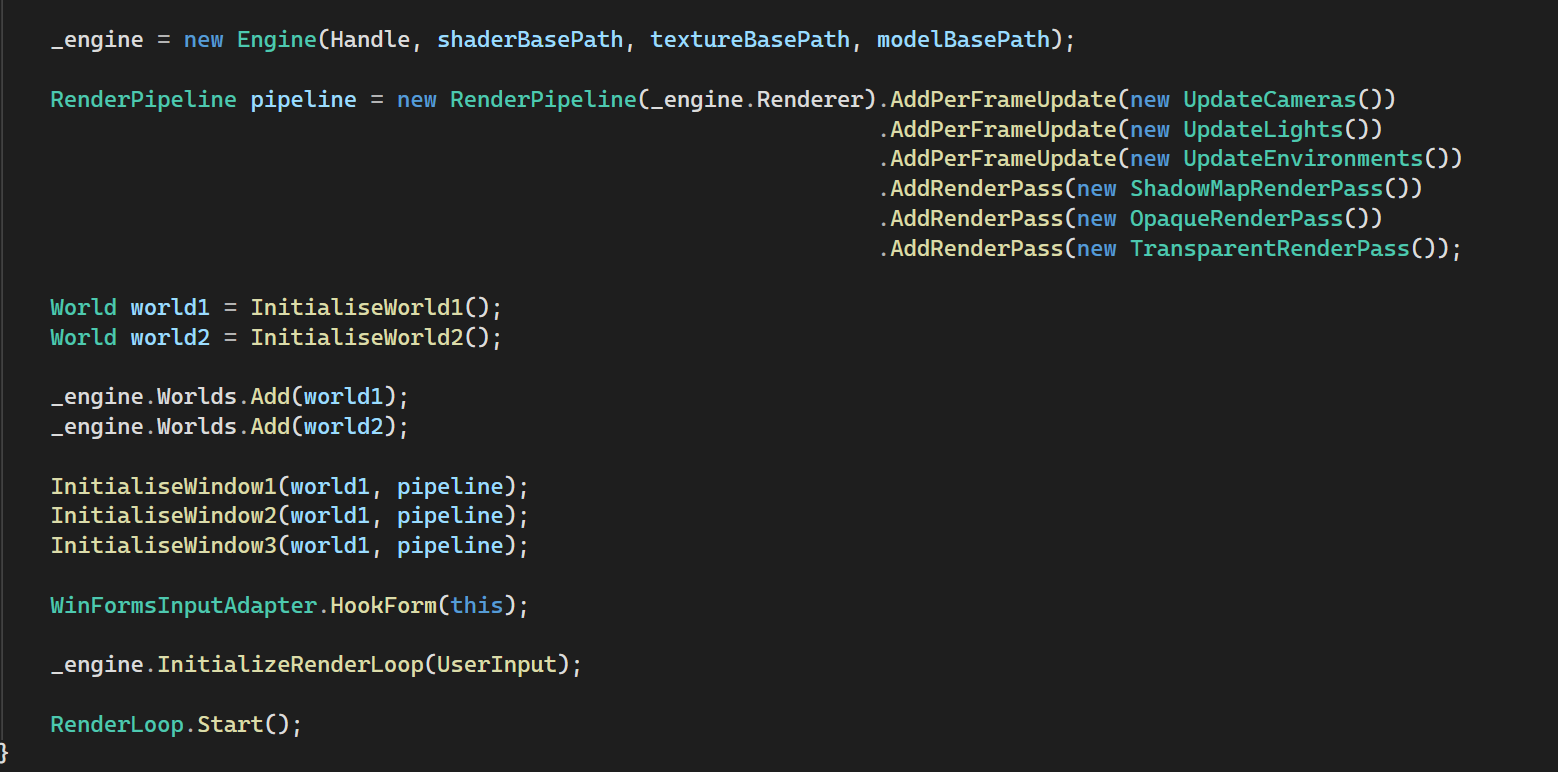
First up initialisation:
This is how you initialise Dorian – Pretty simple – even for a multi-window, multi-world app!
Dorian is incredibly flexible. Rather than offering a fixed rendering pipeline, it allows the caller to precisely define their own rendering pipeline and they can create as many as they need – though in this example I use the same pipeline for all three windows.
This means that developers can precisely pick what they need to go into their pipeline and they can precisely order it how they want. They can even add their own custom pipeline systems – they are not constrained by what Dorian provides.
It’s flexible in that if I wanted reflections for instance, I could just dynamically add a ReflectionsCubeMapRenderPass and the whole thing would just work!
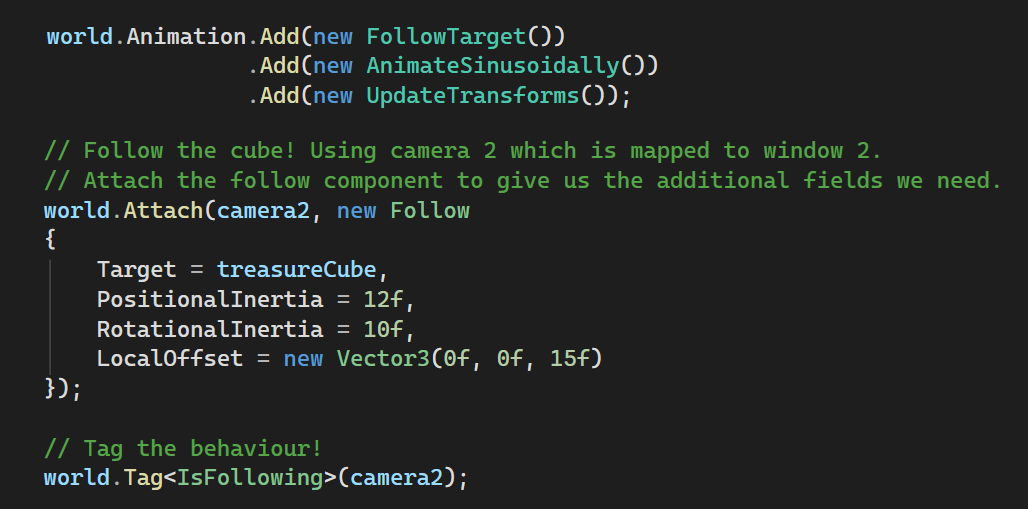
The other thing Dorian provides that neither Ionian nor the POC offer are simulation (not shown) and animation pipelines. Both of these run independently of the rendering pipelines and are just as configurable:
Setting up an animation pipeline and making camera 2 follow the treasure cube!
The code above sets up an animation pipeline precisely the way I want it.
One of the features I added to it is the ability to process ‘Follow’ behaviour – that is to have one entity follow another. I do this by adding a FollowTarget system to the animation pipeline.
This system will be querying Dorian’s ECS system for the relevant entities and then it will act upon them.
For camera 2, we use the FollowTarget system by attaching a ‘Follow’ component to the camera. I have attached this component to the camera as I want the camera to obtain the additional parameters it needs to allow it to follow another entity (the camera itself is an entity)
Finally, the last line adds a behavioural tag to the camera which invokes the follow system for this camera.
That’s it! That’s all the coder has to do to make any entity in Dorian follow any other entity, no matter how complex the movements. It makes the system incredibly easy to use.
If you want the camera to stop following, just remove the tag. You could even change what it’s following and do all of this dynamically.
The beauty of the system is that each entity can have as many behaviours as you want and that these behaviours can be dynamically attached or detached whenever you want and that the same behaviours can be applied to any entity.
For example, you could pretty much use the same code to make one model follow another…
Here is another example of Dorian’s ECS system in action:
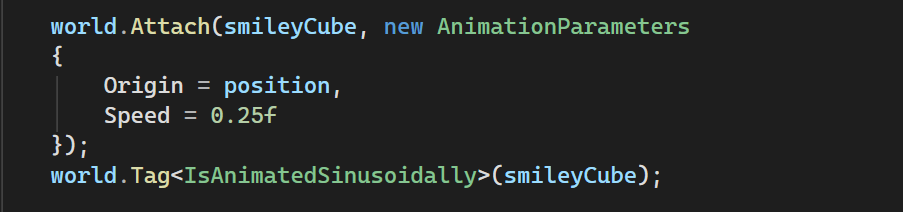
A few lines of code to completely animate a cube!
Here we have another entity, this time the cube you see floating in the demo with the big smiley face.
Once more, we attach a data component to give the entity (the smiley cube) the additional parameters it needs to support animations.
Next, we tag it with the IsAnimatedSinsoidally tag to make it rotate and move. That is all I need to do!
If I want the cube to stop moving I remove the tag.
To top it off, that particular animation is a custom one that I added as a developer using Dorian (as opposed to being the developer coding Dorian).
Dorian allows you to add custom Systems, Tags and Components, so you are not limited by what Dorian can do out of the box.
Dorian is an entity based system, so I could just as easily tag a camera with the same tag as above and have the camera automatically move around like the cube! No additional code required.
It’s this feature that makes Dorian so expressive and so powerful.
Finally, one more code example, but this time it is a structural connection:
Three lines of code to create a camera and turn it into a first person camera.
Dorian allows you to connect (or disconnect) any entity to any other entity! Here it happens to be a camera to a cube model, but that’s just a coincidence.
I could have, for example, connected one of the cubes to another cube! (everything in Dorian is an entity) If that other cube was the parent, the cube we just connected would automatically move along with it. That is the expressive power of Dorian.
Dorian also features its own querying system to allow a developer to easily get at any type of entity that they want.
For example, maybe they want Dorian to return all entities with a Follow component, marked with an IsFollowing behavioural flag and that is in possession of the matrices and vectors to position it in space. This is all you would need to do:
Dorian’s query system in action!
It is an odd architecture to work with until you get used to it.
For example in Ionian and in the POC you had an actual camera class, whereas Dorian doesn’t have cameras. It just has entities that happen to have a camera tag and a world transform component attached to it and that’s it. Together this dynamic composition makes a camera – along with the associated system to operate on its data.
I know this post won’t make a lot sense to most people, but hopefully it gets across two things:
Firstly, I’m still hard at work!
And secondly, that what I’m creating – Dorian – is something of an architectural marvel. It will be the jewel in Sojour’s crown.
Dorian will allow Sojour to have multiple map panes open and visible at the same time. You could even use it to send a ‘players’ map to another monitor when using Sojour as a GM assistant.